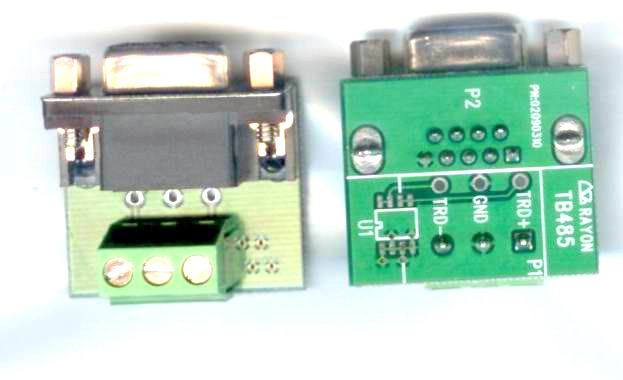
TB485
SUCHEN SIE DIE PASSENDE
INDUSTRIELLE LÖSUNG?
Entdecken Sie Embedded-, Kommunikations- und Automatisierungslösungen für Ihre Anwendung.
APort004
IP Device Server TX to Isolated 4*RS485/422
210,00 EUR
inkl. Umsatzsteuer 249,90 EUR
- Four Isolated RS422/RS485 Ports: Each port is galvanically isolated to prevent ground loops and electrical interference, ensuring reliable communication in industrial environments.
- 10/100 Mbps Ethernet Interface: Auto-detecting 10/100 Base-T RJ45 port for flexible LAN integration.
- High-Performance Embedded CPU: 32-bit 100 MHz MIPS RISC processor delivers superior performance compared to 16-bit architectures.
- Flexible Serial Configuration: Each port can be independently configured as RS422 or RS485 via DIP switches (front panel or internal PCB).
- Auto Data Direction Control: Automatic transmit/receive switching in RS485 mode simplifies half-duplex communication.
- Ground Isolation: All serial ports are ground-isolated to protect connected devices and ensure signal integrity.
- Multi-Protocol Support: Operates in TCP Server, TCP Client, UDP Send/Receive, and UDP Multi-Serial modes.
- Cross-Platform Drivers:
- Windows NT/2000/XP/Vista/7/8/10 Virtual COM driver
- Linux raw TTY driver
- SCO UNIX real TTY driver
- Web, Telnet, and Console Configuration: Multiple setup interfaces for flexible management.
- Firmware Upgradeable: Supports TFTP-based firmware updates via DIP switch configuration.
- Compact Industrial Design: Rugged metal enclosure with small footprint for panel or DIN-rail mounting.
- Low Power Consumption: Operates at 5 V DC, 1.2 A.
- 10/100 Mbps Ethernet Interface: Auto-detecting 10/100 Base-T RJ45 port for flexible LAN integration.
- High-Performance Embedded CPU: 32-bit 100 MHz MIPS RISC processor delivers superior performance compared to 16-bit architectures.
- Flexible Serial Configuration: Each port can be independently configured as RS422 or RS485 via DIP switches (front panel or internal PCB).
- Auto Data Direction Control: Automatic transmit/receive switching in RS485 mode simplifies half-duplex communication.
- Ground Isolation: All serial ports are ground-isolated to protect connected devices and ensure signal integrity.
- Multi-Protocol Support: Operates in TCP Server, TCP Client, UDP Send/Receive, and UDP Multi-Serial modes.
- Cross-Platform Drivers:
- Windows NT/2000/XP/Vista/7/8/10 Virtual COM driver
- Linux raw TTY driver
- SCO UNIX real TTY driver
- Web, Telnet, and Console Configuration: Multiple setup interfaces for flexible management.
- Firmware Upgradeable: Supports TFTP-based firmware updates via DIP switch configuration.
- Compact Industrial Design: Rugged metal enclosure with small footprint for panel or DIN-rail mounting.
- Low Power Consumption: Operates at 5 V DC, 1.2 A.
1. Product Overview
Product Name: APort004
Model: APORT004
Series: APORT Series – IP to Serial Port Converters
Article Number: APort004
Manufacturer: Rayon Technology Co., Ltd.
Manufacturer Address: 2F, No. 177, Chung Shan 2 Rd., Lu Chou City, Taipei Hsien, Taiwan
Contact: Tel: +886-2-82858362 | Fax: +886-2-82857065
Email: rayon@ms1.hinet.net / info@rayontech.com.tw
Websites: [www.rayontech.com.tw](http://www.rayontech.com.tw), [www.computex.com.tw/rayon](http://www.computex.com.tw/rayon)
The APORT004 is a high-performance IP Device Server designed to convert Ethernet-based TCP/IP or UDP/IP communication into four isolated RS422/RS485 serial interfaces. It enables remote serial device connectivity over standard LAN networks, providing a reliable and flexible solution for industrial automation, SCADA, and remote monitoring systems. The unit integrates a 32-bit 100 MHz MIPS RISC processor, 16 MB Flash ROM, and 16 MB SDRAM, ensuring stable operation and efficient data handling.
2. Key Features
- Four Isolated RS422/RS485 Ports: Each port is galvanically isolated to prevent ground loops and electrical interference, ensuring reliable communication in industrial environments.
- 10/100 Mbps Ethernet Interface: Auto-detecting 10/100 Base-T RJ45 port for flexible LAN integration.
- High-Performance Embedded CPU: 32-bit 100 MHz MIPS RISC processor delivers superior performance compared to 16-bit architectures.
- Flexible Serial Configuration: Each port can be independently configured as RS422 or RS485 via DIP switches (front panel or internal PCB).
- Auto Data Direction Control: Automatic transmit/receive switching in RS485 mode simplifies half-duplex communication.
- Ground Isolation: All serial ports are ground-isolated to protect connected devices and ensure signal integrity.
- Multi-Protocol Support: Operates in TCP Server, TCP Client, UDP Send/Receive, and UDP Multi-Serial modes.
- Cross-Platform Drivers:
- Windows NT/2000/XP/Vista/7/8/10 Virtual COM driver
- Linux raw TTY driver
- SCO UNIX real TTY driver
- Web, Telnet, and Console Configuration: Multiple setup interfaces for flexible management.
- Firmware Upgradeable: Supports TFTP-based firmware updates via DIP switch configuration.
- Compact Industrial Design: Rugged metal enclosure with small footprint for panel or DIN-rail mounting.
- Low Power Consumption: Operates at 5 V DC, 1.2 A.
3. Technical Specifications
Processor & Memory
- CPU: 32-bit MIPS RISC, 100 MHz
- Flash ROM: 16 MB
- SDRAM: 16 MB
Serial Interface
- Type: Ground-isolated RS422/RS485
- Connector: DB9 male (x4)
- Port Count: 4 independent ports
- Baud Rate: Up to 230,400 bps
- Configuration: Selectable RS422 or RS485 via DIP switches
- Isolation: Galvanic isolation between ports and system ground
- Console Port: Shared with Serial Port 1
Ethernet Interface
- Type: 10/100 Base-T auto-detecting
- Connector: RJ45
- Protocols: TCP/IP, UDP/IP
- Configuration: Static or DHCP (recommended static)
Power Requirements
- Input Voltage: 5 V DC
- Current Consumption: 1.2 A (max)
- Power Adapter: UP110/UP220 (supplied)
Physical Characteristics
- Dimensions: 205 mm (W) × 135 mm (D) × 29 mm (H)
- Material: Metal enclosure (Rayon industrial-grade housing)
- Weight: Approx. 0.8 kg (typical)
Environmental Conditions
- Operating Temperature: +5 °C to +40 °C
- Storage Temperature: 0 °C to +65 °C
- Operating Humidity: 10–90 % RH (non-condensing)
- Storage Humidity: 5–90 % RH
4. Functionality
The APORT004 functions as an IP-to-serial converter, bridging Ethernet networks with serial-based equipment. It allows remote access to serial devices such as PLCs, sensors, HMIs, and industrial controllers over LAN or WAN environments.
Operating Modes:
1. TCP Server Mode: The APORT004 listens for incoming TCP connections on assigned port numbers, enabling remote clients to communicate with serial devices.
2. TCP Client Mode: The device initiates a connection to a specified remote server, suitable for centralized data collection.
3. UDP Send/Receive Mode: Enables broadcast or point-to-point communication with up to four remote hosts.
4. UDP Multi-Serial Mode: Allows multiple serial ports to share the same UDP port number for simultaneous data distribution.
5. Real TTY Mode (UNIX/Linux): Provides fixed pseudo-terminal mapping for direct serial access.
6. Virtual COM Mode (Windows): Emulates standard COM ports for legacy applications via TPORT or RPORT drivers.
Use Cases:
- Industrial automation and SCADA systems
- Remote monitoring and control of RS485/RS422 devices
- Building management systems (BMS)
- Energy metering and data acquisition
- Serial-over-IP integration for legacy equipment
Compatibility:
- Windows NT/2000/XP/Vista/7/8/10
- Linux and UNIX systems (SCO OpenServer, etc.)
- Compatible with MODBUS RTU/TCP, DNP3, and other serial protocols
5. Components & Accessories
Included Items:
- APORT004 main unit
- UP110/UP220 5 V DC power adapter
- User manual and software CD (drivers and utilities)
Optional Accessories:
- DIN-rail mounting kit
- RS422/RS485 communication cables
- Console cable for setup and firmware upgrade
Connectors:
- Ethernet: RJ45 (10/100 Base-T)
- Serial Ports: 4 × DB9 male connectors
- Power Input: DC barrel jack (5 V DC)
LED Indicators:
- Power LED
- LAN link/activity LEDs (10/100 Mbps)
- TX/RX LEDs per serial port
6. Installation & Setup
Hardware Installation:
1. Connect the APORT004 to a network hub or switch using a standard Ethernet cable.
2. Attach the 5 V DC power adapter (UP110/UP220).
3. Configure DIP switches as required:
- Bit 1: Console port enable (ON = console, OFF = normal serial)
- Bit 2: Firmware upgrade mode (ON = upgrade, OFF = normal)
- Bit 3: Global RS422/RS485 selection (ON = RS422, OFF = RS485)
- Bit 4: Global/individual port configuration (ON = global, OFF = individual)
4. For individual port configuration, open the chassis and set internal DIP switches (SW3) for each port.
5. Connect serial cables to target RS422/RS485 devices.
6. Power on the device and verify LED indicators.
Software Setup:
- Access configuration via Web browser, Telnet, or Console terminal (default IP: 192.168.1.254, password: 11111).
- Configure network parameters (static IP, subnet mask, gateway).
- Assign operating mode and port parameters (baud rate, parity, stop bits, flow control).
- Save and restart to apply settings.
Driver Installation (Windows):
- Use aport_ap.exe for APORT mode (UDP-based virtual COM).
- Use tport_ap.exe for TPORT mode (TCP-based virtual COM).
- Supported OS: Windows NT through Windows 10.
- Drivers create virtual COM ports mapped to APORT serial ports.
Driver Installation (Linux/UNIX):
- Install gvmodem (Linux) or rtty100 (SCO UNIX) drivers.
- Configure `/etc/gtstcpd/gtstcpd.cf` or `/etc/nasd.rc` for IP and port mapping.
7. Performance & Capabilities
- Baud Rate: Up to 230,400 bps per port
- Throughput: Optimized for low-latency serial-to-IP data exchange
- Latency: Dependent on network conditions; adjustable TCP delay compensation available in TPORT driver
- Connection Management: Supports single or multiple client connections depending on mode
- Data Integrity: TCP ensures reliable delivery; UDP provides low-latency broadcast capability
- Auto-Reconnect: TPORT driver includes heartbeat mechanism for link monitoring and automatic reconnection after network interruptions
- Buffering: Internal FIFO buffers for efficient data handling
- Isolation: Prevents cross-talk and ground potential differences between ports
- Limitations:
- Each serial port can be occupied by one TCP connection at a time in TPORT mode
- Network latency may affect timing-sensitive applications; adjustable delay parameters mitigate this
8. Standards & Compliance
- Ethernet Standards: IEEE 802.3 10/100 Base-T
- Serial Standards: EIA RS422, EIA RS485
- Protocol Support: TCP/IP, UDP/IP, RFC 2217 (Telnet COM port control)
- Operating System Compatibility: Windows NT–10, Linux, SCO UNIX
- Safety & EMC: Designed for industrial environments with ground isolation and surge protection
- Firmware Upgrade: TFTP protocol support for remote updates
- Environmental Compliance: RoHS-compliant manufacturing
9. Additional Information
Warranty:
- Standard 1-year limited warranty covering defects in materials and workmanship.
- Excludes damage from misuse, unauthorized servicing, or incorrect power supply.
Support & Maintenance:
- Technical support via email (rayon@ms1.hinet.net).
- Firmware updates available from Rayon Technology’s website.
- RMA (Return Material Authorization) required for repairs; contact manufacturer for RMA number and return instructions.
Maintenance Recommendations:
- Use only the supplied 5 V DC adapter.
- Avoid exposure to extreme temperatures or humidity.
- Periodically check firmware version and update if necessary.
- Use proper grounding and shielded cables for industrial installations.
Firmware Upgrade Procedure:
1. Set DIP switch 2 = ON to enter firmware upgrade mode.
2. Connect console terminal (115200 bps, 8N1).
3. Use TFTP client to upload firmware to IP 192.168.1.254.
4. Power cycle the device after completion.
Troubleshooting Highlights:
- Verify power LED and LAN link indicators.
- Use “ping” to confirm network connectivity.
- Check serial TX/RX LEDs for data activity.
- Use console or web interface to review port status and firmware version.
Summary
The Rayon APORT004 IP Device Server is a robust, Linux-based industrial communication gateway that bridges Ethernet networks with four isolated RS422/RS485 serial interfaces. With its 32-bit RISC architecture, flexible configuration options, and comprehensive driver support across Windows, Linux, and UNIX platforms, it provides a reliable solution for integrating legacy serial equipment into modern IP networks. Its isolation, auto-direction control, and multi-mode operation make it ideal for demanding industrial automation, SCADA, and remote control applications where stability, safety, and interoperability are critical.

Product Name: APort004
Model: APORT004
Series: APORT Series – IP to Serial Port Converters
Article Number: APort004
Manufacturer: Rayon Technology Co., Ltd.
Manufacturer Address: 2F, No. 177, Chung Shan 2 Rd., Lu Chou City, Taipei Hsien, Taiwan
Contact: Tel: +886-2-82858362 | Fax: +886-2-82857065
Email: rayon@ms1.hinet.net / info@rayontech.com.tw
Websites: [www.rayontech.com.tw](http://www.rayontech.com.tw), [www.computex.com.tw/rayon](http://www.computex.com.tw/rayon)
The APORT004 is a high-performance IP Device Server designed to convert Ethernet-based TCP/IP or UDP/IP communication into four isolated RS422/RS485 serial interfaces. It enables remote serial device connectivity over standard LAN networks, providing a reliable and flexible solution for industrial automation, SCADA, and remote monitoring systems. The unit integrates a 32-bit 100 MHz MIPS RISC processor, 16 MB Flash ROM, and 16 MB SDRAM, ensuring stable operation and efficient data handling.
2. Key Features
- Four Isolated RS422/RS485 Ports: Each port is galvanically isolated to prevent ground loops and electrical interference, ensuring reliable communication in industrial environments.
- 10/100 Mbps Ethernet Interface: Auto-detecting 10/100 Base-T RJ45 port for flexible LAN integration.
- High-Performance Embedded CPU: 32-bit 100 MHz MIPS RISC processor delivers superior performance compared to 16-bit architectures.
- Flexible Serial Configuration: Each port can be independently configured as RS422 or RS485 via DIP switches (front panel or internal PCB).
- Auto Data Direction Control: Automatic transmit/receive switching in RS485 mode simplifies half-duplex communication.
- Ground Isolation: All serial ports are ground-isolated to protect connected devices and ensure signal integrity.
- Multi-Protocol Support: Operates in TCP Server, TCP Client, UDP Send/Receive, and UDP Multi-Serial modes.
- Cross-Platform Drivers:
- Windows NT/2000/XP/Vista/7/8/10 Virtual COM driver
- Linux raw TTY driver
- SCO UNIX real TTY driver
- Web, Telnet, and Console Configuration: Multiple setup interfaces for flexible management.
- Firmware Upgradeable: Supports TFTP-based firmware updates via DIP switch configuration.
- Compact Industrial Design: Rugged metal enclosure with small footprint for panel or DIN-rail mounting.
- Low Power Consumption: Operates at 5 V DC, 1.2 A.
3. Technical Specifications
Processor & Memory
- CPU: 32-bit MIPS RISC, 100 MHz
- Flash ROM: 16 MB
- SDRAM: 16 MB
Serial Interface
- Type: Ground-isolated RS422/RS485
- Connector: DB9 male (x4)
- Port Count: 4 independent ports
- Baud Rate: Up to 230,400 bps
- Configuration: Selectable RS422 or RS485 via DIP switches
- Isolation: Galvanic isolation between ports and system ground
- Console Port: Shared with Serial Port 1
Ethernet Interface
- Type: 10/100 Base-T auto-detecting
- Connector: RJ45
- Protocols: TCP/IP, UDP/IP
- Configuration: Static or DHCP (recommended static)
Power Requirements
- Input Voltage: 5 V DC
- Current Consumption: 1.2 A (max)
- Power Adapter: UP110/UP220 (supplied)
Physical Characteristics
- Dimensions: 205 mm (W) × 135 mm (D) × 29 mm (H)
- Material: Metal enclosure (Rayon industrial-grade housing)
- Weight: Approx. 0.8 kg (typical)
Environmental Conditions
- Operating Temperature: +5 °C to +40 °C
- Storage Temperature: 0 °C to +65 °C
- Operating Humidity: 10–90 % RH (non-condensing)
- Storage Humidity: 5–90 % RH
4. Functionality
The APORT004 functions as an IP-to-serial converter, bridging Ethernet networks with serial-based equipment. It allows remote access to serial devices such as PLCs, sensors, HMIs, and industrial controllers over LAN or WAN environments.
Operating Modes:
1. TCP Server Mode: The APORT004 listens for incoming TCP connections on assigned port numbers, enabling remote clients to communicate with serial devices.
2. TCP Client Mode: The device initiates a connection to a specified remote server, suitable for centralized data collection.
3. UDP Send/Receive Mode: Enables broadcast or point-to-point communication with up to four remote hosts.
4. UDP Multi-Serial Mode: Allows multiple serial ports to share the same UDP port number for simultaneous data distribution.
5. Real TTY Mode (UNIX/Linux): Provides fixed pseudo-terminal mapping for direct serial access.
6. Virtual COM Mode (Windows): Emulates standard COM ports for legacy applications via TPORT or RPORT drivers.
Use Cases:
- Industrial automation and SCADA systems
- Remote monitoring and control of RS485/RS422 devices
- Building management systems (BMS)
- Energy metering and data acquisition
- Serial-over-IP integration for legacy equipment
Compatibility:
- Windows NT/2000/XP/Vista/7/8/10
- Linux and UNIX systems (SCO OpenServer, etc.)
- Compatible with MODBUS RTU/TCP, DNP3, and other serial protocols
5. Components & Accessories
Included Items:
- APORT004 main unit
- UP110/UP220 5 V DC power adapter
- User manual and software CD (drivers and utilities)
Optional Accessories:
- DIN-rail mounting kit
- RS422/RS485 communication cables
- Console cable for setup and firmware upgrade
Connectors:
- Ethernet: RJ45 (10/100 Base-T)
- Serial Ports: 4 × DB9 male connectors
- Power Input: DC barrel jack (5 V DC)
LED Indicators:
- Power LED
- LAN link/activity LEDs (10/100 Mbps)
- TX/RX LEDs per serial port
6. Installation & Setup
Hardware Installation:
1. Connect the APORT004 to a network hub or switch using a standard Ethernet cable.
2. Attach the 5 V DC power adapter (UP110/UP220).
3. Configure DIP switches as required:
- Bit 1: Console port enable (ON = console, OFF = normal serial)
- Bit 2: Firmware upgrade mode (ON = upgrade, OFF = normal)
- Bit 3: Global RS422/RS485 selection (ON = RS422, OFF = RS485)
- Bit 4: Global/individual port configuration (ON = global, OFF = individual)
4. For individual port configuration, open the chassis and set internal DIP switches (SW3) for each port.
5. Connect serial cables to target RS422/RS485 devices.
6. Power on the device and verify LED indicators.
Software Setup:
- Access configuration via Web browser, Telnet, or Console terminal (default IP: 192.168.1.254, password: 11111).
- Configure network parameters (static IP, subnet mask, gateway).
- Assign operating mode and port parameters (baud rate, parity, stop bits, flow control).
- Save and restart to apply settings.
Driver Installation (Windows):
- Use aport_ap.exe for APORT mode (UDP-based virtual COM).
- Use tport_ap.exe for TPORT mode (TCP-based virtual COM).
- Supported OS: Windows NT through Windows 10.
- Drivers create virtual COM ports mapped to APORT serial ports.
Driver Installation (Linux/UNIX):
- Install gvmodem (Linux) or rtty100 (SCO UNIX) drivers.
- Configure `/etc/gtstcpd/gtstcpd.cf` or `/etc/nasd.rc` for IP and port mapping.
7. Performance & Capabilities
- Baud Rate: Up to 230,400 bps per port
- Throughput: Optimized for low-latency serial-to-IP data exchange
- Latency: Dependent on network conditions; adjustable TCP delay compensation available in TPORT driver
- Connection Management: Supports single or multiple client connections depending on mode
- Data Integrity: TCP ensures reliable delivery; UDP provides low-latency broadcast capability
- Auto-Reconnect: TPORT driver includes heartbeat mechanism for link monitoring and automatic reconnection after network interruptions
- Buffering: Internal FIFO buffers for efficient data handling
- Isolation: Prevents cross-talk and ground potential differences between ports
- Limitations:
- Each serial port can be occupied by one TCP connection at a time in TPORT mode
- Network latency may affect timing-sensitive applications; adjustable delay parameters mitigate this
8. Standards & Compliance
- Ethernet Standards: IEEE 802.3 10/100 Base-T
- Serial Standards: EIA RS422, EIA RS485
- Protocol Support: TCP/IP, UDP/IP, RFC 2217 (Telnet COM port control)
- Operating System Compatibility: Windows NT–10, Linux, SCO UNIX
- Safety & EMC: Designed for industrial environments with ground isolation and surge protection
- Firmware Upgrade: TFTP protocol support for remote updates
- Environmental Compliance: RoHS-compliant manufacturing
9. Additional Information
Warranty:
- Standard 1-year limited warranty covering defects in materials and workmanship.
- Excludes damage from misuse, unauthorized servicing, or incorrect power supply.
Support & Maintenance:
- Technical support via email (rayon@ms1.hinet.net).
- Firmware updates available from Rayon Technology’s website.
- RMA (Return Material Authorization) required for repairs; contact manufacturer for RMA number and return instructions.
Maintenance Recommendations:
- Use only the supplied 5 V DC adapter.
- Avoid exposure to extreme temperatures or humidity.
- Periodically check firmware version and update if necessary.
- Use proper grounding and shielded cables for industrial installations.
Firmware Upgrade Procedure:
1. Set DIP switch 2 = ON to enter firmware upgrade mode.
2. Connect console terminal (115200 bps, 8N1).
3. Use TFTP client to upload firmware to IP 192.168.1.254.
4. Power cycle the device after completion.
Troubleshooting Highlights:
- Verify power LED and LAN link indicators.
- Use “ping” to confirm network connectivity.
- Check serial TX/RX LEDs for data activity.
- Use console or web interface to review port status and firmware version.
Summary
The Rayon APORT004 IP Device Server is a robust, Linux-based industrial communication gateway that bridges Ethernet networks with four isolated RS422/RS485 serial interfaces. With its 32-bit RISC architecture, flexible configuration options, and comprehensive driver support across Windows, Linux, and UNIX platforms, it provides a reliable solution for integrating legacy serial equipment into modern IP networks. Its isolation, auto-direction control, and multi-mode operation make it ideal for demanding industrial automation, SCADA, and remote control applications where stability, safety, and interoperability are critical.
-
APORT004_Catalog_en.pdf
PDF Catalog
-
APORT_manual.pdf
Manual
-
TPORT driver feature.pdf
Manual
- TB485 - DB9 Female to RS485 terminal screw block kit