AX5488
SUCHEN SIE DIE PASSENDE
INDUSTRIELLE LÖSUNG?
Entdecken Sie Embedded-, Kommunikations- und Automatisierungslösungen für Ihre Anwendung.
- Operating System Compatibility: Fully compatible with Microsoft Windows 95 and Windows NT environments, ensuring reliable operation on legacy systems commonly used in industrial control and measurement setups.
- Dynamic Link Library (DLL) Interface: Provides a standardized DLL interface for seamless integration with custom software applications, enabling developers to access hardware functions programmatically.
- LabVIEW Integration: Optimized for use with National Instruments LabVIEW, allowing direct communication between the AX5488 hardware and LabVIEW virtual instruments (VIs).
- Hardware Communication Layer: Acts as a middleware layer between the AX5488 hardware and the host PC, managing data transfer, command execution, and error handling.
- Stable and Efficient Operation: Designed for continuous operation in industrial and laboratory environments, ensuring consistent performance and minimal downtime.
- Backward Compatibility: Supports legacy hardware and software configurations, making it suitable for maintaining or upgrading existing systems without requiring major infrastructure changes.
- Developer-Oriented Design: Includes function calls, API documentation, and sample code to facilitate rapid integration into custom applications.
- Error Handling and Diagnostics: Provides built-in error reporting and diagnostic functions to assist in troubleshooting communication or configuration issues.
- Low-Level Hardware Access: Enables direct control of I/O channels, registers, and communication ports associated with the AX5488 hardware.
- Modular Architecture: Designed to support future updates or extensions, allowing integration with additional software modules or hardware revisions.
- Dynamic Link Library (DLL) Interface: Provides a standardized DLL interface for seamless integration with custom software applications, enabling developers to access hardware functions programmatically.
- LabVIEW Integration: Optimized for use with National Instruments LabVIEW, allowing direct communication between the AX5488 hardware and LabVIEW virtual instruments (VIs).
- Hardware Communication Layer: Acts as a middleware layer between the AX5488 hardware and the host PC, managing data transfer, command execution, and error handling.
- Stable and Efficient Operation: Designed for continuous operation in industrial and laboratory environments, ensuring consistent performance and minimal downtime.
- Backward Compatibility: Supports legacy hardware and software configurations, making it suitable for maintaining or upgrading existing systems without requiring major infrastructure changes.
- Developer-Oriented Design: Includes function calls, API documentation, and sample code to facilitate rapid integration into custom applications.
- Error Handling and Diagnostics: Provides built-in error reporting and diagnostic functions to assist in troubleshooting communication or configuration issues.
- Low-Level Hardware Access: Enables direct control of I/O channels, registers, and communication ports associated with the AX5488 hardware.
- Modular Architecture: Designed to support future updates or extensions, allowing integration with additional software modules or hardware revisions.
1. Product Overview
Product Name: AX5488 DLL Driver for Windows 95/Windows NT
Model Number: AX5488
Article Number: AS59021
Manufacturer: (Not explicitly stated; typically associated with the AX series hardware interface modules, often used in industrial automation and data acquisition environments)
The AS59021 – AX5488 DLL Driver for Windows 95/Windows NT is a dedicated software driver package designed to enable communication and control between the AX5488 hardware interface module and Windows-based operating systems. This driver provides a dynamic link library (DLL) interface that allows developers and engineers to integrate the AX5488 hardware into custom applications, particularly within LabVIEW and other engineering or scientific software environments. It ensures stable, low-level communication between the operating system and the hardware, facilitating data acquisition, control, and automation tasks in industrial, laboratory, and research settings.
2. Key Features
- Operating System Compatibility: Fully compatible with Microsoft Windows 95 and Windows NT environments, ensuring reliable operation on legacy systems commonly used in industrial control and measurement setups.
- Dynamic Link Library (DLL) Interface: Provides a standardized DLL interface for seamless integration with custom software applications, enabling developers to access hardware functions programmatically.
- LabVIEW Integration: Optimized for use with National Instruments LabVIEW, allowing direct communication between the AX5488 hardware and LabVIEW virtual instruments (VIs).
- Hardware Communication Layer: Acts as a middleware layer between the AX5488 hardware and the host PC, managing data transfer, command execution, and error handling.
- Stable and Efficient Operation: Designed for continuous operation in industrial and laboratory environments, ensuring consistent performance and minimal downtime.
- Backward Compatibility: Supports legacy hardware and software configurations, making it suitable for maintaining or upgrading existing systems without requiring major infrastructure changes.
- Developer-Oriented Design: Includes function calls, API documentation, and sample code to facilitate rapid integration into custom applications.
- Error Handling and Diagnostics: Provides built-in error reporting and diagnostic functions to assist in troubleshooting communication or configuration issues.
- Low-Level Hardware Access: Enables direct control of I/O channels, registers, and communication ports associated with the AX5488 hardware.
- Modular Architecture: Designed to support future updates or extensions, allowing integration with additional software modules or hardware revisions.
3. Technical Specifications
- Product Type: Software driver (Dynamic Link Library)
- Supported Hardware: AX5488 interface module (specific hardware model)
- Supported Operating Systems:
- Microsoft Windows 95
- Microsoft Windows NT 4.0 (and compatible NT-based systems)
- Software Environment Compatibility:
- National Instruments LabVIEW (32-bit versions compatible with Win95/NT)
- Custom C/C++ or Visual Basic applications supporting DLL calls
- File Format: DLL (Dynamic Link Library) with associated configuration and initialization files
- Installation Package: Typically distributed as an executable installer or compressed archive containing driver files, documentation, and example code
- Driver Architecture: 32-bit Windows driver model (WDM) compatible
- Memory Footprint: Lightweight, optimized for minimal system resource usage
- Communication Protocols: Dependent on AX5488 hardware interface (e.g., serial, parallel, or proprietary bus communication)
- Documentation: Includes API reference manual, installation guide, and LabVIEW integration instructions
- Language Support: English (documentation and interface)
- File Dependencies: Requires Windows system libraries (e.g., kernel32.dll, user32.dll) and LabVIEW runtime components (if applicable)
4. Functionality
The AX5488 DLL Driver functions as the essential communication bridge between the AX5488 hardware module and the host computer’s operating system. It exposes a set of callable functions that allow software applications to send commands, read data, and configure the hardware’s operational parameters.
Operational Workflow:
1. Initialization: The driver is loaded into memory when the host application starts. It initializes communication with the AX5488 hardware via the system’s I/O interface.
2. Configuration: The user or application configures communication parameters such as port addresses, baud rates, or channel assignments.
3. Data Exchange: The driver manages bidirectional data flow between the hardware and the application, ensuring synchronization and data integrity.
4. Error Handling: Built-in diagnostic routines detect communication errors, hardware faults, or configuration mismatches, returning standardized error codes.
5. Shutdown: Upon application termination, the driver safely closes communication channels and releases system resources.
Use Cases and Applications:
- Industrial Automation: Integration with control systems, PLCs, and data acquisition units for process monitoring and control.
- Laboratory Measurement Systems: Used in test benches and instrumentation setups requiring precise data collection and control.
- Research and Development: Enables custom software tools to interface directly with measurement hardware for experimental setups.
- Legacy System Maintenance: Provides continued support for older Windows-based systems still in operation within industrial or academic environments.
- Software Development: Allows developers to build custom applications that leverage the AX5488 hardware’s capabilities through a standardized API.
Compatibility:
- Compatible with LabVIEW VIs through provided function libraries.
- Usable with any Windows 95/NT-compatible programming environment supporting DLL calls (e.g., Visual C++, Visual Basic, Delphi).
- Designed for systems equipped with the AX5488 hardware interface card or module.
5. Components & Accessories
Included Items:
- AX5488 DLL Driver (core DLL file)
- Installation package (setup executable or compressed archive)
- Configuration files (INI or CFG format)
- Documentation (PDF or text-based user manual)
- Example source code for integration (LabVIEW VIs, C/C++ examples)
Optional Add-ons:
- Updated driver versions for newer Windows operating systems (if available)
- Additional LabVIEW libraries or toolkits for extended functionality
- Hardware accessories for the AX5488 module (e.g., connection cables, adapters)
Connectors and Interfaces:
- Software-level interface via DLL function calls
- Hardware-level interface through the AX5488 module’s communication ports (specific interface type dependent on hardware configuration)
6. Installation & Setup
System Requirements:
- Operating System: Windows 95 or Windows NT 4.0
- Processor: Intel Pentium-class or compatible CPU
- Memory: Minimum 32 MB RAM (recommended 64 MB or higher)
- Disk Space: Approximately 10–20 MB for installation
- Hardware: AX5488 interface module installed and properly connected
- Software: LabVIEW (optional, for LabVIEW integration)
Installation Procedure:
1. Preparation: Ensure the AX5488 hardware is installed and recognized by the system BIOS or hardware manager.
2. Driver Installation: Run the provided setup executable or manually copy the DLL and configuration files to the designated system directories (e.g., `C:\Windows\System32`).
3. Configuration: Edit configuration files or use the provided setup utility to specify hardware parameters (I/O addresses, communication ports, etc.).
4. Verification: Use included test utilities or sample applications to confirm successful communication with the AX5488 hardware.
5. Integration: Link the DLL to your application or LabVIEW environment using provided function declarations or VIs.
Mounting Options:
As a software component, no physical mounting is required. However, the associated AX5488 hardware must be securely installed in the host system’s expansion slot or connected via the appropriate interface.
Configuration:
Configuration is typically performed through initialization files or API calls that define communication parameters, data formats, and operational modes.
7. Performance & Capabilities
- Communication Speed: Dependent on the AX5488 hardware interface; optimized for low-latency data exchange.
- Data Throughput: Supports real-time data acquisition and control within the limits of the hardware and system bus.
- Efficiency: Lightweight driver architecture minimizes CPU overhead and memory usage.
- Reliability: Designed for continuous operation in industrial environments with stable performance over extended periods.
- Latency: Low communication latency suitable for time-sensitive control applications.
- Scalability: Supports multiple instances or channels if the hardware and system configuration allow.
- Limitations:
- Restricted to Windows 95 and Windows NT operating systems.
- May require legacy hardware interfaces not supported by modern PCs.
- Not compatible with 64-bit operating systems or modern Windows driver models without updates.
8. Standards & Compliance
- Software Standards:
- Complies with Microsoft Windows 95/NT driver development guidelines.
- Follows standard DLL interface conventions for Windows applications.
- Industry Standards:
- Compatible with LabVIEW’s standard VI and driver integration framework.
- Supports standard C/C++ calling conventions for DLLs.
- Regulatory Compliance:
- Designed for use in compliance with general software distribution and licensing regulations.
- No specific hardware safety or electromagnetic compliance required (software-only product).
- Version Control:
- Versioning typically indicated within the DLL properties or accompanying documentation.
- Backward-compatible with earlier AX5488 driver releases.
9. Additional Information
Warranty:
- Typically provided as part of the AX5488 hardware package; software warranty covers functionality and compatibility as specified in documentation.
- Warranty terms may vary depending on the distributor or manufacturer’s policy.
Support:
- Technical support available through the manufacturer or authorized distributor.
- Documentation includes troubleshooting guides and contact information for assistance.
- Online resources or knowledge bases may provide driver updates, FAQs, and integration examples.
Maintenance:
- Regular maintenance involves verifying driver integrity and ensuring compatibility with the host system.
- Periodic updates may be released to address bugs or enhance performance.
- Users should back up configuration files before performing updates or system changes.
Updates:
- Updates may include compatibility improvements for newer LabVIEW versions or minor bug fixes.
- Users are encouraged to check the manufacturer’s website or support portal for the latest driver releases.
Licensing:
- Licensed for use with the AX5488 hardware module.
- Redistribution or modification may be restricted under the software license agreement.
Documentation and Resources:
- Installation Guide: Step-by-step instructions for setup and configuration.
- API Reference Manual: Detailed description of available functions, parameters, and return values.
- LabVIEW Integration Guide: Instructions for linking the DLL with LabVIEW VIs.
- Example Projects: Demonstrations of typical use cases and programming examples.
Summary
The AS59021 – AX5488 DLL Driver for Windows 95/Windows NT is a specialized software component designed to facilitate communication between the AX5488 hardware interface and legacy Windows operating systems. It provides a robust, developer-friendly DLL interface that integrates seamlessly with LabVIEW and other programming environments. Engineered for industrial, laboratory, and research applications, the driver ensures reliable data exchange, efficient performance, and long-term stability. Although optimized for legacy systems, it remains a critical tool for maintaining and extending the functionality of existing AX5488-based installations.

Product Name: AX5488 DLL Driver for Windows 95/Windows NT
Model Number: AX5488
Article Number: AS59021
Manufacturer: (Not explicitly stated; typically associated with the AX series hardware interface modules, often used in industrial automation and data acquisition environments)
The AS59021 – AX5488 DLL Driver for Windows 95/Windows NT is a dedicated software driver package designed to enable communication and control between the AX5488 hardware interface module and Windows-based operating systems. This driver provides a dynamic link library (DLL) interface that allows developers and engineers to integrate the AX5488 hardware into custom applications, particularly within LabVIEW and other engineering or scientific software environments. It ensures stable, low-level communication between the operating system and the hardware, facilitating data acquisition, control, and automation tasks in industrial, laboratory, and research settings.
2. Key Features
- Operating System Compatibility: Fully compatible with Microsoft Windows 95 and Windows NT environments, ensuring reliable operation on legacy systems commonly used in industrial control and measurement setups.
- Dynamic Link Library (DLL) Interface: Provides a standardized DLL interface for seamless integration with custom software applications, enabling developers to access hardware functions programmatically.
- LabVIEW Integration: Optimized for use with National Instruments LabVIEW, allowing direct communication between the AX5488 hardware and LabVIEW virtual instruments (VIs).
- Hardware Communication Layer: Acts as a middleware layer between the AX5488 hardware and the host PC, managing data transfer, command execution, and error handling.
- Stable and Efficient Operation: Designed for continuous operation in industrial and laboratory environments, ensuring consistent performance and minimal downtime.
- Backward Compatibility: Supports legacy hardware and software configurations, making it suitable for maintaining or upgrading existing systems without requiring major infrastructure changes.
- Developer-Oriented Design: Includes function calls, API documentation, and sample code to facilitate rapid integration into custom applications.
- Error Handling and Diagnostics: Provides built-in error reporting and diagnostic functions to assist in troubleshooting communication or configuration issues.
- Low-Level Hardware Access: Enables direct control of I/O channels, registers, and communication ports associated with the AX5488 hardware.
- Modular Architecture: Designed to support future updates or extensions, allowing integration with additional software modules or hardware revisions.
3. Technical Specifications
- Product Type: Software driver (Dynamic Link Library)
- Supported Hardware: AX5488 interface module (specific hardware model)
- Supported Operating Systems:
- Microsoft Windows 95
- Microsoft Windows NT 4.0 (and compatible NT-based systems)
- Software Environment Compatibility:
- National Instruments LabVIEW (32-bit versions compatible with Win95/NT)
- Custom C/C++ or Visual Basic applications supporting DLL calls
- File Format: DLL (Dynamic Link Library) with associated configuration and initialization files
- Installation Package: Typically distributed as an executable installer or compressed archive containing driver files, documentation, and example code
- Driver Architecture: 32-bit Windows driver model (WDM) compatible
- Memory Footprint: Lightweight, optimized for minimal system resource usage
- Communication Protocols: Dependent on AX5488 hardware interface (e.g., serial, parallel, or proprietary bus communication)
- Documentation: Includes API reference manual, installation guide, and LabVIEW integration instructions
- Language Support: English (documentation and interface)
- File Dependencies: Requires Windows system libraries (e.g., kernel32.dll, user32.dll) and LabVIEW runtime components (if applicable)
4. Functionality
The AX5488 DLL Driver functions as the essential communication bridge between the AX5488 hardware module and the host computer’s operating system. It exposes a set of callable functions that allow software applications to send commands, read data, and configure the hardware’s operational parameters.
Operational Workflow:
1. Initialization: The driver is loaded into memory when the host application starts. It initializes communication with the AX5488 hardware via the system’s I/O interface.
2. Configuration: The user or application configures communication parameters such as port addresses, baud rates, or channel assignments.
3. Data Exchange: The driver manages bidirectional data flow between the hardware and the application, ensuring synchronization and data integrity.
4. Error Handling: Built-in diagnostic routines detect communication errors, hardware faults, or configuration mismatches, returning standardized error codes.
5. Shutdown: Upon application termination, the driver safely closes communication channels and releases system resources.
Use Cases and Applications:
- Industrial Automation: Integration with control systems, PLCs, and data acquisition units for process monitoring and control.
- Laboratory Measurement Systems: Used in test benches and instrumentation setups requiring precise data collection and control.
- Research and Development: Enables custom software tools to interface directly with measurement hardware for experimental setups.
- Legacy System Maintenance: Provides continued support for older Windows-based systems still in operation within industrial or academic environments.
- Software Development: Allows developers to build custom applications that leverage the AX5488 hardware’s capabilities through a standardized API.
Compatibility:
- Compatible with LabVIEW VIs through provided function libraries.
- Usable with any Windows 95/NT-compatible programming environment supporting DLL calls (e.g., Visual C++, Visual Basic, Delphi).
- Designed for systems equipped with the AX5488 hardware interface card or module.
5. Components & Accessories
Included Items:
- AX5488 DLL Driver (core DLL file)
- Installation package (setup executable or compressed archive)
- Configuration files (INI or CFG format)
- Documentation (PDF or text-based user manual)
- Example source code for integration (LabVIEW VIs, C/C++ examples)
Optional Add-ons:
- Updated driver versions for newer Windows operating systems (if available)
- Additional LabVIEW libraries or toolkits for extended functionality
- Hardware accessories for the AX5488 module (e.g., connection cables, adapters)
Connectors and Interfaces:
- Software-level interface via DLL function calls
- Hardware-level interface through the AX5488 module’s communication ports (specific interface type dependent on hardware configuration)
6. Installation & Setup
System Requirements:
- Operating System: Windows 95 or Windows NT 4.0
- Processor: Intel Pentium-class or compatible CPU
- Memory: Minimum 32 MB RAM (recommended 64 MB or higher)
- Disk Space: Approximately 10–20 MB for installation
- Hardware: AX5488 interface module installed and properly connected
- Software: LabVIEW (optional, for LabVIEW integration)
Installation Procedure:
1. Preparation: Ensure the AX5488 hardware is installed and recognized by the system BIOS or hardware manager.
2. Driver Installation: Run the provided setup executable or manually copy the DLL and configuration files to the designated system directories (e.g., `C:\Windows\System32`).
3. Configuration: Edit configuration files or use the provided setup utility to specify hardware parameters (I/O addresses, communication ports, etc.).
4. Verification: Use included test utilities or sample applications to confirm successful communication with the AX5488 hardware.
5. Integration: Link the DLL to your application or LabVIEW environment using provided function declarations or VIs.
Mounting Options:
As a software component, no physical mounting is required. However, the associated AX5488 hardware must be securely installed in the host system’s expansion slot or connected via the appropriate interface.
Configuration:
Configuration is typically performed through initialization files or API calls that define communication parameters, data formats, and operational modes.
7. Performance & Capabilities
- Communication Speed: Dependent on the AX5488 hardware interface; optimized for low-latency data exchange.
- Data Throughput: Supports real-time data acquisition and control within the limits of the hardware and system bus.
- Efficiency: Lightweight driver architecture minimizes CPU overhead and memory usage.
- Reliability: Designed for continuous operation in industrial environments with stable performance over extended periods.
- Latency: Low communication latency suitable for time-sensitive control applications.
- Scalability: Supports multiple instances or channels if the hardware and system configuration allow.
- Limitations:
- Restricted to Windows 95 and Windows NT operating systems.
- May require legacy hardware interfaces not supported by modern PCs.
- Not compatible with 64-bit operating systems or modern Windows driver models without updates.
8. Standards & Compliance
- Software Standards:
- Complies with Microsoft Windows 95/NT driver development guidelines.
- Follows standard DLL interface conventions for Windows applications.
- Industry Standards:
- Compatible with LabVIEW’s standard VI and driver integration framework.
- Supports standard C/C++ calling conventions for DLLs.
- Regulatory Compliance:
- Designed for use in compliance with general software distribution and licensing regulations.
- No specific hardware safety or electromagnetic compliance required (software-only product).
- Version Control:
- Versioning typically indicated within the DLL properties or accompanying documentation.
- Backward-compatible with earlier AX5488 driver releases.
9. Additional Information
Warranty:
- Typically provided as part of the AX5488 hardware package; software warranty covers functionality and compatibility as specified in documentation.
- Warranty terms may vary depending on the distributor or manufacturer’s policy.
Support:
- Technical support available through the manufacturer or authorized distributor.
- Documentation includes troubleshooting guides and contact information for assistance.
- Online resources or knowledge bases may provide driver updates, FAQs, and integration examples.
Maintenance:
- Regular maintenance involves verifying driver integrity and ensuring compatibility with the host system.
- Periodic updates may be released to address bugs or enhance performance.
- Users should back up configuration files before performing updates or system changes.
Updates:
- Updates may include compatibility improvements for newer LabVIEW versions or minor bug fixes.
- Users are encouraged to check the manufacturer’s website or support portal for the latest driver releases.
Licensing:
- Licensed for use with the AX5488 hardware module.
- Redistribution or modification may be restricted under the software license agreement.
Documentation and Resources:
- Installation Guide: Step-by-step instructions for setup and configuration.
- API Reference Manual: Detailed description of available functions, parameters, and return values.
- LabVIEW Integration Guide: Instructions for linking the DLL with LabVIEW VIs.
- Example Projects: Demonstrations of typical use cases and programming examples.
Summary
The AS59021 – AX5488 DLL Driver for Windows 95/Windows NT is a specialized software component designed to facilitate communication between the AX5488 hardware interface and legacy Windows operating systems. It provides a robust, developer-friendly DLL interface that integrates seamlessly with LabVIEW and other programming environments. Engineered for industrial, laboratory, and research applications, the driver ensures reliable data exchange, efficient performance, and long-term stability. Although optimized for legacy systems, it remains a critical tool for maintaining and extending the functionality of existing AX5488-based installations.
Keine Manuals/Kataloge verfügbar.
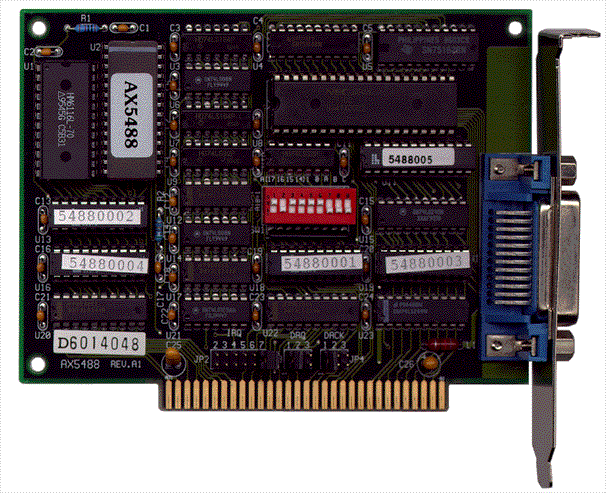
- AX5488 - IEEE-488 (GPIB) ISA Interface Card