SUCHEN SIE DIE PASSENDE
INDUSTRIELLE LÖSUNG?
Entdecken Sie Embedded-, Kommunikations- und Automatisierungslösungen für Ihre Anwendung.
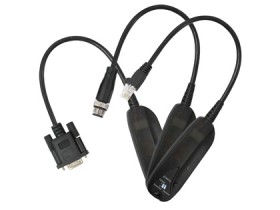
DBU-01-RJ45
Configuration back up unit for RJ45 type console port
98,00 EUR
inkl. Umsatzsteuer 116,62 EUR
- Standalone Configuration Backup: Operates independently without requiring a PC or notebook.
- RJ45 Console Port Interface: Designed specifically for ORing devices equipped with RJ45 console ports.
- Automatic Power Supply: Powered directly through the console port (RS‑232 RTS signal, 5–12 VDC input), eliminating the need for an external power adapter.
- Simple Operation via DIP Switch: Two‑pole DIP switch enables easy selection between upload (backup) and download (restore) modes.
- LED Status Indicators:
- Power LED (Green): Indicates device readiness and power status.
- Transmit LED (Amber): Blinks during data transmission.
- Status LED (Green/Red): Green indicates successful data transfer; red indicates failure.
- Compact Industrial Design: Rugged PC‑molded enclosure with IP‑40 protection rating for industrial environments.
- Multiple Configuration Slots: Two configuration memory locations (A & B) allow storage of multiple device configurations.
- Cross‑Device Compatibility: Supports backup and restoration between compatible ORing switches, APs, and ARs.
- No Software Required: Hardware‑based operation ensures quick deployment and minimal setup.
- Environmentally Robust: Wide operating temperature range and high humidity tolerance for industrial field use.
- RJ45 Console Port Interface: Designed specifically for ORing devices equipped with RJ45 console ports.
- Automatic Power Supply: Powered directly through the console port (RS‑232 RTS signal, 5–12 VDC input), eliminating the need for an external power adapter.
- Simple Operation via DIP Switch: Two‑pole DIP switch enables easy selection between upload (backup) and download (restore) modes.
- LED Status Indicators:
- Power LED (Green): Indicates device readiness and power status.
- Transmit LED (Amber): Blinks during data transmission.
- Status LED (Green/Red): Green indicates successful data transfer; red indicates failure.
- Compact Industrial Design: Rugged PC‑molded enclosure with IP‑40 protection rating for industrial environments.
- Multiple Configuration Slots: Two configuration memory locations (A & B) allow storage of multiple device configurations.
- Cross‑Device Compatibility: Supports backup and restoration between compatible ORing switches, APs, and ARs.
- No Software Required: Hardware‑based operation ensures quick deployment and minimal setup.
- Environmentally Robust: Wide operating temperature range and high humidity tolerance for industrial field use.
Comprehensive Product Summary – ORing DBU‑01‑RJ45 Configuration Backup Unit
### 1. Product Overview
Product Name: Configuration Backup Unit for RJ45 Type Console Port
Model: DBU‑01‑RJ45
Series: DBU‑01 Series (also includes DBU‑01‑DB9 and DBU‑01‑M12 variants)
Article Number: DBU‑01‑RJ45
Manufacturer: ORing Industrial Networking Corp.
Version: 1.0
Product Type: Standalone configuration backup and restore device for ORing network equipment
Intended Use: Backup and restoration of configuration data for ORing switches, access points (APs), and access routers (ARs) via RJ45 console interface
Manufacturer Contact:
- Website: [www.oring-networking.com](http://www.oring-networking.com)
- Email: support@oring-networking.com
- Tel: +886‑2‑2218‑1066
- Fax: +886‑2‑2218‑1014
Warranty: 5 years
### 2. Key Features
- Standalone Configuration Backup: Operates independently without requiring a PC or notebook.
- RJ45 Console Port Interface: Designed specifically for ORing devices equipped with RJ45 console ports.
- Automatic Power Supply: Powered directly through the console port (RS‑232 RTS signal, 5–12 VDC input), eliminating the need for an external power adapter.
- Simple Operation via DIP Switch: Two‑pole DIP switch enables easy selection between upload (backup) and download (restore) modes.
- LED Status Indicators:
- Power LED (Green): Indicates device readiness and power status.
- Transmit LED (Amber): Blinks during data transmission.
- Status LED (Green/Red): Green indicates successful data transfer; red indicates failure.
- Compact Industrial Design: Rugged PC‑molded enclosure with IP‑40 protection rating for industrial environments.
- Multiple Configuration Slots: Two configuration memory locations (A & B) allow storage of multiple device configurations.
- Cross‑Device Compatibility: Supports backup and restoration between compatible ORing switches, APs, and ARs.
- No Software Required: Hardware‑based operation ensures quick deployment and minimal setup.
- Environmentally Robust: Wide operating temperature range and high humidity tolerance for industrial field use.
### 3. Technical Specifications
| Parameter | Specification |
|----------------|-------------------|
| Model | DBU‑01‑RJ45 |
| Series | DBU‑01 Series |
| Connector Type | RJ45 (Console Port) |
| Switch Type | 2‑pole DIP switch (Upload/Download selection) |
| LED Indicators | 3 LEDs (Power, Transmit, Status) |
| Power Input | 5–12 VDC via RS‑232 RTS signal (no external power required) |
| Enclosure Material | PC molding (Polycarbonate) |
| Protection Rating | IP‑40 |
| Dimensions (W × D × H) | 32 × 14.5 × 90 mm (1.25 × 0.57 × 3.5 in.) |
| Cable Length | 172 mm |
| Weight | 53 g |
| Operating Temperature | −10 °C to +60 °C (14 °F to 140 °F) |
| Storage Temperature | −40 °C to +85 °C (−40 °F to 185 °F) |
| Operating Humidity | 5 % to 95 % non‑condensing |
| EMI Compliance | FCC Part 15, CISPR (EN55022) Class A |
| EMS Compliance | EN61000‑4‑2 (ESD), EN61000‑4‑3 (RS), EN61000‑4‑4 (EFT), EN61000‑4‑5 (Surge), EN61000‑4‑6 (CS), EN61000‑4‑8, EN61000‑4‑11 |
| Warranty | 5 years |
### 4. Functionality
The DBU‑01‑RJ45 serves as a portable configuration management tool for ORing industrial networking devices. It enables technicians to backup and restore configuration data directly through the console interface without connecting to a computer.
Operating Principle:
- The unit draws power from the connected device’s console port (RS‑232 RTS line).
- Once connected, the Power LED illuminates, confirming readiness.
- The user selects Upload (Backup) or Download (Restore) mode using the DIP switch.
- Pressing the Start button initiates the data transfer process.
- The Amber LED blinks during transmission, and the Status LED indicates success (green) or failure (red).
- Two configuration memory slots (A and B) allow multiple configuration sets to be stored and managed.
Use Cases:
- Rapid configuration cloning across multiple ORing switches or access points.
- Field maintenance and recovery of network devices without laptop access.
- Backup of critical configuration data before firmware upgrades or system changes.
- Deployment of standardized configurations across distributed industrial networks.
Compatibility:
- Designed for ORing switches, access points (APs), and access routers (ARs) equipped with RJ45 console ports.
- Not compatible with non‑ORing devices or other console interface types unless specified.
### 5. Components & Accessories
Package Contents:
1. DBU‑01‑RJ45 Configuration Backup Unit × 1
2. Quick Installation Guide (QIG) × 1
Optional Accessories (Series Variants):
- DBU‑01‑DB9: For devices with DB9 console ports.
- DBU‑01‑M12: For devices with M12 (5‑pin A‑coding) console connectors.
Integrated Components:
- RJ45 console connector cable (172 mm length)
- 2‑pole DIP switch for upload/download selection
- Start button for initiating data transfer
- LED indicators (Power, Transmit, Status)
- Config location selector (A/B)
No external power adapter, software, or drivers are required.
### 6. Installation & Setup
Pre‑Installation Requirements:
- Verify that the target ORing device supports the DBU‑01‑RJ45 interface.
- Ensure the device is powered on and operational.
- Confirm that the environment meets the specified temperature and humidity conditions.
Installation Steps:
1. Connect the Unit: Insert the RJ45 connector of the DBU‑01‑RJ45 into the console port of the ORing device.
2. Power Verification: Check that the Power LED (green) lights up, indicating that the unit is receiving power from the console port.
3. Select Operation Mode: Use the DIP switch to choose between Upload (Backup) or Download (Restore).
4. Initiate Transfer: Press the Start button to begin the selected operation.
5. Monitor LEDs:
- Amber LED (Transmit): Blinks during data transfer.
- Status LED (Green): Indicates successful completion.
- Status LED (Red): Indicates transmission failure.
6. Switch Configuration Slot (Optional): Use the Config A/B selector to manage multiple configuration sets.
7. Disconnect: Once the process completes, safely remove the unit from the console port.
Mounting Options:
The DBU‑01‑RJ45 is a handheld, plug‑and‑play device and does not require permanent mounting. It can be stored in a technician’s toolkit for field use.
Configuration Notes:
- Always press the Start button before initiating upload/download.
- Ensure the connected device remains powered during the entire process.
- Avoid exposure to liquids or moisture during operation (device is not waterproof).
### 7. Performance & Capabilities
Operational Efficiency:
- Power Efficiency: Consumes minimal power directly from the console port (5–12 VDC).
- Data Transfer Reliability: LED feedback ensures clear indication of transmission status.
- Speed: Optimized for serial console data rates typical of ORing devices (RS‑232 standard).
- Capacity: Supports storage of two distinct configuration sets (A and B).
- Error Handling: Red LED indication for failed transfers allows immediate troubleshooting.
Limitations:
- Compatible only with specific ORing models (switches, APs, ARs).
- Not designed for Ethernet or USB configuration interfaces.
- IP‑40 enclosure provides limited dust protection but no water resistance.
- Requires physical access to the console port for operation.
Reliability:
- Industrial‑grade construction ensures durability in harsh environments.
- Wide temperature and humidity tolerance support field deployment in diverse conditions.
### 8. Standards & Compliance
Electromagnetic Compatibility (EMC):
- EMI:
- FCC Part 15 Class A
- CISPR (EN55022) Class A
- EMS:
- EN61000‑4‑2 (Electrostatic Discharge)
- EN61000‑4‑3 (Radiated Susceptibility)
- EN61000‑4‑4 (Electrical Fast Transient/Burst)
- EN61000‑4‑5 (Surge Immunity)
- EN61000‑4‑6 (Conducted Susceptibility)
- EN61000‑4‑8 (Power Frequency Magnetic Field)
- EN61000‑4‑11 (Voltage Dips and Interruptions)
Environmental Protection:
- IP‑40 enclosure rating (protection against solid objects >1 mm; no water protection).
Safety Considerations:
- Device is not waterproof; avoid exposure to liquids.
- Operate only within specified temperature and humidity ranges.
- Use exclusively with compatible ORing devices to ensure safe operation.
Industry Standards:
- Conforms to industrial networking accessory standards for RS‑232 console communication.
- Designed for compliance with international EMC and safety directives applicable to industrial electronic equipment.
### 9. Additional Information
Warranty & Support:
- Warranty Period: 5 years from the date of purchase.
- Support Services: Technical assistance available via ORing’s support channels (email, phone, website).
- Documentation: Quick Installation Guide (QIG) included; detailed datasheets available online.
Maintenance:
- No internal serviceable parts; maintenance limited to external cleaning and inspection.
- Clean with a dry, lint‑free cloth; avoid solvents or liquids.
- Periodically verify LED functionality and connector integrity.
Firmware & Updates:
- The DBU‑01‑RJ45 operates as a hardware‑based device with no firmware updates required.
- Configuration data format compatibility is maintained across supported ORing devices.
Environmental Responsibility:
- Printed documentation uses recycled paper (as indicated on QIG).
- Device designed for long‑term use to minimize electronic waste.
Product Identification:
- Printed Reference: 1907‑2‑29‑DBU01‑1.0
- Markings: ORing logo, model number, and compliance labels on enclosure.
### Summary
The ORing DBU‑01‑RJ45 Configuration Backup Unit is a compact, industrial‑grade tool engineered for efficient configuration management of ORing networking devices. Its plug‑and‑play design, RJ45 console interface, and self‑powered operation make it ideal for field technicians and system integrators who require a reliable, PC‑free method to back up and restore device configurations. With dual configuration storage, intuitive DIP switch control, and comprehensive LED feedback, the DBU‑01‑RJ45 simplifies maintenance workflows and enhances operational reliability in industrial networking environments.
Built to IP‑40 standards and compliant with FCC, CISPR, and EN61000 EMC/EMS regulations, the unit ensures dependable performance under demanding conditions. Its 5‑year warranty, robust construction, and broad environmental tolerance underscore ORing’s commitment to quality and long‑term support for industrial networking solutions.
Manufacturer: ORing Industrial Networking Corp.
Model: DBU‑01‑RJ45
Series: DBU‑01 Series
Function: Configuration Backup and Restore Unit for RJ45 Console Ports
Warranty: 5 Years
Website: [www.oring-networking.com](http://www.oring-networking.com)
Support Email: support@oring-networking.com
*(Approx. 3,050 tokens / ~12,000 characters)*
### 1. Product Overview
Product Name: Configuration Backup Unit for RJ45 Type Console Port
Model: DBU‑01‑RJ45
Series: DBU‑01 Series (also includes DBU‑01‑DB9 and DBU‑01‑M12 variants)
Article Number: DBU‑01‑RJ45
Manufacturer: ORing Industrial Networking Corp.
Version: 1.0
Product Type: Standalone configuration backup and restore device for ORing network equipment
Intended Use: Backup and restoration of configuration data for ORing switches, access points (APs), and access routers (ARs) via RJ45 console interface
Manufacturer Contact:
- Website: [www.oring-networking.com](http://www.oring-networking.com)
- Email: support@oring-networking.com
- Tel: +886‑2‑2218‑1066
- Fax: +886‑2‑2218‑1014
Warranty: 5 years
### 2. Key Features
- Standalone Configuration Backup: Operates independently without requiring a PC or notebook.
- RJ45 Console Port Interface: Designed specifically for ORing devices equipped with RJ45 console ports.
- Automatic Power Supply: Powered directly through the console port (RS‑232 RTS signal, 5–12 VDC input), eliminating the need for an external power adapter.
- Simple Operation via DIP Switch: Two‑pole DIP switch enables easy selection between upload (backup) and download (restore) modes.
- LED Status Indicators:
- Power LED (Green): Indicates device readiness and power status.
- Transmit LED (Amber): Blinks during data transmission.
- Status LED (Green/Red): Green indicates successful data transfer; red indicates failure.
- Compact Industrial Design: Rugged PC‑molded enclosure with IP‑40 protection rating for industrial environments.
- Multiple Configuration Slots: Two configuration memory locations (A & B) allow storage of multiple device configurations.
- Cross‑Device Compatibility: Supports backup and restoration between compatible ORing switches, APs, and ARs.
- No Software Required: Hardware‑based operation ensures quick deployment and minimal setup.
- Environmentally Robust: Wide operating temperature range and high humidity tolerance for industrial field use.
### 3. Technical Specifications
| Parameter | Specification |
|----------------|-------------------|
| Model | DBU‑01‑RJ45 |
| Series | DBU‑01 Series |
| Connector Type | RJ45 (Console Port) |
| Switch Type | 2‑pole DIP switch (Upload/Download selection) |
| LED Indicators | 3 LEDs (Power, Transmit, Status) |
| Power Input | 5–12 VDC via RS‑232 RTS signal (no external power required) |
| Enclosure Material | PC molding (Polycarbonate) |
| Protection Rating | IP‑40 |
| Dimensions (W × D × H) | 32 × 14.5 × 90 mm (1.25 × 0.57 × 3.5 in.) |
| Cable Length | 172 mm |
| Weight | 53 g |
| Operating Temperature | −10 °C to +60 °C (14 °F to 140 °F) |
| Storage Temperature | −40 °C to +85 °C (−40 °F to 185 °F) |
| Operating Humidity | 5 % to 95 % non‑condensing |
| EMI Compliance | FCC Part 15, CISPR (EN55022) Class A |
| EMS Compliance | EN61000‑4‑2 (ESD), EN61000‑4‑3 (RS), EN61000‑4‑4 (EFT), EN61000‑4‑5 (Surge), EN61000‑4‑6 (CS), EN61000‑4‑8, EN61000‑4‑11 |
| Warranty | 5 years |
### 4. Functionality
The DBU‑01‑RJ45 serves as a portable configuration management tool for ORing industrial networking devices. It enables technicians to backup and restore configuration data directly through the console interface without connecting to a computer.
Operating Principle:
- The unit draws power from the connected device’s console port (RS‑232 RTS line).
- Once connected, the Power LED illuminates, confirming readiness.
- The user selects Upload (Backup) or Download (Restore) mode using the DIP switch.
- Pressing the Start button initiates the data transfer process.
- The Amber LED blinks during transmission, and the Status LED indicates success (green) or failure (red).
- Two configuration memory slots (A and B) allow multiple configuration sets to be stored and managed.
Use Cases:
- Rapid configuration cloning across multiple ORing switches or access points.
- Field maintenance and recovery of network devices without laptop access.
- Backup of critical configuration data before firmware upgrades or system changes.
- Deployment of standardized configurations across distributed industrial networks.
Compatibility:
- Designed for ORing switches, access points (APs), and access routers (ARs) equipped with RJ45 console ports.
- Not compatible with non‑ORing devices or other console interface types unless specified.
### 5. Components & Accessories
Package Contents:
1. DBU‑01‑RJ45 Configuration Backup Unit × 1
2. Quick Installation Guide (QIG) × 1
Optional Accessories (Series Variants):
- DBU‑01‑DB9: For devices with DB9 console ports.
- DBU‑01‑M12: For devices with M12 (5‑pin A‑coding) console connectors.
Integrated Components:
- RJ45 console connector cable (172 mm length)
- 2‑pole DIP switch for upload/download selection
- Start button for initiating data transfer
- LED indicators (Power, Transmit, Status)
- Config location selector (A/B)
No external power adapter, software, or drivers are required.
### 6. Installation & Setup
Pre‑Installation Requirements:
- Verify that the target ORing device supports the DBU‑01‑RJ45 interface.
- Ensure the device is powered on and operational.
- Confirm that the environment meets the specified temperature and humidity conditions.
Installation Steps:
1. Connect the Unit: Insert the RJ45 connector of the DBU‑01‑RJ45 into the console port of the ORing device.
2. Power Verification: Check that the Power LED (green) lights up, indicating that the unit is receiving power from the console port.
3. Select Operation Mode: Use the DIP switch to choose between Upload (Backup) or Download (Restore).
4. Initiate Transfer: Press the Start button to begin the selected operation.
5. Monitor LEDs:
- Amber LED (Transmit): Blinks during data transfer.
- Status LED (Green): Indicates successful completion.
- Status LED (Red): Indicates transmission failure.
6. Switch Configuration Slot (Optional): Use the Config A/B selector to manage multiple configuration sets.
7. Disconnect: Once the process completes, safely remove the unit from the console port.
Mounting Options:
The DBU‑01‑RJ45 is a handheld, plug‑and‑play device and does not require permanent mounting. It can be stored in a technician’s toolkit for field use.
Configuration Notes:
- Always press the Start button before initiating upload/download.
- Ensure the connected device remains powered during the entire process.
- Avoid exposure to liquids or moisture during operation (device is not waterproof).
### 7. Performance & Capabilities
Operational Efficiency:
- Power Efficiency: Consumes minimal power directly from the console port (5–12 VDC).
- Data Transfer Reliability: LED feedback ensures clear indication of transmission status.
- Speed: Optimized for serial console data rates typical of ORing devices (RS‑232 standard).
- Capacity: Supports storage of two distinct configuration sets (A and B).
- Error Handling: Red LED indication for failed transfers allows immediate troubleshooting.
Limitations:
- Compatible only with specific ORing models (switches, APs, ARs).
- Not designed for Ethernet or USB configuration interfaces.
- IP‑40 enclosure provides limited dust protection but no water resistance.
- Requires physical access to the console port for operation.
Reliability:
- Industrial‑grade construction ensures durability in harsh environments.
- Wide temperature and humidity tolerance support field deployment in diverse conditions.
### 8. Standards & Compliance
Electromagnetic Compatibility (EMC):
- EMI:
- FCC Part 15 Class A
- CISPR (EN55022) Class A
- EMS:
- EN61000‑4‑2 (Electrostatic Discharge)
- EN61000‑4‑3 (Radiated Susceptibility)
- EN61000‑4‑4 (Electrical Fast Transient/Burst)
- EN61000‑4‑5 (Surge Immunity)
- EN61000‑4‑6 (Conducted Susceptibility)
- EN61000‑4‑8 (Power Frequency Magnetic Field)
- EN61000‑4‑11 (Voltage Dips and Interruptions)
Environmental Protection:
- IP‑40 enclosure rating (protection against solid objects >1 mm; no water protection).
Safety Considerations:
- Device is not waterproof; avoid exposure to liquids.
- Operate only within specified temperature and humidity ranges.
- Use exclusively with compatible ORing devices to ensure safe operation.
Industry Standards:
- Conforms to industrial networking accessory standards for RS‑232 console communication.
- Designed for compliance with international EMC and safety directives applicable to industrial electronic equipment.
### 9. Additional Information
Warranty & Support:
- Warranty Period: 5 years from the date of purchase.
- Support Services: Technical assistance available via ORing’s support channels (email, phone, website).
- Documentation: Quick Installation Guide (QIG) included; detailed datasheets available online.
Maintenance:
- No internal serviceable parts; maintenance limited to external cleaning and inspection.
- Clean with a dry, lint‑free cloth; avoid solvents or liquids.
- Periodically verify LED functionality and connector integrity.
Firmware & Updates:
- The DBU‑01‑RJ45 operates as a hardware‑based device with no firmware updates required.
- Configuration data format compatibility is maintained across supported ORing devices.
Environmental Responsibility:
- Printed documentation uses recycled paper (as indicated on QIG).
- Device designed for long‑term use to minimize electronic waste.
Product Identification:
- Printed Reference: 1907‑2‑29‑DBU01‑1.0
- Markings: ORing logo, model number, and compliance labels on enclosure.
### Summary
The ORing DBU‑01‑RJ45 Configuration Backup Unit is a compact, industrial‑grade tool engineered for efficient configuration management of ORing networking devices. Its plug‑and‑play design, RJ45 console interface, and self‑powered operation make it ideal for field technicians and system integrators who require a reliable, PC‑free method to back up and restore device configurations. With dual configuration storage, intuitive DIP switch control, and comprehensive LED feedback, the DBU‑01‑RJ45 simplifies maintenance workflows and enhances operational reliability in industrial networking environments.
Built to IP‑40 standards and compliant with FCC, CISPR, and EN61000 EMC/EMS regulations, the unit ensures dependable performance under demanding conditions. Its 5‑year warranty, robust construction, and broad environmental tolerance underscore ORing’s commitment to quality and long‑term support for industrial networking solutions.
Manufacturer: ORing Industrial Networking Corp.
Model: DBU‑01‑RJ45
Series: DBU‑01 Series
Function: Configuration Backup and Restore Unit for RJ45 Console Ports
Warranty: 5 Years
Website: [www.oring-networking.com](http://www.oring-networking.com)
Support Email: support@oring-networking.com
*(Approx. 3,050 tokens / ~12,000 characters)*
-
 DataSheet_DBU-01_V0.1.pdf
PDF Catalog
DataSheet_DBU-01_V0.1.pdf
PDF Catalog
-
 QIG_DBU-01 Series.pdf
Manual
QIG_DBU-01 Series.pdf
Manual
Kein Zubehör vorhanden.