
 SUCHEN SIE DIE PASSENDE
INDUSTRIELLE LÖSUNG?
Entdecken Sie Embedded-, Kommunikations- und Automatisierungslösungen für Ihre Anwendung.
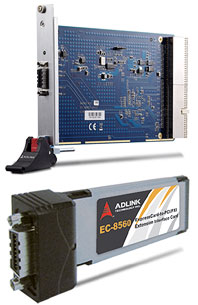
- ExpressCard‑to‑PXI Control: Enables laptops equipped with ExpressCard/34 or ExpressCard/54 slots to control PXI or PCI devices in an external chassis.
- High‑Speed PCI Express Interface: Implements a PCI Express x1 link with a signaling rate of 2.5 Gbps per direction and a data throughput of 250 MB/s.
- Transparent Bridge Architecture: No additional drivers or software required; devices in the extension chassis are recognized natively by the host BIOS.
- Extended Distance Operation: Supports cable lengths of 1 m, 3 m, and 7 m using shielded twisted‑pair copper cables with high EMI immunity.
- Full PCI Compatibility: Supports both 5 V and 3.3 V PCI buses, 32‑bit/33 MHz operation.
- Environmental Compliance: Fully RoHS and WEEE compliant, designed for minimal environmental impact.
- Hardware Reliability: Incorporates signal equalization and spread‑spectrum clock control to reduce EMI and maintain signal integrity over long distances.
- Ease of Integration: Plug‑and‑play installation with automatic resource allocation by system BIOS.
- Versatile Applications: Ideal for portable test and measurement, industrial automation, and field‑deployable instrumentation systems.
- High‑Speed PCI Express Interface: Implements a PCI Express x1 link with a signaling rate of 2.5 Gbps per direction and a data throughput of 250 MB/s.
- Transparent Bridge Architecture: No additional drivers or software required; devices in the extension chassis are recognized natively by the host BIOS.
- Extended Distance Operation: Supports cable lengths of 1 m, 3 m, and 7 m using shielded twisted‑pair copper cables with high EMI immunity.
- Full PCI Compatibility: Supports both 5 V and 3.3 V PCI buses, 32‑bit/33 MHz operation.
- Environmental Compliance: Fully RoHS and WEEE compliant, designed for minimal environmental impact.
- Hardware Reliability: Incorporates signal equalization and spread‑spectrum clock control to reduce EMI and maintain signal integrity over long distances.
- Ease of Integration: Plug‑and‑play installation with automatic resource allocation by system BIOS.
- Versatile Applications: Ideal for portable test and measurement, industrial automation, and field‑deployable instrumentation systems.
Comprehensive Product Summary: ADLINK EC‑8560 ExpressCard‑to‑PCI/PXI Extension Host Card
### 1. Product Overview
Product Name: EC‑8560 ExpressCard‑to‑PCI/PXI Extension Host Card
Model: EC‑8560
Series: ExpressCard‑to‑PXI Extension Kit
Associated Module: PXI‑8565 (PXI interface controller)
Article Number: EC‑8560
Part Number: 50‑1V001‑1000
Manufacturer: ADLINK Technology, Inc.
Manual Revision: 2.00 (April 8, 2008)
The ADLINK EC‑8560 is a high‑performance ExpressCard/34 host interface designed to extend PCI Express connectivity from a laptop or portable computer to a remote PXI or PCI expansion chassis. Used in conjunction with the PXI‑8565 module, it forms a complete ExpressCard‑to‑PXI Extension Kit that enables seamless control of PXI instrumentation and peripheral modules from a notebook computer. The system provides full hardware and software transparency, allowing PXI devices to appear as if they are installed directly in the host system.
### 2. Key Features
- ExpressCard‑to‑PXI Control: Enables laptops equipped with ExpressCard/34 or ExpressCard/54 slots to control PXI or PCI devices in an external chassis.
- High‑Speed PCI Express Interface: Implements a PCI Express x1 link with a signaling rate of 2.5 Gbps per direction and a data throughput of 250 MB/s.
- Transparent Bridge Architecture: No additional drivers or software required; devices in the extension chassis are recognized natively by the host BIOS.
- Extended Distance Operation: Supports cable lengths of 1 m, 3 m, and 7 m using shielded twisted‑pair copper cables with high EMI immunity.
- Full PCI Compatibility: Supports both 5 V and 3.3 V PCI buses, 32‑bit/33 MHz operation.
- Environmental Compliance: Fully RoHS and WEEE compliant, designed for minimal environmental impact.
- Hardware Reliability: Incorporates signal equalization and spread‑spectrum clock control to reduce EMI and maintain signal integrity over long distances.
- Ease of Integration: Plug‑and‑play installation with automatic resource allocation by system BIOS.
- Versatile Applications: Ideal for portable test and measurement, industrial automation, and field‑deployable instrumentation systems.
### 3. Technical Specifications
EC‑8560 (Host Interface Card)
- Form Factor: ExpressCard/34 (compatible with ExpressCard/54 via sustaining rack)
- Standards Compliance:
- ExpressCard Standard Release 1.2
- PCI Express Base Specification 1.0a
- Interface: PCI Express x1 link
- Data Throughput: 250 MB/s
- Maximum Cable Length: 7 m
- Dimensions: 108 mm (W) × 34 mm (H)
- Power Requirements: +3.3 V DC, 210 mA (max)
- Indicators: Power/Link LED (active when host and chassis are connected and powered)
PXI‑8565 (PXI Interface Controller)
- Standards Compliance:
- PCI‑to‑PCI Bridge Architecture Specification 1.2
- PCI Local Bus Specification 3.0
- Bus Support: 32‑bit/33 MHz PCI bus, 5 V and 3.3 V signaling
- Power Requirements: +3.3 V DC, 720 mA
- Connectors and Jumpers:
- CN1: PCI Express serial link connector
- J1: Spread Spectrum Clock Control (enable/disable)
- D1: Serial Link Status LED
- Spread Spectrum Control: Reduces peak EMI by modulating PCI clock with low‑frequency carrier (enabled by default).
Environmental Conditions
- Operating Temperature: 0 °C to 50 °C
- Storage Temperature: –20 °C to 80 °C
- Relative Humidity: 10 % to 90 %, non‑condensing
### 4. Functionality
The EC‑8560 and PXI‑8565 operate as a transparent PCI Express‑to‑PCI bridge system. The EC‑8560 plugs into a laptop’s ExpressCard slot and transmits PCI Express signals through a shielded cable to the PXI‑8565 installed in a PXI chassis. The PXI‑8565 converts the PCI Express link into a standard PCI bus, enabling the host computer to access and control PXI modules as if they were installed locally.
Use Cases and Applications:
- Portable test and measurement systems requiring PXI instrumentation.
- Industrial automation and control systems where the host must be isolated from the test environment.
- Military and aerospace field testing where rugged, remote PXI systems are deployed.
- High‑density I/O or data acquisition systems requiring expansion beyond the host’s internal slots.
- Electronics manufacturing testing and validation setups.
Compatibility:
- Works with any laptop or portable computer featuring an ExpressCard/34 or ExpressCard/54 slot.
- Compatible with ADLINK PXI chassis (e.g., PXIS‑2508) and other PXI‑compliant systems.
- No additional drivers required; fully transparent to operating systems supporting PCI Express.
### 5. Components & Accessories
Standard Package Contents:
1. EC‑8560 ExpressCard module
2. PXI‑8565 PXI interface controller card
3. 3 m extension cable (ACL‑EXPRESS‑3)
4. ExpressCard sustaining rack (for ExpressCard/54 slot support)
5. User’s manual
Optional Accessories:
- ACL‑EXPRESS‑1: 1 m PCI Express‑to‑PCI extension cable
- ACL‑EXPRESS‑3: 3 m PCI Express‑to‑PCI extension cable (standard)
- ACL‑EXPRESS‑7: 7 m PCI Express‑to‑PCI extension cable
All cables are shielded twisted‑pair assemblies designed for high‑speed differential signaling with strong EMI immunity.
### 6. Installation & Setup
Installation Environment:
- Perform installation on a grounded anti‑static mat using an anti‑static wrist strap.
- Ensure a clean, well‑lit workspace with stable surfaces.
- Inspect all components for shipping damage before installation.
EC‑8560 Installation (Host Laptop):
1. Power off the laptop.
2. Connect the ACL‑EXPRESS cable to the EC‑8560 and secure with screws.
3. Insert the EC‑8560 into the ExpressCard slot.
4. If using an ExpressCard/54 slot, attach the sustaining rack for mechanical stability.
PXI‑8565 Installation (PXI Chassis):
1. Power off the PXI chassis and disconnect AC power.
2. Remove the system slot cover panel.
3. Insert the PXI‑8565 into the PXI system slot (not a peripheral slot).
4. Secure the module with bracket screws.
Cabling Procedure:
1. Connect the ACL‑EXPRESS cable between the EC‑8560 and PXI‑8565.
2. Tighten retention screws on both ends.
3. Do not connect or disconnect the cable while the system is powered.
Power‑On Sequence:
1. Verify cable connections.
2. Power on the PXI chassis first.
3. Power on the host laptop.
- The BIOS enumerates devices behind the PCI bridge and assigns resources.
4. To power off, shut down the host first, then the PXI chassis.
LED Indicators:
- LEDs on both EC‑8560 and PXI‑8565 illuminate when:
- The extension cable is properly connected.
- The PXI chassis is powered.
- The host is undergoing POST.
### 7. Performance & Capabilities
- Data Rate: 2.5 Gbps per direction (PCIe x1 link)
- Throughput: 250 MB/s sustained
- Bus Width: 32‑bit PCI
- Bus Frequency: 33 MHz
- Latency: Negligible; transparent bridge operation
- Cable Lengths: 1 m, 3 m, 7 m (maximum 7 m without signal degradation)
- Signal Integrity: Maintained via equalization and differential signaling
- EMI Reduction: Spread spectrum clocking minimizes radiated emissions
- System Transparency: No driver overhead; BIOS and OS treat remote PXI devices as local PCI devices
- Limitations:
- Only one extension chassis per host (point‑to‑point PCIe architecture).
- Requires BIOS support for multiple PCI bridges (recommended Intel 945/965 or newer chipsets).
- Cable must remain connected during operation to prevent data loss.
### 8. Standards & Compliance
Industry Standards:
- PCI Express Base Specification 1.0a
- PCI‑to‑PCI Bridge Architecture Specification 1.2
- PCI Local Bus Specification 3.0
- PXI Specification 2.2
- ExpressCard Standard Release 1.2
Environmental & Safety Compliance:
- RoHS Directive: Restriction of Hazardous Substances compliant.
- WEEE Directive: Waste Electrical and Electronic Equipment compliant.
- Safety: Designed for safe operation under standard laboratory and industrial conditions; includes ESD protection and EMI shielding.
Certifications:
ADLINK products are manufactured under ISO‑certified quality systems and comply with applicable CE and FCC regulations for electromagnetic compatibility.
### 9. Additional Information
Warranty:
- Standard limited two‑year warranty (one year for products purchased in China).
- Warranty covers defects in materials and workmanship under normal use.
- Exclusions include damage from misuse, improper installation, environmental factors, or unauthorized repair.
- Peripherals and third‑party components are covered by their respective manufacturers.
- Customers must obtain an RMA (Return Material Authorization) before returning products for service.
- RMA forms and policy details available at [http://rma.adlinktech.com/policy/](http://rma.adlinktech.com/policy/).
Maintenance & Handling:
- Handle cards using ESD precautions.
- Keep ventilation unobstructed and avoid exposure to moisture or high temperature.
- Disconnect power before installation or removal.
- Do not attempt user‑level repairs; service must be performed by qualified personnel.
Support & Contact Information:
ADLINK provides global technical support through regional offices:
- Headquarters (Taipei, Taiwan): +886‑2‑8226‑5877 | service@adlinktech.com
- ADLINK America (Irvine, CA, USA): +1‑866‑4ADLINK | info@adlinktech.com
- ADLINK Europe (Düsseldorf, Germany): +49‑211‑495‑5552 | emea@adlinktech.com
- ADLINK China (Beijing, Shanghai, Shenzhen): market@adlinkchina.com.cn
- ADLINK Japan: japan@adlinktech.com | +81‑3‑4455‑3722
- ADLINK Korea: korea@adlinktech.com | +82‑2‑2057‑0565
- ADLINK Singapore & India: singapore@adlinktech.com | india@adlinktech.com
Maintenance Recommendations:
- Periodically inspect connectors and cables for wear.
- Store unused components in anti‑static packaging.
- Follow proper disposal and recycling procedures per WEEE guidelines.
Software & Firmware Updates:
The EC‑8560/PXI‑8565 system operates transparently and does not require firmware or driver updates. BIOS updates on the host system may improve resource allocation and compatibility.
### Summary
The ADLINK EC‑8560 ExpressCard‑to‑PCI/PXI Extension Host Card, paired with the PXI‑8565 interface module, provides a robust, high‑speed bridge between portable computing platforms and PXI instrumentation systems. Leveraging PCI Express technology, it delivers 250 MB/s throughput over distances up to 7 meters, maintaining full hardware transparency and compatibility with standard PXI modules. Designed for demanding test, measurement, and automation environments, the EC‑8560 system combines mobility, reliability, and compliance with international standards, making it a versatile solution for engineers requiring remote PXI control from modern laptops.
### 1. Product Overview
Product Name: EC‑8560 ExpressCard‑to‑PCI/PXI Extension Host Card
Model: EC‑8560
Series: ExpressCard‑to‑PXI Extension Kit
Associated Module: PXI‑8565 (PXI interface controller)
Article Number: EC‑8560
Part Number: 50‑1V001‑1000
Manufacturer: ADLINK Technology, Inc.
Manual Revision: 2.00 (April 8, 2008)
The ADLINK EC‑8560 is a high‑performance ExpressCard/34 host interface designed to extend PCI Express connectivity from a laptop or portable computer to a remote PXI or PCI expansion chassis. Used in conjunction with the PXI‑8565 module, it forms a complete ExpressCard‑to‑PXI Extension Kit that enables seamless control of PXI instrumentation and peripheral modules from a notebook computer. The system provides full hardware and software transparency, allowing PXI devices to appear as if they are installed directly in the host system.
### 2. Key Features
- ExpressCard‑to‑PXI Control: Enables laptops equipped with ExpressCard/34 or ExpressCard/54 slots to control PXI or PCI devices in an external chassis.
- High‑Speed PCI Express Interface: Implements a PCI Express x1 link with a signaling rate of 2.5 Gbps per direction and a data throughput of 250 MB/s.
- Transparent Bridge Architecture: No additional drivers or software required; devices in the extension chassis are recognized natively by the host BIOS.
- Extended Distance Operation: Supports cable lengths of 1 m, 3 m, and 7 m using shielded twisted‑pair copper cables with high EMI immunity.
- Full PCI Compatibility: Supports both 5 V and 3.3 V PCI buses, 32‑bit/33 MHz operation.
- Environmental Compliance: Fully RoHS and WEEE compliant, designed for minimal environmental impact.
- Hardware Reliability: Incorporates signal equalization and spread‑spectrum clock control to reduce EMI and maintain signal integrity over long distances.
- Ease of Integration: Plug‑and‑play installation with automatic resource allocation by system BIOS.
- Versatile Applications: Ideal for portable test and measurement, industrial automation, and field‑deployable instrumentation systems.
### 3. Technical Specifications
EC‑8560 (Host Interface Card)
- Form Factor: ExpressCard/34 (compatible with ExpressCard/54 via sustaining rack)
- Standards Compliance:
- ExpressCard Standard Release 1.2
- PCI Express Base Specification 1.0a
- Interface: PCI Express x1 link
- Data Throughput: 250 MB/s
- Maximum Cable Length: 7 m
- Dimensions: 108 mm (W) × 34 mm (H)
- Power Requirements: +3.3 V DC, 210 mA (max)
- Indicators: Power/Link LED (active when host and chassis are connected and powered)
PXI‑8565 (PXI Interface Controller)
- Standards Compliance:
- PCI‑to‑PCI Bridge Architecture Specification 1.2
- PCI Local Bus Specification 3.0
- Bus Support: 32‑bit/33 MHz PCI bus, 5 V and 3.3 V signaling
- Power Requirements: +3.3 V DC, 720 mA
- Connectors and Jumpers:
- CN1: PCI Express serial link connector
- J1: Spread Spectrum Clock Control (enable/disable)
- D1: Serial Link Status LED
- Spread Spectrum Control: Reduces peak EMI by modulating PCI clock with low‑frequency carrier (enabled by default).
Environmental Conditions
- Operating Temperature: 0 °C to 50 °C
- Storage Temperature: –20 °C to 80 °C
- Relative Humidity: 10 % to 90 %, non‑condensing
### 4. Functionality
The EC‑8560 and PXI‑8565 operate as a transparent PCI Express‑to‑PCI bridge system. The EC‑8560 plugs into a laptop’s ExpressCard slot and transmits PCI Express signals through a shielded cable to the PXI‑8565 installed in a PXI chassis. The PXI‑8565 converts the PCI Express link into a standard PCI bus, enabling the host computer to access and control PXI modules as if they were installed locally.
Use Cases and Applications:
- Portable test and measurement systems requiring PXI instrumentation.
- Industrial automation and control systems where the host must be isolated from the test environment.
- Military and aerospace field testing where rugged, remote PXI systems are deployed.
- High‑density I/O or data acquisition systems requiring expansion beyond the host’s internal slots.
- Electronics manufacturing testing and validation setups.
Compatibility:
- Works with any laptop or portable computer featuring an ExpressCard/34 or ExpressCard/54 slot.
- Compatible with ADLINK PXI chassis (e.g., PXIS‑2508) and other PXI‑compliant systems.
- No additional drivers required; fully transparent to operating systems supporting PCI Express.
### 5. Components & Accessories
Standard Package Contents:
1. EC‑8560 ExpressCard module
2. PXI‑8565 PXI interface controller card
3. 3 m extension cable (ACL‑EXPRESS‑3)
4. ExpressCard sustaining rack (for ExpressCard/54 slot support)
5. User’s manual
Optional Accessories:
- ACL‑EXPRESS‑1: 1 m PCI Express‑to‑PCI extension cable
- ACL‑EXPRESS‑3: 3 m PCI Express‑to‑PCI extension cable (standard)
- ACL‑EXPRESS‑7: 7 m PCI Express‑to‑PCI extension cable
All cables are shielded twisted‑pair assemblies designed for high‑speed differential signaling with strong EMI immunity.
### 6. Installation & Setup
Installation Environment:
- Perform installation on a grounded anti‑static mat using an anti‑static wrist strap.
- Ensure a clean, well‑lit workspace with stable surfaces.
- Inspect all components for shipping damage before installation.
EC‑8560 Installation (Host Laptop):
1. Power off the laptop.
2. Connect the ACL‑EXPRESS cable to the EC‑8560 and secure with screws.
3. Insert the EC‑8560 into the ExpressCard slot.
4. If using an ExpressCard/54 slot, attach the sustaining rack for mechanical stability.
PXI‑8565 Installation (PXI Chassis):
1. Power off the PXI chassis and disconnect AC power.
2. Remove the system slot cover panel.
3. Insert the PXI‑8565 into the PXI system slot (not a peripheral slot).
4. Secure the module with bracket screws.
Cabling Procedure:
1. Connect the ACL‑EXPRESS cable between the EC‑8560 and PXI‑8565.
2. Tighten retention screws on both ends.
3. Do not connect or disconnect the cable while the system is powered.
Power‑On Sequence:
1. Verify cable connections.
2. Power on the PXI chassis first.
3. Power on the host laptop.
- The BIOS enumerates devices behind the PCI bridge and assigns resources.
4. To power off, shut down the host first, then the PXI chassis.
LED Indicators:
- LEDs on both EC‑8560 and PXI‑8565 illuminate when:
- The extension cable is properly connected.
- The PXI chassis is powered.
- The host is undergoing POST.
### 7. Performance & Capabilities
- Data Rate: 2.5 Gbps per direction (PCIe x1 link)
- Throughput: 250 MB/s sustained
- Bus Width: 32‑bit PCI
- Bus Frequency: 33 MHz
- Latency: Negligible; transparent bridge operation
- Cable Lengths: 1 m, 3 m, 7 m (maximum 7 m without signal degradation)
- Signal Integrity: Maintained via equalization and differential signaling
- EMI Reduction: Spread spectrum clocking minimizes radiated emissions
- System Transparency: No driver overhead; BIOS and OS treat remote PXI devices as local PCI devices
- Limitations:
- Only one extension chassis per host (point‑to‑point PCIe architecture).
- Requires BIOS support for multiple PCI bridges (recommended Intel 945/965 or newer chipsets).
- Cable must remain connected during operation to prevent data loss.
### 8. Standards & Compliance
Industry Standards:
- PCI Express Base Specification 1.0a
- PCI‑to‑PCI Bridge Architecture Specification 1.2
- PCI Local Bus Specification 3.0
- PXI Specification 2.2
- ExpressCard Standard Release 1.2
Environmental & Safety Compliance:
- RoHS Directive: Restriction of Hazardous Substances compliant.
- WEEE Directive: Waste Electrical and Electronic Equipment compliant.
- Safety: Designed for safe operation under standard laboratory and industrial conditions; includes ESD protection and EMI shielding.
Certifications:
ADLINK products are manufactured under ISO‑certified quality systems and comply with applicable CE and FCC regulations for electromagnetic compatibility.
### 9. Additional Information
Warranty:
- Standard limited two‑year warranty (one year for products purchased in China).
- Warranty covers defects in materials and workmanship under normal use.
- Exclusions include damage from misuse, improper installation, environmental factors, or unauthorized repair.
- Peripherals and third‑party components are covered by their respective manufacturers.
- Customers must obtain an RMA (Return Material Authorization) before returning products for service.
- RMA forms and policy details available at [http://rma.adlinktech.com/policy/](http://rma.adlinktech.com/policy/).
Maintenance & Handling:
- Handle cards using ESD precautions.
- Keep ventilation unobstructed and avoid exposure to moisture or high temperature.
- Disconnect power before installation or removal.
- Do not attempt user‑level repairs; service must be performed by qualified personnel.
Support & Contact Information:
ADLINK provides global technical support through regional offices:
- Headquarters (Taipei, Taiwan): +886‑2‑8226‑5877 | service@adlinktech.com
- ADLINK America (Irvine, CA, USA): +1‑866‑4ADLINK | info@adlinktech.com
- ADLINK Europe (Düsseldorf, Germany): +49‑211‑495‑5552 | emea@adlinktech.com
- ADLINK China (Beijing, Shanghai, Shenzhen): market@adlinkchina.com.cn
- ADLINK Japan: japan@adlinktech.com | +81‑3‑4455‑3722
- ADLINK Korea: korea@adlinktech.com | +82‑2‑2057‑0565
- ADLINK Singapore & India: singapore@adlinktech.com | india@adlinktech.com
Maintenance Recommendations:
- Periodically inspect connectors and cables for wear.
- Store unused components in anti‑static packaging.
- Follow proper disposal and recycling procedures per WEEE guidelines.
Software & Firmware Updates:
The EC‑8560/PXI‑8565 system operates transparently and does not require firmware or driver updates. BIOS updates on the host system may improve resource allocation and compatibility.
### Summary
The ADLINK EC‑8560 ExpressCard‑to‑PCI/PXI Extension Host Card, paired with the PXI‑8565 interface module, provides a robust, high‑speed bridge between portable computing platforms and PXI instrumentation systems. Leveraging PCI Express technology, it delivers 250 MB/s throughput over distances up to 7 meters, maintaining full hardware transparency and compatibility with standard PXI modules. Designed for demanding test, measurement, and automation environments, the EC‑8560 system combines mobility, reliability, and compliance with international standards, making it a versatile solution for engineers requiring remote PXI control from modern laptops.
-
 EC-8560+PXI-8565_Datasheet_1.pdf
PDF Catalog
EC-8560+PXI-8565_Datasheet_1.pdf
PDF Catalog

Kein Zubehör vorhanden.

