
 SUCHEN SIE DIE PASSENDE
INDUSTRIELLE LÖSUNG?
Entdecken Sie Embedded-, Kommunikations- und Automatisierungslösungen für Ihre Anwendung.
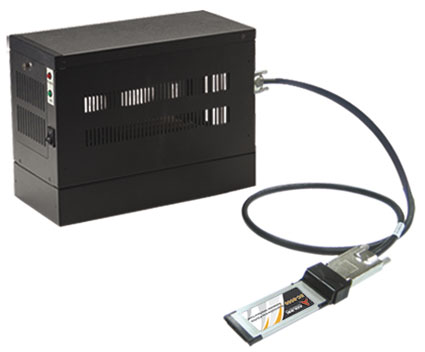
- ExpressCard‑to‑PCI/PXI Expansion: Enables laptops or compact PCs with ExpressCard/34 or ExpressCard/54 slots to control external PCI or PXI devices.
- High‑Speed PCI Express Interface: Utilizes a PCI Express x1 link with 250 MB/s throughput per direction (2.5 Gbps signaling rate).
- Transparent Bridge Architecture: No additional drivers or software required; devices in the extension chassis appear as if installed directly in the host system.
- Extended Distance Operation: Supports cable lengths of 1 m, 3 m, or 7 m without signal degradation.
- Multi‑Voltage PCI Bus Support: Compatible with both 5 V and 3.3 V PCI signaling environments.
- Full 32‑bit/33 MHz PCI Bus Operation: Ensures compatibility with standard PCI and PXI modules.
- Hardware and Software Transparency: Seamless integration with host BIOS and OS resource allocation.
- Compact and Portable Design: Ideal for mobile test and measurement setups.
- Environmental Compliance: Fully RoHS and WEEE compliant.
- Industrial‑Grade Reliability: Designed for high‑density I/O, automation, and rugged field applications.
- High‑Speed PCI Express Interface: Utilizes a PCI Express x1 link with 250 MB/s throughput per direction (2.5 Gbps signaling rate).
- Transparent Bridge Architecture: No additional drivers or software required; devices in the extension chassis appear as if installed directly in the host system.
- Extended Distance Operation: Supports cable lengths of 1 m, 3 m, or 7 m without signal degradation.
- Multi‑Voltage PCI Bus Support: Compatible with both 5 V and 3.3 V PCI signaling environments.
- Full 32‑bit/33 MHz PCI Bus Operation: Ensures compatibility with standard PCI and PXI modules.
- Hardware and Software Transparency: Seamless integration with host BIOS and OS resource allocation.
- Compact and Portable Design: Ideal for mobile test and measurement setups.
- Environmental Compliance: Fully RoHS and WEEE compliant.
- Industrial‑Grade Reliability: Designed for high‑density I/O, automation, and rugged field applications.
Comprehensive Product Summary: ADLINK ECS‑8582‑4S ExpressCard Extension Box (with EC‑8560 and PXI‑8565)
### 1. Product Overview
Product Name: ExpressCard Extension Box – 4 Free Slots
Model: ECS‑8582‑4S
Series: ExpressCard‑to‑PCI/PXI Extension Systems
Article Number: ECS‑8582‑4S
Manufacturer: ADLINK Technology, Inc.
Associated Components: EC‑8560 (ExpressCard module) and PXI‑8565 (PXI interface controller)
Part Number (Manual): 50‑1V001‑1000
Manual Revision: 2.00 (April 8, 2008)
The ADLINK ECS‑8582‑4S is a complete ExpressCard‑to‑PCI extension solution designed to expand the I/O and peripheral capabilities of notebook or compact host systems. It provides four free PCI slots housed in a dedicated external chassis, connected to the host via a high‑speed ExpressCard interface. The system integrates ADLINK’s EC‑8560 ExpressCard module and PXI‑8565 PCI bridge card, linked through a shielded 3‑meter cable, enabling transparent PCI bus extension up to 7 meters from the host computer.
### 2. Key Features
- ExpressCard‑to‑PCI/PXI Expansion: Enables laptops or compact PCs with ExpressCard/34 or ExpressCard/54 slots to control external PCI or PXI devices.
- High‑Speed PCI Express Interface: Utilizes a PCI Express x1 link with 250 MB/s throughput per direction (2.5 Gbps signaling rate).
- Transparent Bridge Architecture: No additional drivers or software required; devices in the extension chassis appear as if installed directly in the host system.
- Extended Distance Operation: Supports cable lengths of 1 m, 3 m, or 7 m without signal degradation.
- Multi‑Voltage PCI Bus Support: Compatible with both 5 V and 3.3 V PCI signaling environments.
- Full 32‑bit/33 MHz PCI Bus Operation: Ensures compatibility with standard PCI and PXI modules.
- Hardware and Software Transparency: Seamless integration with host BIOS and OS resource allocation.
- Compact and Portable Design: Ideal for mobile test and measurement setups.
- Environmental Compliance: Fully RoHS and WEEE compliant.
- Industrial‑Grade Reliability: Designed for high‑density I/O, automation, and rugged field applications.
### 3. Technical Specifications
Physical Dimensions (ECS‑8582‑4S Chassis):
- 122 mm (H) × 195 mm (W) × 259 mm (D)
Weight:
- Approx. 2.5–3.0 kg (including backplane and installed PXI‑8565 card)
Material:
- Aluminum alloy chassis with steel backplane and EMI‑shielded connectors
EC‑8560 (Host Interface Module):
- Form Factor: ExpressCard/34 (fits ExpressCard/34 and /54 slots)
- Interface: PCI Express x1 link
- Data Throughput: 250 MB/s (each direction)
- Power Requirement: +3.3 V, 210 mA (max)
- Dimensions: 108 mm (L) × 34 mm (W)
- Compliance: ExpressCard Standard Release 1.2; PCI Express Base Specification 1.0a
PXI‑8565 (Remote Interface Controller):
- Interface: PCI‑to‑PCI Bridge (Rev. 1.2 compliant)
- Bus Support: 32‑bit/33 MHz PCI bus, 5 V and 3.3 V signaling
- Power Requirement: +3.3 V, 720 mA
- Connectors: CN1 (PCI Express serial link), J1 (spread spectrum clock control), D1 (status LED)
- Spread Spectrum Clock Control: Optional EMI reduction via low‑frequency modulation
Environmental Conditions:
- Operating Temperature: 0 °C to 50 °C
- Storage Temperature: −20 °C to 80 °C
- Relative Humidity: 10 % to 90 %, non‑condensing
### 4. Functionality
The ECS‑8582‑4S functions as a remote PCI expansion chassis controlled by a host computer through an ExpressCard interface. The EC‑8560 module installed in the host laptop converts the PCI Express signals into a serialized differential link transmitted through a shielded cable. At the remote end, the PXI‑8565 card receives and converts these signals back into a standard PCI bus, which is distributed across the four available PCI slots in the ECS‑8582‑4S chassis.
Use Cases and Applications:
- Portable test and measurement systems requiring multiple PCI/PXI instruments.
- Industrial automation and control systems where the host must be isolated from the test environment.
- Military and aerospace testing setups demanding remote instrumentation.
- High‑density I/O expansion for data acquisition, signal processing, or control applications.
- Electronics manufacturing test stations requiring flexible PCI slot expansion.
Compatibility:
- Compatible with any laptop or PC supporting ExpressCard/34 or ExpressCard/54 interfaces.
- Supports standard PCI and PXI modules compliant with PCI Local Bus Specification 3.0.
- Works transparently with Windows and Linux operating systems without additional drivers.
### 5. Components & Accessories
Included Items (Standard Package):
1. ECS‑8582‑4S Chassis – 4 free PCI slots with integrated backplane.
2. EC‑8560 ExpressCard Module – Host interface card for laptop/PC.
3. PXI‑8565 PCI Bridge Card – Installed in the chassis system slot.
4. 3‑Meter Shielded Cable (ACL‑EXPRESS‑3) – Connects EC‑8560 to PXI‑8565.
5. ExpressCard Sustaining Rack – Provides mechanical support for ExpressCard/54 slots.
6. User’s Manual and Documentation.
Optional Accessories:
- ACL‑EXPRESS‑1: 1‑meter PCI Express‑to‑PCI extension cable.
- ACL‑EXPRESS‑3: 3‑meter standard cable (included).
- ACL‑EXPRESS‑7: 7‑meter long‑distance cable.
Each cable is a high‑quality, shielded, twisted‑pair assembly designed for high‑speed differential signaling with strong EMI immunity.
### 6. Installation & Setup
Installation Environment:
- Install on a stable, flat surface in a well‑ventilated area.
- Use anti‑static precautions (ESD wrist strap, grounded mat).
- Inspect all components for shipping damage before installation.
Step‑by‑Step Setup:
1. Install EC‑8560 on Host Laptop:
- Power off the laptop.
- Connect the ACL‑EXPRESS‑3 cable to the EC‑8560.
- Insert the EC‑8560 into the ExpressCard slot (use sustaining rack if ExpressCard/54).
2. Install PXI‑8565 in the Extension Chassis:
- Power off the PXI chassis.
- Remove the system slot cover and insert PXI‑8565 into the system slot (not a peripheral slot).
- Secure with retaining screws.
3. Connect the Cable:
- Attach the other end of the ACL‑EXPRESS‑3 cable to the PXI‑8565 connector.
- Tighten retention screws to ensure a secure connection.
4. Power‑On Sequence:
- Power on the PXI extension chassis first.
- Then power on the host laptop.
- The BIOS will enumerate devices behind the PCI bridge automatically.
5. Power‑Off Sequence:
- Power off the host laptop first.
- Then power off the extension chassis.
LED Indicators:
- LEDs on EC‑8560 and PXI‑8565 illuminate when:
- Cable connection is secure.
- Extension chassis is powered on.
- Host PC is performing POST.
Cautions:
- Do not disconnect the cable while the system is powered on.
- Always power on the chassis before the host to ensure proper BIOS resource allocation.
### 7. Performance & Capabilities
- Data Throughput: 250 MB/s per direction (PCIe x1 link).
- Bus Width: 32‑bit PCI bus.
- Bus Frequency: 33 MHz.
- Cable Length Options: 1 m, 3 m, or 7 m.
- Latency: Negligible; hardware‑transparent bridge ensures near‑native PCI performance.
- Efficiency: Full PCI bandwidth maintained across the extension link.
- Limitations:
- Only one extension chassis can be connected per host ExpressCard port (point‑to‑point architecture).
- BIOS resource allocation may limit the number of PCI devices depending on host chipset.
- Recommended host chipsets: Intel 945, 965, or later for optimal compatibility.
Reliability and EMI Control:
- Spread Spectrum Clock Control (J1 jumper) reduces peak EMI emissions.
- Shielded cable and differential signaling minimize noise and crosstalk.
### 8. Standards & Compliance
Industry Standards:
- ExpressCard Standard Release 1.2 (PCMCIA/USB‑IF)
- PCI Express Base Specification 1.0a (PCI‑SIG)
- PCI‑to‑PCI Bridge Architecture Specification 1.2
- PCI Local Bus Specification 3.0
- PXI Specification 2.2 (PXI Systems Alliance)
Environmental & Safety Compliance:
- RoHS Directive (EU 2002/95/EC): Restriction of Hazardous Substances.
- WEEE Directive (EU 2002/96/EC): Waste Electrical and Electronic Equipment.
- Designed for minimal environmental impact and recyclable materials.
Trademarks and Associations:
- ExpressCard™, PCI™, PCI Express®, PCI‑X®, and PXI™ are trademarks of their respective organizations.
### 9. Additional Information
Warranty:
- Standard Warranty: Two years from factory shipment date (one year for products purchased in China).
- Coverage: Manufacturing defects and hardware failures under normal use.
- Exclusions:
- Damage from misuse, improper installation, or environmental factors.
- Unauthorized repairs or modifications.
- Products with altered or missing serial numbers.
- Acts of nature (fire, flood, lightning, etc.).
- Repair Process:
- Obtain RMA form from [http://rma.adlinktech.com/policy/](http://rma.adlinktech.com/policy/).
- Include RMA form with returned product.
- Customer responsible for shipping costs to ADLINK.
Maintenance:
- Keep connectors clean and free of dust.
- Avoid bending or twisting the extension cable.
- Ensure adequate ventilation for the chassis.
- Periodically inspect for loose connections or damaged cables.
Support and Service Contacts:
- ADLINK Headquarters (Taipei, Taiwan):
- Tel: +886‑2‑8226‑5877
- Email: service@adlinktech.com
- Web: [www.adlinktech.com](http://www.adlinktech.com)
- Regional Offices:
- USA: Irvine, CA – info@adlinktech.com
- Europe: Düsseldorf, Germany – emea@adlinktech.com
- China: Beijing, Shanghai, Shenzhen – market@adlinkchina.com.cn
- Japan: Tokyo – japan@adlinktech.com
- Korea: Seoul – korea@adlinktech.com
- Singapore & India: singapore@adlinktech.com / india@adlinktech.com
Safety Guidelines:
- Disconnect power before installation or removal.
- Avoid exposure to moisture, high temperature, or vibration.
- Use only recommended voltage and power sources.
- Service only by qualified personnel.
- Lithium battery (if present) must be replaced with identical type to avoid explosion risk.
Documentation and References:
- PCI Express Base Specification 1.0a (PCI‑SIG)
- PCI Local Bus Specification 3.0 (PCI‑SIG)
- PXI Specification 2.2 (PXI Systems Alliance)
- ExpressCard Standard Release 1.2 (PCMCIA)
### Summary
The ADLINK ECS‑8582‑4S ExpressCard Extension Box is a robust, high‑performance solution for extending PCI or PXI functionality to portable computing platforms. By leveraging the EC‑8560 ExpressCard module and PXI‑8565 bridge card, it provides a transparent, driver‑free PCI expansion environment over a high‑speed PCI Express link. With up to four available PCI slots, full 32‑bit/33 MHz operation, and cable lengths up to 7 m, it is ideal for test, measurement, and industrial automation applications requiring remote or distributed I/O.
Engineered for reliability, compliance, and ease of integration, the ECS‑8582‑4S exemplifies ADLINK’s commitment to modular, scalable, and environmentally responsible computing solutions for professional and industrial users.
### 1. Product Overview
Product Name: ExpressCard Extension Box – 4 Free Slots
Model: ECS‑8582‑4S
Series: ExpressCard‑to‑PCI/PXI Extension Systems
Article Number: ECS‑8582‑4S
Manufacturer: ADLINK Technology, Inc.
Associated Components: EC‑8560 (ExpressCard module) and PXI‑8565 (PXI interface controller)
Part Number (Manual): 50‑1V001‑1000
Manual Revision: 2.00 (April 8, 2008)
The ADLINK ECS‑8582‑4S is a complete ExpressCard‑to‑PCI extension solution designed to expand the I/O and peripheral capabilities of notebook or compact host systems. It provides four free PCI slots housed in a dedicated external chassis, connected to the host via a high‑speed ExpressCard interface. The system integrates ADLINK’s EC‑8560 ExpressCard module and PXI‑8565 PCI bridge card, linked through a shielded 3‑meter cable, enabling transparent PCI bus extension up to 7 meters from the host computer.
### 2. Key Features
- ExpressCard‑to‑PCI/PXI Expansion: Enables laptops or compact PCs with ExpressCard/34 or ExpressCard/54 slots to control external PCI or PXI devices.
- High‑Speed PCI Express Interface: Utilizes a PCI Express x1 link with 250 MB/s throughput per direction (2.5 Gbps signaling rate).
- Transparent Bridge Architecture: No additional drivers or software required; devices in the extension chassis appear as if installed directly in the host system.
- Extended Distance Operation: Supports cable lengths of 1 m, 3 m, or 7 m without signal degradation.
- Multi‑Voltage PCI Bus Support: Compatible with both 5 V and 3.3 V PCI signaling environments.
- Full 32‑bit/33 MHz PCI Bus Operation: Ensures compatibility with standard PCI and PXI modules.
- Hardware and Software Transparency: Seamless integration with host BIOS and OS resource allocation.
- Compact and Portable Design: Ideal for mobile test and measurement setups.
- Environmental Compliance: Fully RoHS and WEEE compliant.
- Industrial‑Grade Reliability: Designed for high‑density I/O, automation, and rugged field applications.
### 3. Technical Specifications
Physical Dimensions (ECS‑8582‑4S Chassis):
- 122 mm (H) × 195 mm (W) × 259 mm (D)
Weight:
- Approx. 2.5–3.0 kg (including backplane and installed PXI‑8565 card)
Material:
- Aluminum alloy chassis with steel backplane and EMI‑shielded connectors
EC‑8560 (Host Interface Module):
- Form Factor: ExpressCard/34 (fits ExpressCard/34 and /54 slots)
- Interface: PCI Express x1 link
- Data Throughput: 250 MB/s (each direction)
- Power Requirement: +3.3 V, 210 mA (max)
- Dimensions: 108 mm (L) × 34 mm (W)
- Compliance: ExpressCard Standard Release 1.2; PCI Express Base Specification 1.0a
PXI‑8565 (Remote Interface Controller):
- Interface: PCI‑to‑PCI Bridge (Rev. 1.2 compliant)
- Bus Support: 32‑bit/33 MHz PCI bus, 5 V and 3.3 V signaling
- Power Requirement: +3.3 V, 720 mA
- Connectors: CN1 (PCI Express serial link), J1 (spread spectrum clock control), D1 (status LED)
- Spread Spectrum Clock Control: Optional EMI reduction via low‑frequency modulation
Environmental Conditions:
- Operating Temperature: 0 °C to 50 °C
- Storage Temperature: −20 °C to 80 °C
- Relative Humidity: 10 % to 90 %, non‑condensing
### 4. Functionality
The ECS‑8582‑4S functions as a remote PCI expansion chassis controlled by a host computer through an ExpressCard interface. The EC‑8560 module installed in the host laptop converts the PCI Express signals into a serialized differential link transmitted through a shielded cable. At the remote end, the PXI‑8565 card receives and converts these signals back into a standard PCI bus, which is distributed across the four available PCI slots in the ECS‑8582‑4S chassis.
Use Cases and Applications:
- Portable test and measurement systems requiring multiple PCI/PXI instruments.
- Industrial automation and control systems where the host must be isolated from the test environment.
- Military and aerospace testing setups demanding remote instrumentation.
- High‑density I/O expansion for data acquisition, signal processing, or control applications.
- Electronics manufacturing test stations requiring flexible PCI slot expansion.
Compatibility:
- Compatible with any laptop or PC supporting ExpressCard/34 or ExpressCard/54 interfaces.
- Supports standard PCI and PXI modules compliant with PCI Local Bus Specification 3.0.
- Works transparently with Windows and Linux operating systems without additional drivers.
### 5. Components & Accessories
Included Items (Standard Package):
1. ECS‑8582‑4S Chassis – 4 free PCI slots with integrated backplane.
2. EC‑8560 ExpressCard Module – Host interface card for laptop/PC.
3. PXI‑8565 PCI Bridge Card – Installed in the chassis system slot.
4. 3‑Meter Shielded Cable (ACL‑EXPRESS‑3) – Connects EC‑8560 to PXI‑8565.
5. ExpressCard Sustaining Rack – Provides mechanical support for ExpressCard/54 slots.
6. User’s Manual and Documentation.
Optional Accessories:
- ACL‑EXPRESS‑1: 1‑meter PCI Express‑to‑PCI extension cable.
- ACL‑EXPRESS‑3: 3‑meter standard cable (included).
- ACL‑EXPRESS‑7: 7‑meter long‑distance cable.
Each cable is a high‑quality, shielded, twisted‑pair assembly designed for high‑speed differential signaling with strong EMI immunity.
### 6. Installation & Setup
Installation Environment:
- Install on a stable, flat surface in a well‑ventilated area.
- Use anti‑static precautions (ESD wrist strap, grounded mat).
- Inspect all components for shipping damage before installation.
Step‑by‑Step Setup:
1. Install EC‑8560 on Host Laptop:
- Power off the laptop.
- Connect the ACL‑EXPRESS‑3 cable to the EC‑8560.
- Insert the EC‑8560 into the ExpressCard slot (use sustaining rack if ExpressCard/54).
2. Install PXI‑8565 in the Extension Chassis:
- Power off the PXI chassis.
- Remove the system slot cover and insert PXI‑8565 into the system slot (not a peripheral slot).
- Secure with retaining screws.
3. Connect the Cable:
- Attach the other end of the ACL‑EXPRESS‑3 cable to the PXI‑8565 connector.
- Tighten retention screws to ensure a secure connection.
4. Power‑On Sequence:
- Power on the PXI extension chassis first.
- Then power on the host laptop.
- The BIOS will enumerate devices behind the PCI bridge automatically.
5. Power‑Off Sequence:
- Power off the host laptop first.
- Then power off the extension chassis.
LED Indicators:
- LEDs on EC‑8560 and PXI‑8565 illuminate when:
- Cable connection is secure.
- Extension chassis is powered on.
- Host PC is performing POST.
Cautions:
- Do not disconnect the cable while the system is powered on.
- Always power on the chassis before the host to ensure proper BIOS resource allocation.
### 7. Performance & Capabilities
- Data Throughput: 250 MB/s per direction (PCIe x1 link).
- Bus Width: 32‑bit PCI bus.
- Bus Frequency: 33 MHz.
- Cable Length Options: 1 m, 3 m, or 7 m.
- Latency: Negligible; hardware‑transparent bridge ensures near‑native PCI performance.
- Efficiency: Full PCI bandwidth maintained across the extension link.
- Limitations:
- Only one extension chassis can be connected per host ExpressCard port (point‑to‑point architecture).
- BIOS resource allocation may limit the number of PCI devices depending on host chipset.
- Recommended host chipsets: Intel 945, 965, or later for optimal compatibility.
Reliability and EMI Control:
- Spread Spectrum Clock Control (J1 jumper) reduces peak EMI emissions.
- Shielded cable and differential signaling minimize noise and crosstalk.
### 8. Standards & Compliance
Industry Standards:
- ExpressCard Standard Release 1.2 (PCMCIA/USB‑IF)
- PCI Express Base Specification 1.0a (PCI‑SIG)
- PCI‑to‑PCI Bridge Architecture Specification 1.2
- PCI Local Bus Specification 3.0
- PXI Specification 2.2 (PXI Systems Alliance)
Environmental & Safety Compliance:
- RoHS Directive (EU 2002/95/EC): Restriction of Hazardous Substances.
- WEEE Directive (EU 2002/96/EC): Waste Electrical and Electronic Equipment.
- Designed for minimal environmental impact and recyclable materials.
Trademarks and Associations:
- ExpressCard™, PCI™, PCI Express®, PCI‑X®, and PXI™ are trademarks of their respective organizations.
### 9. Additional Information
Warranty:
- Standard Warranty: Two years from factory shipment date (one year for products purchased in China).
- Coverage: Manufacturing defects and hardware failures under normal use.
- Exclusions:
- Damage from misuse, improper installation, or environmental factors.
- Unauthorized repairs or modifications.
- Products with altered or missing serial numbers.
- Acts of nature (fire, flood, lightning, etc.).
- Repair Process:
- Obtain RMA form from [http://rma.adlinktech.com/policy/](http://rma.adlinktech.com/policy/).
- Include RMA form with returned product.
- Customer responsible for shipping costs to ADLINK.
Maintenance:
- Keep connectors clean and free of dust.
- Avoid bending or twisting the extension cable.
- Ensure adequate ventilation for the chassis.
- Periodically inspect for loose connections or damaged cables.
Support and Service Contacts:
- ADLINK Headquarters (Taipei, Taiwan):
- Tel: +886‑2‑8226‑5877
- Email: service@adlinktech.com
- Web: [www.adlinktech.com](http://www.adlinktech.com)
- Regional Offices:
- USA: Irvine, CA – info@adlinktech.com
- Europe: Düsseldorf, Germany – emea@adlinktech.com
- China: Beijing, Shanghai, Shenzhen – market@adlinkchina.com.cn
- Japan: Tokyo – japan@adlinktech.com
- Korea: Seoul – korea@adlinktech.com
- Singapore & India: singapore@adlinktech.com / india@adlinktech.com
Safety Guidelines:
- Disconnect power before installation or removal.
- Avoid exposure to moisture, high temperature, or vibration.
- Use only recommended voltage and power sources.
- Service only by qualified personnel.
- Lithium battery (if present) must be replaced with identical type to avoid explosion risk.
Documentation and References:
- PCI Express Base Specification 1.0a (PCI‑SIG)
- PCI Local Bus Specification 3.0 (PCI‑SIG)
- PXI Specification 2.2 (PXI Systems Alliance)
- ExpressCard Standard Release 1.2 (PCMCIA)
### Summary
The ADLINK ECS‑8582‑4S ExpressCard Extension Box is a robust, high‑performance solution for extending PCI or PXI functionality to portable computing platforms. By leveraging the EC‑8560 ExpressCard module and PXI‑8565 bridge card, it provides a transparent, driver‑free PCI expansion environment over a high‑speed PCI Express link. With up to four available PCI slots, full 32‑bit/33 MHz operation, and cable lengths up to 7 m, it is ideal for test, measurement, and industrial automation applications requiring remote or distributed I/O.
Engineered for reliability, compliance, and ease of integration, the ECS‑8582‑4S exemplifies ADLINK’s commitment to modular, scalable, and environmentally responsible computing solutions for professional and industrial users.
-
 EC-8560+PXI-8565_Datasheet_1.pdf
PDF Catalog
EC-8560+PXI-8565_Datasheet_1.pdf
PDF Catalog

Kein Zubehör vorhanden.

