
 SUCHEN SIE DIE PASSENDE
INDUSTRIELLE LÖSUNG?
Entdecken Sie Embedded-, Kommunikations- und Automatisierungslösungen für Ihre Anwendung.
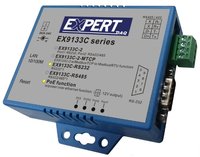
EX9133C-2-MTCP
M4 120Mhz 128K RAM 512K ROM Modbus TCP to Modbus RTU/ASCII(Ethernet to RS485/422*1 & RS232*1), DC Jack/ Terminal Block optional. About2.json Report ID Remote IP support
139,00 EUR
inkl. Umsatzsteuer 165,41 EUR
- Dual Serial Interfaces:
One RS-232 port and one RS-422/485 (auto-detect) port for flexible serial connectivity.
- Protocol Conversion:
Converts between Modbus TCP and Modbus RTU/ASCII in both directions:
- Modbus TCP → Modbus RTU/ASCII (Slave)
- Modbus RTU/ASCII → Modbus TCP (Slave)
- High-Performance CPU:
ARM Cortex-M4 32-bit processor running at 120 MHz, providing 1.25 DMIPS/MHz computational efficiency.
- Memory Resources:
128 KB SRAM and 512 KB Flash ROM for stable operation and firmware storage.
- Ethernet Connectivity:
- 10/100 Mbps auto-detecting RJ-45 port
- Built-in 1.5 kV magnetic isolation
- Supports TCP, UDP, HTTP, DHCP, ICMP, ARP protocols
- Web-Based Configuration:
Configuration via standard web browsers (Internet Explorer, Netscape) using HTTP interface—no proprietary software required.
- Dynamic IP Support:
DHCP client mode for automatic IP assignment.
- Security:
Password-protected login to prevent unauthorized access.
- Remote Management:
Supports remote firmware updates and configuration over Ethernet.
- Socket Communication:
One socket connection for remote management and data exchange.
- Industrial Reliability:
- 15 kV ESD protection on all signal lines
- Built-in watchdog timer
- Surge and overcurrent protection on RS-422/485 lines
- Extended operating temperature range (0°C to 70°C)
- Compatibility:
Works with Windows 2000, 2003, XP, Vista, and Windows 7 via virtual COM port drivers.
- Compact Design:
Small footprint (115 × 90 × 27 mm) and lightweight (140 g), suitable for DIN rail or panel mounting.
One RS-232 port and one RS-422/485 (auto-detect) port for flexible serial connectivity.
- Protocol Conversion:
Converts between Modbus TCP and Modbus RTU/ASCII in both directions:
- Modbus TCP → Modbus RTU/ASCII (Slave)
- Modbus RTU/ASCII → Modbus TCP (Slave)
- High-Performance CPU:
ARM Cortex-M4 32-bit processor running at 120 MHz, providing 1.25 DMIPS/MHz computational efficiency.
- Memory Resources:
128 KB SRAM and 512 KB Flash ROM for stable operation and firmware storage.
- Ethernet Connectivity:
- 10/100 Mbps auto-detecting RJ-45 port
- Built-in 1.5 kV magnetic isolation
- Supports TCP, UDP, HTTP, DHCP, ICMP, ARP protocols
- Web-Based Configuration:
Configuration via standard web browsers (Internet Explorer, Netscape) using HTTP interface—no proprietary software required.
- Dynamic IP Support:
DHCP client mode for automatic IP assignment.
- Security:
Password-protected login to prevent unauthorized access.
- Remote Management:
Supports remote firmware updates and configuration over Ethernet.
- Socket Communication:
One socket connection for remote management and data exchange.
- Industrial Reliability:
- 15 kV ESD protection on all signal lines
- Built-in watchdog timer
- Surge and overcurrent protection on RS-422/485 lines
- Extended operating temperature range (0°C to 70°C)
- Compatibility:
Works with Windows 2000, 2003, XP, Vista, and Windows 7 via virtual COM port drivers.
- Compact Design:
Small footprint (115 × 90 × 27 mm) and lightweight (140 g), suitable for DIN rail or panel mounting.
Comprehensive Product Summary – EX9133C-2-MTCP
### 1. Product Overview
Product Name: Modbus TCP to Modbus RTU/ASCII Converter
Model: EX9133C-2-MTCP
Series: ARM Cortex-M4 Industrial Communication Converter Series
Article Number: EX9133C-2-MTCP
Manufacturer: TOPSCCC (Taiwan)
Manual Version: 1.0.1 (October 20, 2016)
Product Type: Ethernet-to-Serial Modbus Gateway / Converter
The EX9133C-2-MTCP is an industrial-grade Modbus TCP to Modbus RTU/ASCII converter designed to connect legacy serial devices to modern Ethernet networks. It enables seamless communication between Modbus TCP/IP clients and Modbus RTU/ASCII serial devices over LAN, WAN, or the Internet. The device is built around a high-performance ARM Cortex-M4 32-bit processor and housed in a compact, durable PVC enclosure suitable for industrial environments.
### 2. Key Features
- Dual Serial Interfaces:
One RS-232 port and one RS-422/485 (auto-detect) port for flexible serial connectivity.
- Protocol Conversion:
Converts between Modbus TCP and Modbus RTU/ASCII in both directions:
- Modbus TCP → Modbus RTU/ASCII (Slave)
- Modbus RTU/ASCII → Modbus TCP (Slave)
- High-Performance CPU:
ARM Cortex-M4 32-bit processor running at 120 MHz, providing 1.25 DMIPS/MHz computational efficiency.
- Memory Resources:
128 KB SRAM and 512 KB Flash ROM for stable operation and firmware storage.
- Ethernet Connectivity:
- 10/100 Mbps auto-detecting RJ-45 port
- Built-in 1.5 kV magnetic isolation
- Supports TCP, UDP, HTTP, DHCP, ICMP, ARP protocols
- Web-Based Configuration:
Configuration via standard web browsers (Internet Explorer, Netscape) using HTTP interface—no proprietary software required.
- Dynamic IP Support:
DHCP client mode for automatic IP assignment.
- Security:
Password-protected login to prevent unauthorized access.
- Remote Management:
Supports remote firmware updates and configuration over Ethernet.
- Socket Communication:
One socket connection for remote management and data exchange.
- Industrial Reliability:
- 15 kV ESD protection on all signal lines
- Built-in watchdog timer
- Surge and overcurrent protection on RS-422/485 lines
- Extended operating temperature range (0°C to 70°C)
- Compatibility:
Works with Windows 2000, 2003, XP, Vista, and Windows 7 via virtual COM port drivers.
- Compact Design:
Small footprint (115 × 90 × 27 mm) and lightweight (140 g), suitable for DIN rail or panel mounting.
### 3. Technical Specifications
Processor: ARM Cortex-M4 32-bit, 120 MHz
Memory: 128 KB SRAM, 512 KB Flash ROM
Ethernet Interface:
- Connector: RJ-45
- Speed: 10/100 Mbps (auto-detect)
- Protocols: HTTP, DHCP, Modbus TCP, Modbus RTU/ASCII
- Modes: Modbus TCP Client/Server
- Security: Password login
- Isolation: 1.5 kV magnetic isolation
- Supported Functions: Remote IP, Report ID, JSON reporting
Serial Interfaces:
- Port 1 (RS-232):
- Connector: DB9 male
- Signals: Rx, Tx, GND, RTS, CTS, DTR, DSR, DCD
- Baud Rate: 300–115,200 bps
- Parity: None, Odd, Even, Mark, Space
- Data Bits: 5, 6, 7, 8
- Stop Bits: 1, 2
- Port 2 (RS-422/485 Auto-Detect):
- Connector: 7-pin terminal block
- RS-422 Signals: Rx+, Rx−, Tx+, Tx− (surge and overcurrent protected)
- RS-485 Signals: Data+, Data− (surge and overcurrent protected)
- Baud Rate: 300–115,200 bps
- Parity: None, Odd, Even, Mark, Space
- Data Bits: 5–8
- Stop Bits: 1, 2
- Built-in pull high/low resistors
Power Supply:
- Input Voltage: 9–24 VDC
- Current: 500 mA
- Connector: DC Jack (default) or terminal block (optional)
- Polarity: Inner positive / outer negative
Indicators (LEDs):
- Port 1 (Red): RS-232 data transmission
- Port 2 (Green): RS-422/485 data transmission
- DI/DO (Red): Data input/output activity
- SYS (Green): System status (blinks once per second in normal operation)
Environmental Conditions:
- Operating Temperature: 0°C to 70°C
- Storage Temperature: −10°C to 80°C
- Humidity: 5–95% RH (non-condensing)
Physical Characteristics:
- Dimensions: 115 × 90 × 27 mm (W × D × H)
- Weight: 140 g
- Enclosure: Industrial-grade PVC
- Mounting: DIN rail or panel mount (optional kit)
Certifications:
- CE, FCC, RoHS compliant
Warranty: 1 year
### 4. Functionality
The EX9133C-2-MTCP functions as a transparent gateway between Ethernet-based Modbus TCP/IP networks and serial Modbus RTU/ASCII devices. It enables industrial controllers, PLCs, sensors, and meters with serial interfaces to communicate over Ethernet without modifying existing software.
Operating Modes:
- Modbus TCP Server Mode: Accepts connections from Modbus TCP clients and forwards requests to serial devices.
- Modbus TCP Client Mode: Initiates connections to remote Modbus TCP servers for data exchange.
- UDP Mode: Supports UDP-based communication for lightweight data transmission.
Use Cases:
- Integrating legacy Modbus RTU/ASCII devices into modern SCADA or HMI systems.
- Remote monitoring and control of serial devices over LAN/WAN.
- Industrial automation, building management, and energy monitoring systems.
- Applications requiring Ethernet-based access to serial instrumentation.
Compatibility:
- Works with standard Modbus TCP/IP software and virtual COM port drivers.
- Compatible with Windows operating systems and standard network APIs (Winsock/BSD Sockets).
### 5. Components & Accessories
Included Items:
- 1 × EX9133C-2-MTCP converter unit
- 1 × Quick Installation Guide (in documentation CD)
Optional Accessories:
- Power Adapter (9V/12V/24V DC, 500 mA)
- DIN Rail Mounting Kit (2 EUR)
- Power Cable (2 EUR)
- 12V Power Adapter (9 EUR)
Connectors:
- RJ-45 Ethernet port
- DB9 male RS-232 port
- 7-pin terminal block for RS-422/485
- DC power jack or terminal block input
### 6. Installation & Setup
Power Connection:
Connect a 9–24 VDC power supply (inner positive, outer negative) to the DC jack or terminal block. The device consumes approximately 500 mA.
Network Connection:
Connect the RJ-45 Ethernet port to a network switch or hub. The LAN LED will illuminate when connected, and the data LED will blink during network activity.
Serial Connection:
Attach serial cables to the RS-232 or RS-422/485 ports according to the pin assignments provided in the manual.
Reset Function:
Press and hold the reset button for 3 seconds to restore factory defaults. Holding for more than 5 seconds enters firmware update mode.
LED Indicators:
- SYS LED: Blinks once per second during normal operation.
- PORT LEDs: Indicate data transmission on respective serial ports.
- DI/DO LED: Indicates digital I/O activity.
Configuration Tools:
1. EXBrowser Utility (Windows):
- Detects and configures devices via UDP broadcast.
- Allows IP and MAC address modification.
- Displays device status (IP, subnet mask, MAC, device ID).
2. Web Browser Interface:
- Access via device IP address.
- Configure network parameters, serial settings, and Modbus modes.
- Password-protected login.
- Supports DHCP, static IP, gateway, and subnet configuration.
Factory Default Reset:
Power on the device, press and hold the reset button for 5 seconds to restore default settings (password cleared).
### 7. Performance & Capabilities
- Processing Speed: 120 MHz ARM Cortex-M4 core
- Data Throughput: Up to 115.2 kbps per serial port
- Network Speed: 10/100 Mbps Ethernet auto-negotiation
- Socket Connections: 1 concurrent connection
- Reliability: Watchdog timer ensures continuous operation
- Firmware Updates: Performed online via Ethernet
- ESD Protection: 15 kV on all signal lines
- Surge Protection: Integrated on RS-422/485 lines
- Auto-Detection: Automatically identifies RS-422 or RS-485 interface type
- Auto-Reboot: Configurable auto-reset timer (1–255 minutes) for fault recovery
- Packet Handling: Adjustable packet collection time (0–999 ms) for optimized data flow
Limitations:
- Supports one socket connection at a time.
- Configuration limited to one device per EXBrowser session.
- Broadcast-based detection cannot traverse routers (local subnet only).
### 8. Standards & Compliance
- Electrical Safety: Built-in 1.5 kV magnetic isolation on Ethernet port
- Electrostatic Discharge (ESD): 15 kV protection on all signal lines
- Environmental Compliance: RoHS compliant
- Regulatory Approvals: CE and FCC certified
- Industrial Standards:
- Modbus TCP/IP
- Modbus RTU/ASCII
- IEEE 802.3 (Ethernet)
- DHCP, TCP/IP, UDP, HTTP protocols
### 9. Additional Information
Warranty:
1-year limited warranty covering manufacturing defects.
Support & Maintenance:
- Firmware updates available via Ethernet.
- Technical support provided by TOPSCCC.
- User manual and configuration utilities included on CD.
- FAQ and troubleshooting guidance provided in documentation.
Maintenance Recommendations:
- Ensure proper grounding and surge protection in industrial environments.
- Periodically check firmware version and update as needed.
- Avoid exposure to extreme temperatures or humidity beyond specified limits.
- Use only approved power supplies and accessories.
Software Updates:
Firmware can be updated remotely through the web interface, ensuring compatibility with evolving Modbus and network standards.
### Summary
The EX9133C-2-MTCP is a robust, cost-effective Modbus TCP to Modbus RTU/ASCII converter engineered for industrial automation and control systems. Powered by a 120 MHz ARM Cortex-M4 processor, it bridges Ethernet and serial communication seamlessly, enabling remote access to legacy devices over modern IP networks. With dual serial ports, flexible configuration options, and industrial-grade protection, it provides a reliable solution for integrating PLCs, sensors, and meters into Ethernet-based infrastructures. Its web-based configuration, DHCP support, and remote firmware update capabilities make it a versatile and future-proof choice for industrial communication applications.
### 1. Product Overview
Product Name: Modbus TCP to Modbus RTU/ASCII Converter
Model: EX9133C-2-MTCP
Series: ARM Cortex-M4 Industrial Communication Converter Series
Article Number: EX9133C-2-MTCP
Manufacturer: TOPSCCC (Taiwan)
Manual Version: 1.0.1 (October 20, 2016)
Product Type: Ethernet-to-Serial Modbus Gateway / Converter
The EX9133C-2-MTCP is an industrial-grade Modbus TCP to Modbus RTU/ASCII converter designed to connect legacy serial devices to modern Ethernet networks. It enables seamless communication between Modbus TCP/IP clients and Modbus RTU/ASCII serial devices over LAN, WAN, or the Internet. The device is built around a high-performance ARM Cortex-M4 32-bit processor and housed in a compact, durable PVC enclosure suitable for industrial environments.
### 2. Key Features
- Dual Serial Interfaces:
One RS-232 port and one RS-422/485 (auto-detect) port for flexible serial connectivity.
- Protocol Conversion:
Converts between Modbus TCP and Modbus RTU/ASCII in both directions:
- Modbus TCP → Modbus RTU/ASCII (Slave)
- Modbus RTU/ASCII → Modbus TCP (Slave)
- High-Performance CPU:
ARM Cortex-M4 32-bit processor running at 120 MHz, providing 1.25 DMIPS/MHz computational efficiency.
- Memory Resources:
128 KB SRAM and 512 KB Flash ROM for stable operation and firmware storage.
- Ethernet Connectivity:
- 10/100 Mbps auto-detecting RJ-45 port
- Built-in 1.5 kV magnetic isolation
- Supports TCP, UDP, HTTP, DHCP, ICMP, ARP protocols
- Web-Based Configuration:
Configuration via standard web browsers (Internet Explorer, Netscape) using HTTP interface—no proprietary software required.
- Dynamic IP Support:
DHCP client mode for automatic IP assignment.
- Security:
Password-protected login to prevent unauthorized access.
- Remote Management:
Supports remote firmware updates and configuration over Ethernet.
- Socket Communication:
One socket connection for remote management and data exchange.
- Industrial Reliability:
- 15 kV ESD protection on all signal lines
- Built-in watchdog timer
- Surge and overcurrent protection on RS-422/485 lines
- Extended operating temperature range (0°C to 70°C)
- Compatibility:
Works with Windows 2000, 2003, XP, Vista, and Windows 7 via virtual COM port drivers.
- Compact Design:
Small footprint (115 × 90 × 27 mm) and lightweight (140 g), suitable for DIN rail or panel mounting.
### 3. Technical Specifications
Processor: ARM Cortex-M4 32-bit, 120 MHz
Memory: 128 KB SRAM, 512 KB Flash ROM
Ethernet Interface:
- Connector: RJ-45
- Speed: 10/100 Mbps (auto-detect)
- Protocols: HTTP, DHCP, Modbus TCP, Modbus RTU/ASCII
- Modes: Modbus TCP Client/Server
- Security: Password login
- Isolation: 1.5 kV magnetic isolation
- Supported Functions: Remote IP, Report ID, JSON reporting
Serial Interfaces:
- Port 1 (RS-232):
- Connector: DB9 male
- Signals: Rx, Tx, GND, RTS, CTS, DTR, DSR, DCD
- Baud Rate: 300–115,200 bps
- Parity: None, Odd, Even, Mark, Space
- Data Bits: 5, 6, 7, 8
- Stop Bits: 1, 2
- Port 2 (RS-422/485 Auto-Detect):
- Connector: 7-pin terminal block
- RS-422 Signals: Rx+, Rx−, Tx+, Tx− (surge and overcurrent protected)
- RS-485 Signals: Data+, Data− (surge and overcurrent protected)
- Baud Rate: 300–115,200 bps
- Parity: None, Odd, Even, Mark, Space
- Data Bits: 5–8
- Stop Bits: 1, 2
- Built-in pull high/low resistors
Power Supply:
- Input Voltage: 9–24 VDC
- Current: 500 mA
- Connector: DC Jack (default) or terminal block (optional)
- Polarity: Inner positive / outer negative
Indicators (LEDs):
- Port 1 (Red): RS-232 data transmission
- Port 2 (Green): RS-422/485 data transmission
- DI/DO (Red): Data input/output activity
- SYS (Green): System status (blinks once per second in normal operation)
Environmental Conditions:
- Operating Temperature: 0°C to 70°C
- Storage Temperature: −10°C to 80°C
- Humidity: 5–95% RH (non-condensing)
Physical Characteristics:
- Dimensions: 115 × 90 × 27 mm (W × D × H)
- Weight: 140 g
- Enclosure: Industrial-grade PVC
- Mounting: DIN rail or panel mount (optional kit)
Certifications:
- CE, FCC, RoHS compliant
Warranty: 1 year
### 4. Functionality
The EX9133C-2-MTCP functions as a transparent gateway between Ethernet-based Modbus TCP/IP networks and serial Modbus RTU/ASCII devices. It enables industrial controllers, PLCs, sensors, and meters with serial interfaces to communicate over Ethernet without modifying existing software.
Operating Modes:
- Modbus TCP Server Mode: Accepts connections from Modbus TCP clients and forwards requests to serial devices.
- Modbus TCP Client Mode: Initiates connections to remote Modbus TCP servers for data exchange.
- UDP Mode: Supports UDP-based communication for lightweight data transmission.
Use Cases:
- Integrating legacy Modbus RTU/ASCII devices into modern SCADA or HMI systems.
- Remote monitoring and control of serial devices over LAN/WAN.
- Industrial automation, building management, and energy monitoring systems.
- Applications requiring Ethernet-based access to serial instrumentation.
Compatibility:
- Works with standard Modbus TCP/IP software and virtual COM port drivers.
- Compatible with Windows operating systems and standard network APIs (Winsock/BSD Sockets).
### 5. Components & Accessories
Included Items:
- 1 × EX9133C-2-MTCP converter unit
- 1 × Quick Installation Guide (in documentation CD)
Optional Accessories:
- Power Adapter (9V/12V/24V DC, 500 mA)
- DIN Rail Mounting Kit (2 EUR)
- Power Cable (2 EUR)
- 12V Power Adapter (9 EUR)
Connectors:
- RJ-45 Ethernet port
- DB9 male RS-232 port
- 7-pin terminal block for RS-422/485
- DC power jack or terminal block input
### 6. Installation & Setup
Power Connection:
Connect a 9–24 VDC power supply (inner positive, outer negative) to the DC jack or terminal block. The device consumes approximately 500 mA.
Network Connection:
Connect the RJ-45 Ethernet port to a network switch or hub. The LAN LED will illuminate when connected, and the data LED will blink during network activity.
Serial Connection:
Attach serial cables to the RS-232 or RS-422/485 ports according to the pin assignments provided in the manual.
Reset Function:
Press and hold the reset button for 3 seconds to restore factory defaults. Holding for more than 5 seconds enters firmware update mode.
LED Indicators:
- SYS LED: Blinks once per second during normal operation.
- PORT LEDs: Indicate data transmission on respective serial ports.
- DI/DO LED: Indicates digital I/O activity.
Configuration Tools:
1. EXBrowser Utility (Windows):
- Detects and configures devices via UDP broadcast.
- Allows IP and MAC address modification.
- Displays device status (IP, subnet mask, MAC, device ID).
2. Web Browser Interface:
- Access via device IP address.
- Configure network parameters, serial settings, and Modbus modes.
- Password-protected login.
- Supports DHCP, static IP, gateway, and subnet configuration.
Factory Default Reset:
Power on the device, press and hold the reset button for 5 seconds to restore default settings (password cleared).
### 7. Performance & Capabilities
- Processing Speed: 120 MHz ARM Cortex-M4 core
- Data Throughput: Up to 115.2 kbps per serial port
- Network Speed: 10/100 Mbps Ethernet auto-negotiation
- Socket Connections: 1 concurrent connection
- Reliability: Watchdog timer ensures continuous operation
- Firmware Updates: Performed online via Ethernet
- ESD Protection: 15 kV on all signal lines
- Surge Protection: Integrated on RS-422/485 lines
- Auto-Detection: Automatically identifies RS-422 or RS-485 interface type
- Auto-Reboot: Configurable auto-reset timer (1–255 minutes) for fault recovery
- Packet Handling: Adjustable packet collection time (0–999 ms) for optimized data flow
Limitations:
- Supports one socket connection at a time.
- Configuration limited to one device per EXBrowser session.
- Broadcast-based detection cannot traverse routers (local subnet only).
### 8. Standards & Compliance
- Electrical Safety: Built-in 1.5 kV magnetic isolation on Ethernet port
- Electrostatic Discharge (ESD): 15 kV protection on all signal lines
- Environmental Compliance: RoHS compliant
- Regulatory Approvals: CE and FCC certified
- Industrial Standards:
- Modbus TCP/IP
- Modbus RTU/ASCII
- IEEE 802.3 (Ethernet)
- DHCP, TCP/IP, UDP, HTTP protocols
### 9. Additional Information
Warranty:
1-year limited warranty covering manufacturing defects.
Support & Maintenance:
- Firmware updates available via Ethernet.
- Technical support provided by TOPSCCC.
- User manual and configuration utilities included on CD.
- FAQ and troubleshooting guidance provided in documentation.
Maintenance Recommendations:
- Ensure proper grounding and surge protection in industrial environments.
- Periodically check firmware version and update as needed.
- Avoid exposure to extreme temperatures or humidity beyond specified limits.
- Use only approved power supplies and accessories.
Software Updates:
Firmware can be updated remotely through the web interface, ensuring compatibility with evolving Modbus and network standards.
### Summary
The EX9133C-2-MTCP is a robust, cost-effective Modbus TCP to Modbus RTU/ASCII converter engineered for industrial automation and control systems. Powered by a 120 MHz ARM Cortex-M4 processor, it bridges Ethernet and serial communication seamlessly, enabling remote access to legacy devices over modern IP networks. With dual serial ports, flexible configuration options, and industrial-grade protection, it provides a reliable solution for integrating PLCs, sensors, and meters into Ethernet-based infrastructures. Its web-based configuration, DHCP support, and remote firmware update capabilities make it a versatile and future-proof choice for industrial communication applications.

Kein Zubehör vorhanden.