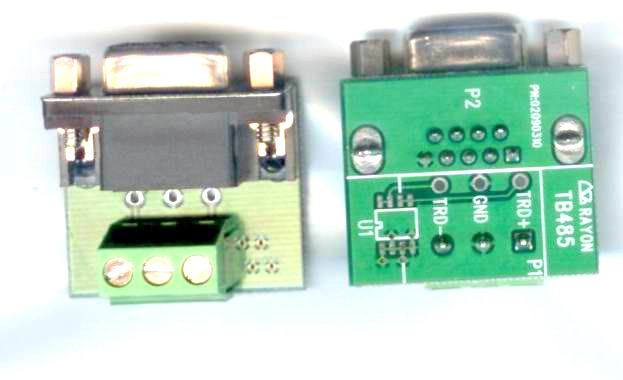
TB485
SUCHEN SIE DIE PASSENDE
INDUSTRIELLE LÖSUNG?
Entdecken Sie Embedded-, Kommunikations- und Automatisierungslösungen für Ihre Anwendung.
IPort134
IP Device Server Linux based TX to 4*RS485/422
145,00 EUR
inkl. Umsatzsteuer 172,55 EUR
- Linux-Based Embedded System:
Built on a 32-bit 100 MHz MIPS RISC CPU with 16 MB Flash ROM and 16 MB SDRAM, providing a stable, multitasking environment for network-to-serial data conversion.
- Multi-Port Serial Connectivity:
- IPort134I: 4 ground-isolated RS422/RS485 ports
- IPort138I: 8 ground-isolated RS422/RS485 ports
Each port configurable individually via DIP switch or software.
- Ethernet Interface:
- Auto-detecting 10/100 Mbps Ethernet (100Base-T)
- RJ45 connector with link/activity LEDs
- Supports TCP/IP and UDP/IP protocols
- Flexible Configuration:
- Web-based, Telnet, or console terminal setup
- Supports static or dynamic IP addressing
- Configurable serial modes: TCP Server, TCP Client, UDP Send/Receive, UDP Multi-Serial, Real TTY (Linux/UNIX), and Virtual COM (Windows)
- Cross-Platform Driver Support:
- Windows NT/2000/XP/Vista/7/8/10 Virtual COM driver
- Linux raw TTY driver
- SCO UNIX real TTY driver
- Supports both TPORT and RPORT virtual COM modes for flexible network sharing
- Ground Isolation:
Each RS422/RS485 port is galvanically isolated to prevent ground loops and protect connected equipment.
- Auto Data Direction Control:
Automatic transmit/receive switching in RS485 mode for half-duplex communication.
- High-Speed Serial Communication:
Supports baud rates up to 230,400 bps per port.
- Web-Based Management:
Integrated HTTP server for configuration, firmware updates, and status monitoring.
- Firmware Upgradeable:
Supports TFTP-based firmware updates via console or network.
Built on a 32-bit 100 MHz MIPS RISC CPU with 16 MB Flash ROM and 16 MB SDRAM, providing a stable, multitasking environment for network-to-serial data conversion.
- Multi-Port Serial Connectivity:
- IPort134I: 4 ground-isolated RS422/RS485 ports
- IPort138I: 8 ground-isolated RS422/RS485 ports
Each port configurable individually via DIP switch or software.
- Ethernet Interface:
- Auto-detecting 10/100 Mbps Ethernet (100Base-T)
- RJ45 connector with link/activity LEDs
- Supports TCP/IP and UDP/IP protocols
- Flexible Configuration:
- Web-based, Telnet, or console terminal setup
- Supports static or dynamic IP addressing
- Configurable serial modes: TCP Server, TCP Client, UDP Send/Receive, UDP Multi-Serial, Real TTY (Linux/UNIX), and Virtual COM (Windows)
- Cross-Platform Driver Support:
- Windows NT/2000/XP/Vista/7/8/10 Virtual COM driver
- Linux raw TTY driver
- SCO UNIX real TTY driver
- Supports both TPORT and RPORT virtual COM modes for flexible network sharing
- Ground Isolation:
Each RS422/RS485 port is galvanically isolated to prevent ground loops and protect connected equipment.
- Auto Data Direction Control:
Automatic transmit/receive switching in RS485 mode for half-duplex communication.
- High-Speed Serial Communication:
Supports baud rates up to 230,400 bps per port.
- Web-Based Management:
Integrated HTTP server for configuration, firmware updates, and status monitoring.
- Firmware Upgradeable:
Supports TFTP-based firmware updates via console or network.
Comprehensive Product Summary – IPort134 / IPort138I IP Device Server
### 1. Product Overview
Product Name: IPort134 / IPort138I
Model: IPort134 (4-port version) / IPort138I (8-port version)
Series: IPORT / APORT Series – IP to Serial Port Converters
Article Number: IPort134
Manufacturer: Rayon Technology Co., Ltd.
Manufacturer Address: 2F, No. 177, Chung Shan 2 Rd., Lu Chou City, Taipei Hsien, Taiwan
Contact:
- Tel: +886-2-82858362
- Fax: +886-2-82857065
- Email: rayon@ms1.hinet.net / info@rayontech.com.tw
- Web: [www.rayontech.com.tw](http://www.rayontech.com.tw)
Product Type:
Linux-based IP Device Server and Serial Port Converter supporting Ethernet-to-multi-serial communication. Converts 10/100Base-TX Ethernet to multiple RS422/RS485 serial interfaces with ground isolation. Designed for industrial automation, remote device management, and network-based serial communication.
### 2. Key Features
- Linux-Based Embedded System:
Built on a 32-bit 100 MHz MIPS RISC CPU with 16 MB Flash ROM and 16 MB SDRAM, providing a stable, multitasking environment for network-to-serial data conversion.
- Multi-Port Serial Connectivity:
- IPort134I: 4 ground-isolated RS422/RS485 ports
- IPort138I: 8 ground-isolated RS422/RS485 ports
Each port configurable individually via DIP switch or software.
- Ethernet Interface:
- Auto-detecting 10/100 Mbps Ethernet (100Base-T)
- RJ45 connector with link/activity LEDs
- Supports TCP/IP and UDP/IP protocols
- Flexible Configuration:
- Web-based, Telnet, or console terminal setup
- Supports static or dynamic IP addressing
- Configurable serial modes: TCP Server, TCP Client, UDP Send/Receive, UDP Multi-Serial, Real TTY (Linux/UNIX), and Virtual COM (Windows)
- Cross-Platform Driver Support:
- Windows NT/2000/XP/Vista/7/8/10 Virtual COM driver
- Linux raw TTY driver
- SCO UNIX real TTY driver
- Supports both TPORT and RPORT virtual COM modes for flexible network sharing
- Ground Isolation:
Each RS422/RS485 port is galvanically isolated to prevent ground loops and protect connected equipment.
- Auto Data Direction Control:
Automatic transmit/receive switching in RS485 mode for half-duplex communication.
- High-Speed Serial Communication:
Supports baud rates up to 230,400 bps per port.
- Web-Based Management:
Integrated HTTP server for configuration, firmware updates, and status monitoring.
- Firmware Upgradeable:
Supports TFTP-based firmware updates via console or network.
### 3. Technical Specifications
Processor & Memory:
- CPU: 32-bit MIPS RISC, 100 MHz
- Flash ROM: 16 MB
- SDRAM: 16 MB
Network Interface:
- Type: 10/100 Mbps Ethernet (100Base-T)
- Connector: RJ45
- Auto-negotiation for 10/100 Mbps
Serial Interfaces:
- Type: Ground-isolated RS422/RS485
- Connector: DB9 male
- Number of Ports: 4 (IPort134I) or 8 (IPort138I)
- Baud Rate: Up to 230,400 bps
- Mode Selection: RS422 or RS485 via DIP switch or software
- Console Port: Shared with Serial Port 1
Power Requirements:
- Input Voltage: 5 V DC
- Current Consumption: 1.2 A (IPort134I) / 1.6 A (IPort138I)
- Power Adapter: UP110/UP220 (5 V DC regulated supply)
Physical Dimensions:
- IPort134I: 205 × 135 × 29 mm
- IPort138I: 205 × 135 × 48 mm
- Material: Industrial-grade Rayon enclosure
Environmental Conditions:
- Operating Temperature: 5 °C – 40 °C
- Storage Temperature: 0 °C – 65 °C
- Operating Humidity: 10 – 90 % RH (non-condensing)
- Storage Humidity: 5 – 90 % RH
### 4. Functionality
Operating Principle:
The IPort134/138I acts as a bridge between Ethernet and serial communication networks. It encapsulates serial data into TCP or UDP packets for transmission over IP networks and decapsulates received packets back into serial data streams.
Supported Modes:
1. TCP Server Mode:
The device listens on a defined TCP port, accepting incoming connections from clients. Ideal for remote terminal access or SCADA systems.
2. TCP Client Mode:
Initiates a connection to a predefined server IP and port. Suitable for data logging or centralized control systems.
3. UDP Send/Receive Mode:
Enables broadcast or unicast communication to up to four remote hosts.
4. UDP Multi-Serial Mode:
Allows multiple serial ports to share the same UDP port for simultaneous data distribution.
5. Real TTY Mode (UNIX/Linux):
Provides fixed pseudo-terminal devices mapped to serial ports for transparent serial communication.
6. Virtual COM Mode (Windows):
Emulates standard COM ports using TPORT or RPORT drivers, allowing legacy serial applications to operate over IP.
Use Cases:
- Industrial automation and PLC communication
- Building management systems (BMS)
- Remote monitoring and control of RS485/RS422 devices
- SCADA and HMI integration
- Serial device networking (sensors, meters, controllers)
Compatibility:
- Windows NT/2000/XP/Vista/7/8/10
- Linux distributions supporting raw TTY
- SCO UNIX and UNIX variants
### 5. Components & Accessories
Included Items:
- IPort134I or IPort138I main unit
- UP110/UP220 5 V DC power adapter
- User manual and software CD (drivers, utilities, firmware tools)
Optional Accessories:
- Console cable (RS232)
- DIN-rail or wall-mounting brackets
- Replacement power adapters
- Firmware upgrade utilities (wftp8.exe)
Connectors:
- Ethernet: RJ45 (10/100Base-T)
- Serial: DB9 male (RS422/RS485)
- Power: Barrel-type DC jack (5 V DC input)
### 6. Installation & Setup
Hardware Installation:
1. Connect the Ethernet port to a network hub or switch using a standard CAT5/6 cable.
2. Connect serial devices to DB9 ports using appropriate RS422/RS485 wiring.
3. Configure DIP switches for RS422 or RS485 mode per port.
4. Connect the 5 V DC power adapter and power on the device.
5. Observe LED indicators for power and link status.
DIP Switch Configuration:
- Bit 1: Console port enable (ON = console, OFF = normal serial)
- Bit 2: Firmware upgrade mode (ON = upgrade, OFF = normal)
- Bit 3–4: RS422/RS485 mode selection (ON = RS422, OFF = RS485)
Software Setup:
- Access via web browser (default IP: 192.168.1.254, password: 11111)
- Configure IP address, subnet mask, and gateway
- Assign serial port modes and parameters (baud rate, parity, stop bits, flow control)
- Save and reboot to apply settings
Driver Installation (Windows):
- Use aport_ap.exe or tport_ap.exe utilities to map virtual COM ports
- Install APORT or TPORT drivers depending on mode
- Verify COM port assignment in Device Manager
- For Windows 7+, run setup utilities as Administrator
Firmware Upgrade:
- Enable firmware upgrade mode via DIP switch
- Use TFTP client or wftp8.exe utility to upload new firmware image
- Default upgrade IP: 192.168.1.254
### 7. Performance & Capabilities
Data Throughput:
- Serial speed up to 230.4 kbps per port
- Ethernet throughput up to 100 Mbps
- Low-latency data exchange optimized for industrial communication
Processing Efficiency:
- Embedded Linux OS ensures multitasking and stable operation
- Dedicated MIPS CPU handles serial-to-IP conversion independently of host PC load
Network Performance:
- Supports simultaneous TCP/UDP sessions
- Configurable TCP delay time for latency compensation
- Heartbeat mechanism in TPORT driver for connection monitoring and auto-reconnect
Limitations:
- TCP latency dependent on network conditions
- TPORT driver supports single dedicated Windows host per serial port; use RPORT for multi-host environments
- Operating temperature limited to 40 °C (indoor/controlled environments)
### 8. Standards & Compliance
Networking Standards:
- IEEE 802.3 10Base-T / 100Base-TX
- TCP/IP, UDP/IP, DHCP, ARP, ICMP, TFTP protocols
Serial Communication Standards:
- EIA RS422 / RS485 compliant
- Ground isolation per port for industrial safety
Software & Protocol Compliance:
- RFC 2217 (Telnet COM Port Control) supported in TCP server mode
- Compatible with standard terminal emulation (VT100)
- Supports MODBUS and other serial-based industrial protocols
Regulatory & Safety:
- Designed for CE/FCC Class A industrial environments
- RoHS-compliant manufacturing
### 9. Additional Information
Warranty & Support:
- Warranty Period: 1 year limited warranty covering defects in materials and workmanship
- Exclusions: Damage from misuse, electrical surges, or unauthorized servicing
- Repair Procedure:
- Obtain RMA number from Rayon Technology before returning units
- Provide model, serial number, and fault description
- Warranty repairs free of charge; out-of-warranty repairs at flat rate
Maintenance:
- Use only 5 V DC regulated power supply
- Avoid exposure to high humidity or temperature extremes
- Periodically check firmware updates for performance improvements
Software Utilities:
- aport_ap.exe / tport_ap.exe: Virtual COM configuration
- aport_search.exe / tport_search.exe: Network discovery utilities
- wftp8.exe: Firmware upgrade tool
- Teraterm: Recommended terminal emulator for console access
Firmware & Updates:
- Firmware images available from Rayon support
- Upgrades performed via TFTP or Windows utility
- Default firmware IP: 192.168.1.254
Related Products in the APORT/IPORT Family:
- APORT200 / APORT020: 2 × RS232 or 2 × isolated RS232
- APORT101: 1 × RS232 + 1 × RS422/485
- APORT400 / APORT040: 4 × RS232 or 4 × isolated RS232
- APORT080 / APORT008: 8 × isolated RS232 or 8 × RS422/485
- IPORT114 / IPORT118: 4 / 8 × RS232/RS422/RS485 configurable ports
Manufacturer’s Notes:
- All product names and trademarks belong to their respective owners.
- Rayon Technology reserves the right to modify specifications without prior notice.
### Summary
The Rayon IPort134I / IPort138I IP Device Server is a robust, Linux-based Ethernet-to-serial converter designed for industrial and automation environments requiring reliable, isolated multi-port serial communication over IP networks. With flexible configuration options, cross-platform driver support, and high-speed serial performance, it enables seamless integration of legacy serial devices into modern Ethernet infrastructures. Its combination of hardware isolation, embedded intelligence, and comprehensive software tools makes it a versatile solution for SCADA, MODBUS, and remote control applications where stability, configurability, and network transparency are critical.

### 1. Product Overview
Product Name: IPort134 / IPort138I
Model: IPort134 (4-port version) / IPort138I (8-port version)
Series: IPORT / APORT Series – IP to Serial Port Converters
Article Number: IPort134
Manufacturer: Rayon Technology Co., Ltd.
Manufacturer Address: 2F, No. 177, Chung Shan 2 Rd., Lu Chou City, Taipei Hsien, Taiwan
Contact:
- Tel: +886-2-82858362
- Fax: +886-2-82857065
- Email: rayon@ms1.hinet.net / info@rayontech.com.tw
- Web: [www.rayontech.com.tw](http://www.rayontech.com.tw)
Product Type:
Linux-based IP Device Server and Serial Port Converter supporting Ethernet-to-multi-serial communication. Converts 10/100Base-TX Ethernet to multiple RS422/RS485 serial interfaces with ground isolation. Designed for industrial automation, remote device management, and network-based serial communication.
### 2. Key Features
- Linux-Based Embedded System:
Built on a 32-bit 100 MHz MIPS RISC CPU with 16 MB Flash ROM and 16 MB SDRAM, providing a stable, multitasking environment for network-to-serial data conversion.
- Multi-Port Serial Connectivity:
- IPort134I: 4 ground-isolated RS422/RS485 ports
- IPort138I: 8 ground-isolated RS422/RS485 ports
Each port configurable individually via DIP switch or software.
- Ethernet Interface:
- Auto-detecting 10/100 Mbps Ethernet (100Base-T)
- RJ45 connector with link/activity LEDs
- Supports TCP/IP and UDP/IP protocols
- Flexible Configuration:
- Web-based, Telnet, or console terminal setup
- Supports static or dynamic IP addressing
- Configurable serial modes: TCP Server, TCP Client, UDP Send/Receive, UDP Multi-Serial, Real TTY (Linux/UNIX), and Virtual COM (Windows)
- Cross-Platform Driver Support:
- Windows NT/2000/XP/Vista/7/8/10 Virtual COM driver
- Linux raw TTY driver
- SCO UNIX real TTY driver
- Supports both TPORT and RPORT virtual COM modes for flexible network sharing
- Ground Isolation:
Each RS422/RS485 port is galvanically isolated to prevent ground loops and protect connected equipment.
- Auto Data Direction Control:
Automatic transmit/receive switching in RS485 mode for half-duplex communication.
- High-Speed Serial Communication:
Supports baud rates up to 230,400 bps per port.
- Web-Based Management:
Integrated HTTP server for configuration, firmware updates, and status monitoring.
- Firmware Upgradeable:
Supports TFTP-based firmware updates via console or network.
### 3. Technical Specifications
Processor & Memory:
- CPU: 32-bit MIPS RISC, 100 MHz
- Flash ROM: 16 MB
- SDRAM: 16 MB
Network Interface:
- Type: 10/100 Mbps Ethernet (100Base-T)
- Connector: RJ45
- Auto-negotiation for 10/100 Mbps
Serial Interfaces:
- Type: Ground-isolated RS422/RS485
- Connector: DB9 male
- Number of Ports: 4 (IPort134I) or 8 (IPort138I)
- Baud Rate: Up to 230,400 bps
- Mode Selection: RS422 or RS485 via DIP switch or software
- Console Port: Shared with Serial Port 1
Power Requirements:
- Input Voltage: 5 V DC
- Current Consumption: 1.2 A (IPort134I) / 1.6 A (IPort138I)
- Power Adapter: UP110/UP220 (5 V DC regulated supply)
Physical Dimensions:
- IPort134I: 205 × 135 × 29 mm
- IPort138I: 205 × 135 × 48 mm
- Material: Industrial-grade Rayon enclosure
Environmental Conditions:
- Operating Temperature: 5 °C – 40 °C
- Storage Temperature: 0 °C – 65 °C
- Operating Humidity: 10 – 90 % RH (non-condensing)
- Storage Humidity: 5 – 90 % RH
### 4. Functionality
Operating Principle:
The IPort134/138I acts as a bridge between Ethernet and serial communication networks. It encapsulates serial data into TCP or UDP packets for transmission over IP networks and decapsulates received packets back into serial data streams.
Supported Modes:
1. TCP Server Mode:
The device listens on a defined TCP port, accepting incoming connections from clients. Ideal for remote terminal access or SCADA systems.
2. TCP Client Mode:
Initiates a connection to a predefined server IP and port. Suitable for data logging or centralized control systems.
3. UDP Send/Receive Mode:
Enables broadcast or unicast communication to up to four remote hosts.
4. UDP Multi-Serial Mode:
Allows multiple serial ports to share the same UDP port for simultaneous data distribution.
5. Real TTY Mode (UNIX/Linux):
Provides fixed pseudo-terminal devices mapped to serial ports for transparent serial communication.
6. Virtual COM Mode (Windows):
Emulates standard COM ports using TPORT or RPORT drivers, allowing legacy serial applications to operate over IP.
Use Cases:
- Industrial automation and PLC communication
- Building management systems (BMS)
- Remote monitoring and control of RS485/RS422 devices
- SCADA and HMI integration
- Serial device networking (sensors, meters, controllers)
Compatibility:
- Windows NT/2000/XP/Vista/7/8/10
- Linux distributions supporting raw TTY
- SCO UNIX and UNIX variants
### 5. Components & Accessories
Included Items:
- IPort134I or IPort138I main unit
- UP110/UP220 5 V DC power adapter
- User manual and software CD (drivers, utilities, firmware tools)
Optional Accessories:
- Console cable (RS232)
- DIN-rail or wall-mounting brackets
- Replacement power adapters
- Firmware upgrade utilities (wftp8.exe)
Connectors:
- Ethernet: RJ45 (10/100Base-T)
- Serial: DB9 male (RS422/RS485)
- Power: Barrel-type DC jack (5 V DC input)
### 6. Installation & Setup
Hardware Installation:
1. Connect the Ethernet port to a network hub or switch using a standard CAT5/6 cable.
2. Connect serial devices to DB9 ports using appropriate RS422/RS485 wiring.
3. Configure DIP switches for RS422 or RS485 mode per port.
4. Connect the 5 V DC power adapter and power on the device.
5. Observe LED indicators for power and link status.
DIP Switch Configuration:
- Bit 1: Console port enable (ON = console, OFF = normal serial)
- Bit 2: Firmware upgrade mode (ON = upgrade, OFF = normal)
- Bit 3–4: RS422/RS485 mode selection (ON = RS422, OFF = RS485)
Software Setup:
- Access via web browser (default IP: 192.168.1.254, password: 11111)
- Configure IP address, subnet mask, and gateway
- Assign serial port modes and parameters (baud rate, parity, stop bits, flow control)
- Save and reboot to apply settings
Driver Installation (Windows):
- Use aport_ap.exe or tport_ap.exe utilities to map virtual COM ports
- Install APORT or TPORT drivers depending on mode
- Verify COM port assignment in Device Manager
- For Windows 7+, run setup utilities as Administrator
Firmware Upgrade:
- Enable firmware upgrade mode via DIP switch
- Use TFTP client or wftp8.exe utility to upload new firmware image
- Default upgrade IP: 192.168.1.254
### 7. Performance & Capabilities
Data Throughput:
- Serial speed up to 230.4 kbps per port
- Ethernet throughput up to 100 Mbps
- Low-latency data exchange optimized for industrial communication
Processing Efficiency:
- Embedded Linux OS ensures multitasking and stable operation
- Dedicated MIPS CPU handles serial-to-IP conversion independently of host PC load
Network Performance:
- Supports simultaneous TCP/UDP sessions
- Configurable TCP delay time for latency compensation
- Heartbeat mechanism in TPORT driver for connection monitoring and auto-reconnect
Limitations:
- TCP latency dependent on network conditions
- TPORT driver supports single dedicated Windows host per serial port; use RPORT for multi-host environments
- Operating temperature limited to 40 °C (indoor/controlled environments)
### 8. Standards & Compliance
Networking Standards:
- IEEE 802.3 10Base-T / 100Base-TX
- TCP/IP, UDP/IP, DHCP, ARP, ICMP, TFTP protocols
Serial Communication Standards:
- EIA RS422 / RS485 compliant
- Ground isolation per port for industrial safety
Software & Protocol Compliance:
- RFC 2217 (Telnet COM Port Control) supported in TCP server mode
- Compatible with standard terminal emulation (VT100)
- Supports MODBUS and other serial-based industrial protocols
Regulatory & Safety:
- Designed for CE/FCC Class A industrial environments
- RoHS-compliant manufacturing
### 9. Additional Information
Warranty & Support:
- Warranty Period: 1 year limited warranty covering defects in materials and workmanship
- Exclusions: Damage from misuse, electrical surges, or unauthorized servicing
- Repair Procedure:
- Obtain RMA number from Rayon Technology before returning units
- Provide model, serial number, and fault description
- Warranty repairs free of charge; out-of-warranty repairs at flat rate
Maintenance:
- Use only 5 V DC regulated power supply
- Avoid exposure to high humidity or temperature extremes
- Periodically check firmware updates for performance improvements
Software Utilities:
- aport_ap.exe / tport_ap.exe: Virtual COM configuration
- aport_search.exe / tport_search.exe: Network discovery utilities
- wftp8.exe: Firmware upgrade tool
- Teraterm: Recommended terminal emulator for console access
Firmware & Updates:
- Firmware images available from Rayon support
- Upgrades performed via TFTP or Windows utility
- Default firmware IP: 192.168.1.254
Related Products in the APORT/IPORT Family:
- APORT200 / APORT020: 2 × RS232 or 2 × isolated RS232
- APORT101: 1 × RS232 + 1 × RS422/485
- APORT400 / APORT040: 4 × RS232 or 4 × isolated RS232
- APORT080 / APORT008: 8 × isolated RS232 or 8 × RS422/485
- IPORT114 / IPORT118: 4 / 8 × RS232/RS422/RS485 configurable ports
Manufacturer’s Notes:
- All product names and trademarks belong to their respective owners.
- Rayon Technology reserves the right to modify specifications without prior notice.
### Summary
The Rayon IPort134I / IPort138I IP Device Server is a robust, Linux-based Ethernet-to-serial converter designed for industrial and automation environments requiring reliable, isolated multi-port serial communication over IP networks. With flexible configuration options, cross-platform driver support, and high-speed serial performance, it enables seamless integration of legacy serial devices into modern Ethernet infrastructures. Its combination of hardware isolation, embedded intelligence, and comprehensive software tools makes it a versatile solution for SCADA, MODBUS, and remote control applications where stability, configurability, and network transparency are critical.
-
IPORT138I_Catalog_en.pdf
PDF Catalog
-
APORT_manual.pdf
Manual
-
TPORT driver feature.pdf
Manual
- TB485 - DB9 Female to RS485 terminal screw block kit