SUCHEN SIE DIE PASSENDE
INDUSTRIELLE LÖSUNG?
Entdecken Sie Embedded-, Kommunikations- und Automatisierungslösungen für Ihre Anwendung.
- All-in-One DAQ Software Core: Combines essential utilities, drivers, and configuration tools into a single integrated package for ADLINK DAQ and PXI systems.
- Comprehensive Driver Support: Includes official ADLINK device drivers for Windows operating systems, ensuring stable and optimized communication between hardware and host systems.
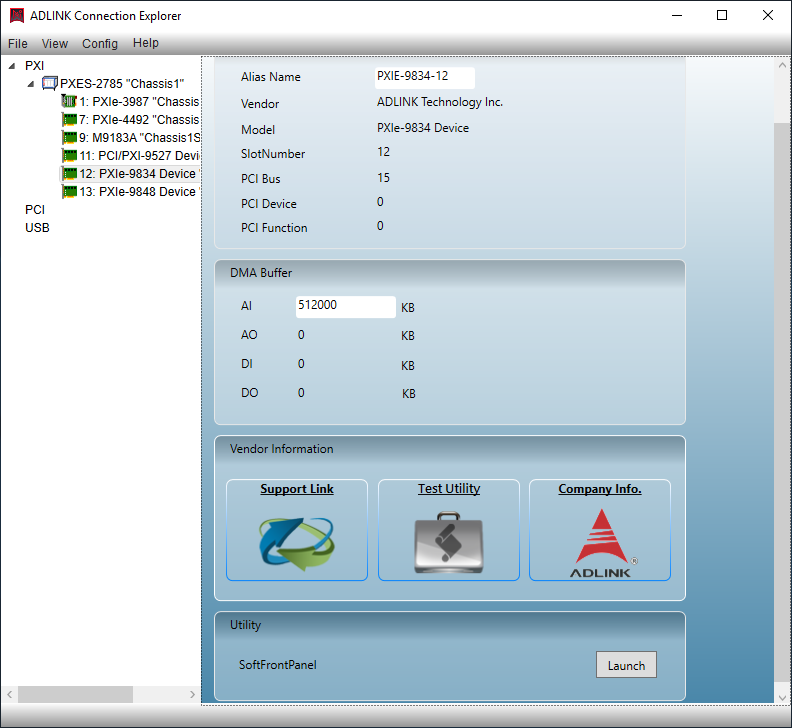
- ACE (ADLINK Configuration Environment): A dedicated driver and device management utility that simplifies installation, updates, and configuration of ADLINK hardware components.
- PXI Configuration Utility: Provides a graphical interface for configuring PXI chassis, modules, and system resources, enabling efficient setup and resource allocation.
- Resource Management Tool: Centralized management of PXI system resources, including slot assignments, trigger routing, and synchronization settings.
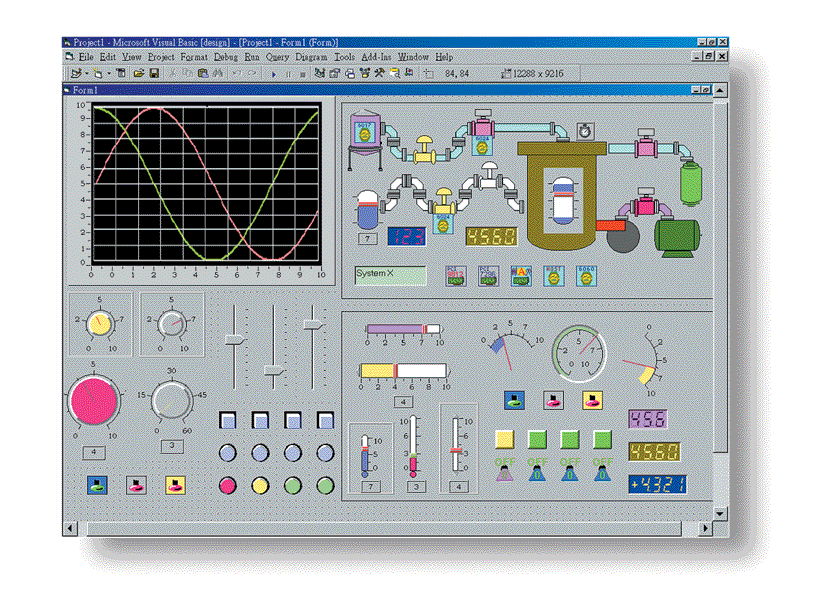
- Test and Diagnostic Utilities: Includes SFP (System Function Panel) and Chassis Watch tools for real-time monitoring, testing, and troubleshooting of PXI systems.
- Unified Interface: Offers a consistent user experience across multiple ADLINK hardware platforms, reducing setup time and minimizing configuration errors.
- Optimized for ADLINK Ecosystem: Designed specifically for ADLINK’s PXI, PXIe, and DAQ product lines, ensuring full compatibility and performance optimization.
- Scalable Architecture: Supports expansion and integration with additional ADLINK software modules and third-party applications.
- Windows OS Compatibility: Fully compatible with modern Windows environments, supporting both 32-bit and 64-bit architectures.
- Comprehensive Driver Support: Includes official ADLINK device drivers for Windows operating systems, ensuring stable and optimized communication between hardware and host systems.
- ACE (ADLINK Configuration Environment): A dedicated driver and device management utility that simplifies installation, updates, and configuration of ADLINK hardware components.
- PXI Configuration Utility: Provides a graphical interface for configuring PXI chassis, modules, and system resources, enabling efficient setup and resource allocation.
- Resource Management Tool: Centralized management of PXI system resources, including slot assignments, trigger routing, and synchronization settings.
- Test and Diagnostic Utilities: Includes SFP (System Function Panel) and Chassis Watch tools for real-time monitoring, testing, and troubleshooting of PXI systems.
- Unified Interface: Offers a consistent user experience across multiple ADLINK hardware platforms, reducing setup time and minimizing configuration errors.
- Optimized for ADLINK Ecosystem: Designed specifically for ADLINK’s PXI, PXIe, and DAQ product lines, ensuring full compatibility and performance optimization.
- Scalable Architecture: Supports expansion and integration with additional ADLINK software modules and third-party applications.
- Windows OS Compatibility: Fully compatible with modern Windows environments, supporting both 32-bit and 64-bit architectures.
1. Product Overview
Product Name: MAPS-Core
Model / Article Number: MAPS-Core
Series: MAPS Software Suite – Core Package
Manufacturer: ADLINK Technology Inc.
Product Type: Data Acquisition (DAQ) Software & Utility All-in-One Core Package
The ADLINK MAPS-Core is a comprehensive software foundation designed to support and manage ADLINK’s data acquisition (DAQ) hardware ecosystem. It serves as the central software layer that integrates device drivers, configuration utilities, and diagnostic tools into a unified environment. The MAPS-Core package provides the essential runtime and management framework for ADLINK’s measurement, automation, and PXI-based modular instrumentation systems. It is engineered to streamline device setup, configuration, and operation across a wide range of ADLINK hardware platforms, ensuring optimal performance, compatibility, and ease of use for engineers, system integrators, and test developers.
2. Key Features
- All-in-One DAQ Software Core: Combines essential utilities, drivers, and configuration tools into a single integrated package for ADLINK DAQ and PXI systems.
- Comprehensive Driver Support: Includes official ADLINK device drivers for Windows operating systems, ensuring stable and optimized communication between hardware and host systems.
- ACE (ADLINK Configuration Environment): A dedicated driver and device management utility that simplifies installation, updates, and configuration of ADLINK hardware components.
- PXI Configuration Utility: Provides a graphical interface for configuring PXI chassis, modules, and system resources, enabling efficient setup and resource allocation.
- Resource Management Tool: Centralized management of PXI system resources, including slot assignments, trigger routing, and synchronization settings.
- Test and Diagnostic Utilities: Includes SFP (System Function Panel) and Chassis Watch tools for real-time monitoring, testing, and troubleshooting of PXI systems.
- Unified Interface: Offers a consistent user experience across multiple ADLINK hardware platforms, reducing setup time and minimizing configuration errors.
- Optimized for ADLINK Ecosystem: Designed specifically for ADLINK’s PXI, PXIe, and DAQ product lines, ensuring full compatibility and performance optimization.
- Scalable Architecture: Supports expansion and integration with additional ADLINK software modules and third-party applications.
- Windows OS Compatibility: Fully compatible with modern Windows environments, supporting both 32-bit and 64-bit architectures.
3. Technical Specifications
- Software Type: Core DAQ and PXI management software package
- Supported Operating Systems: Microsoft Windows (Windows 10/11, 64-bit recommended)
- Supported Hardware: ADLINK PXI, PXIe, and DAQ product families
- Included Utilities:
- ADLINK ACE (Driver/Device Management Utility)
- PXI Configuration Utility
- Resource Management Tool for PXI
- Test Utilities: SFP (System Function Panel) and Chassis Watch
- Driver Package: Official ADLINK hardware drivers for Windows
- Installation Package Format: Executable installer (.exe) or compressed archive (.zip)
- System Requirements:
- CPU: Intel Core i3 or higher
- Memory: Minimum 4 GB RAM (8 GB recommended)
- Storage: 500 MB free disk space
- Display: 1024×768 resolution or higher
- Language Support: English (default), with potential localization support depending on version
- Licensing: Included with ADLINK hardware or available as a downloadable software package from ADLINK’s official website
4. Functionality
The MAPS-Core package functions as the foundational software layer for ADLINK’s measurement and automation systems. It provides the essential tools required to install, configure, and manage ADLINK DAQ and PXI hardware.
- Driver Management: Through the ACE utility, users can install, update, and manage device drivers for ADLINK hardware. ACE automatically detects connected devices, verifies driver versions, and ensures compatibility with the host system.
- PXI Configuration: The PXI Configuration Utility allows users to view and configure PXI chassis and modules. It provides a graphical representation of the PXI system, enabling intuitive slot assignment, trigger routing, and synchronization setup.
- Resource Management: The Resource Management Tool centralizes control of PXI system resources, ensuring efficient allocation and preventing conflicts between modules.
- Testing and Diagnostics: The SFP and Chassis Watch utilities provide real-time system monitoring, allowing users to test module functionality, monitor chassis health, and diagnose potential issues.
- Integration and Compatibility: MAPS-Core integrates seamlessly with ADLINK’s measurement and automation software ecosystem, including higher-level application frameworks and third-party test environments such as LabVIEW, MATLAB, and Visual Studio.
Use Cases and Applications:
- Laboratory and industrial data acquisition systems
- Automated test equipment (ATE) setups
- PXI-based modular instrumentation systems
- Measurement and control applications in R&D and production environments
- System integration and hardware validation for ADLINK PXI and DAQ modules
5. Components & Accessories
Included Components:
- MAPS-Core software package (installer)
- ADLINK ACE utility
- PXI Configuration Utility
- Resource Management Tool
- SFP (System Function Panel)
- Chassis Watch diagnostic tool
- ADLINK hardware drivers for Windows
Optional Add-ons and Extensions:
- Additional MAPS software modules (e.g., MAPS-Lab, MAPS-Test, MAPS-DAQ)
- Third-party software integration plug-ins
- Firmware update packages for ADLINK hardware
- Extended driver libraries for specific PXI or DAQ modules
Connectors and Interfaces (Software Level):
- PXI backplane communication interface
- Windows driver interface (WDM/WinUSB)
- API support for integration with ADLINK SDKs and development environments
6. Installation & Setup
System Requirements:
- Windows 10/11 (64-bit)
- Administrator privileges for installation
- Internet connection for driver updates (optional)
Installation Steps:
1. Download the MAPS-Core installer from ADLINK’s official support portal.
2. Run the installer and follow the on-screen instructions.
3. Install the ACE utility and required drivers for connected ADLINK hardware.
4. Launch the PXI Configuration Utility to detect and configure PXI chassis and modules.
5. Use the Resource Management Tool to assign system resources and verify configuration.
6. Run SFP or Chassis Watch to perform initial system diagnostics.
Mounting and Configuration:
- No physical mounting required; software installation only.
- PXI chassis and modules must be properly installed and powered before configuration.
- Configuration files can be saved and exported for system replication or backup.
Post-Installation Configuration:
- Verify driver installation via ACE.
- Update firmware if prompted.
- Configure PXI system topology and synchronization settings.
- Test system functionality using SFP or Chassis Watch utilities.
7. Performance & Capabilities
Performance Highlights:
- Optimized driver communication for low-latency data acquisition.
- Efficient resource allocation for multi-module PXI systems.
- Real-time monitoring and diagnostic feedback through SFP and Chassis Watch.
- Scalable performance across single- and multi-chassis PXI configurations.
Capacity and Scalability:
- Supports multiple PXI chassis and modules simultaneously.
- Compatible with a wide range of ADLINK DAQ and PXI hardware families.
- Designed for both small-scale laboratory setups and large-scale automated test systems.
Efficiency and Reliability:
- Streamlined driver management reduces setup time and minimizes configuration errors.
- Centralized resource management ensures stable system operation.
- Diagnostic utilities enhance system uptime and simplify maintenance.
Limitations:
- Designed exclusively for ADLINK hardware; not compatible with third-party PXI systems.
- Windows-only support (no native Linux or macOS versions).
- Requires periodic updates to maintain compatibility with new hardware releases.
8. Standards & Compliance
Certifications and Compliance:
- Compliant with PXI and PXIe industry standards (PXI Systems Alliance specifications).
- Follows Microsoft Windows driver development standards (WHQL-compliant drivers).
- Adheres to ADLINK’s internal quality and reliability standards for software products.
- Supports standard communication protocols for PXI backplane and trigger routing.
Industry Standards Supported:
- PXI 1.0 / PXIe 1.0 specifications
- Windows Driver Model (WDM)
- VISA (Virtual Instrument Software Architecture) compatibility through ADLINK SDKs
- IVI (Interchangeable Virtual Instruments) driver framework support (depending on module)
Regulatory Compliance:
- Software conforms to international software distribution and licensing regulations.
- Digital signatures and secure installation packages ensure authenticity and integrity.
9. Additional Information
Warranty and Licensing:
- Software license included with ADLINK hardware purchase or available as a free download for registered users.
- Warranty coverage aligns with ADLINK’s standard software support policy.
- Updates and patches provided through ADLINK’s online support portal.
Technical Support:
- Comprehensive online documentation and user manuals.
- Access to ADLINK’s technical support team via email, phone, or support ticket system.
- Knowledge base and FAQ resources available on ADLINK’s website.
Maintenance and Updates:
- Regular driver and utility updates to support new hardware releases.
- Firmware update integration through ACE utility.
- Backward compatibility maintained for legacy ADLINK PXI and DAQ modules.
- Recommended periodic system checks using SFP and Chassis Watch tools.
Version Control and Distribution:
- Distributed as a unified installer package.
- Version numbers correspond to ADLINK’s software release cycle.
- Change logs and release notes accompany each update.
Documentation and Resources:
- User manuals for ACE, PXI Configuration Utility, and Resource Management Tool.
- Application notes and integration guides for system developers.
- Example configurations and test scenarios for common PXI setups.
Summary
The ADLINK MAPS-Core package is the essential software backbone for ADLINK’s data acquisition and PXI-based instrumentation systems. By integrating driver management, configuration utilities, and diagnostic tools into a single cohesive platform, MAPS-Core simplifies system setup, enhances reliability, and ensures optimal performance across ADLINK’s hardware ecosystem. It is purpose-built for engineers and system integrators who require a stable, scalable, and fully supported software environment for measurement, automation, and test applications.
With its combination of ACE driver management, PXI configuration, resource control, and diagnostic utilities, MAPS-Core provides a unified, efficient, and professional-grade solution for managing complex DAQ and PXI systems in both laboratory and industrial environments.
Product Name: MAPS-Core
Model / Article Number: MAPS-Core
Series: MAPS Software Suite – Core Package
Manufacturer: ADLINK Technology Inc.
Product Type: Data Acquisition (DAQ) Software & Utility All-in-One Core Package
The ADLINK MAPS-Core is a comprehensive software foundation designed to support and manage ADLINK’s data acquisition (DAQ) hardware ecosystem. It serves as the central software layer that integrates device drivers, configuration utilities, and diagnostic tools into a unified environment. The MAPS-Core package provides the essential runtime and management framework for ADLINK’s measurement, automation, and PXI-based modular instrumentation systems. It is engineered to streamline device setup, configuration, and operation across a wide range of ADLINK hardware platforms, ensuring optimal performance, compatibility, and ease of use for engineers, system integrators, and test developers.
2. Key Features
- All-in-One DAQ Software Core: Combines essential utilities, drivers, and configuration tools into a single integrated package for ADLINK DAQ and PXI systems.
- Comprehensive Driver Support: Includes official ADLINK device drivers for Windows operating systems, ensuring stable and optimized communication between hardware and host systems.
- ACE (ADLINK Configuration Environment): A dedicated driver and device management utility that simplifies installation, updates, and configuration of ADLINK hardware components.
- PXI Configuration Utility: Provides a graphical interface for configuring PXI chassis, modules, and system resources, enabling efficient setup and resource allocation.
- Resource Management Tool: Centralized management of PXI system resources, including slot assignments, trigger routing, and synchronization settings.
- Test and Diagnostic Utilities: Includes SFP (System Function Panel) and Chassis Watch tools for real-time monitoring, testing, and troubleshooting of PXI systems.
- Unified Interface: Offers a consistent user experience across multiple ADLINK hardware platforms, reducing setup time and minimizing configuration errors.
- Optimized for ADLINK Ecosystem: Designed specifically for ADLINK’s PXI, PXIe, and DAQ product lines, ensuring full compatibility and performance optimization.
- Scalable Architecture: Supports expansion and integration with additional ADLINK software modules and third-party applications.
- Windows OS Compatibility: Fully compatible with modern Windows environments, supporting both 32-bit and 64-bit architectures.
3. Technical Specifications
- Software Type: Core DAQ and PXI management software package
- Supported Operating Systems: Microsoft Windows (Windows 10/11, 64-bit recommended)
- Supported Hardware: ADLINK PXI, PXIe, and DAQ product families
- Included Utilities:
- ADLINK ACE (Driver/Device Management Utility)
- PXI Configuration Utility
- Resource Management Tool for PXI
- Test Utilities: SFP (System Function Panel) and Chassis Watch
- Driver Package: Official ADLINK hardware drivers for Windows
- Installation Package Format: Executable installer (.exe) or compressed archive (.zip)
- System Requirements:
- CPU: Intel Core i3 or higher
- Memory: Minimum 4 GB RAM (8 GB recommended)
- Storage: 500 MB free disk space
- Display: 1024×768 resolution or higher
- Language Support: English (default), with potential localization support depending on version
- Licensing: Included with ADLINK hardware or available as a downloadable software package from ADLINK’s official website
4. Functionality
The MAPS-Core package functions as the foundational software layer for ADLINK’s measurement and automation systems. It provides the essential tools required to install, configure, and manage ADLINK DAQ and PXI hardware.
- Driver Management: Through the ACE utility, users can install, update, and manage device drivers for ADLINK hardware. ACE automatically detects connected devices, verifies driver versions, and ensures compatibility with the host system.
- PXI Configuration: The PXI Configuration Utility allows users to view and configure PXI chassis and modules. It provides a graphical representation of the PXI system, enabling intuitive slot assignment, trigger routing, and synchronization setup.
- Resource Management: The Resource Management Tool centralizes control of PXI system resources, ensuring efficient allocation and preventing conflicts between modules.
- Testing and Diagnostics: The SFP and Chassis Watch utilities provide real-time system monitoring, allowing users to test module functionality, monitor chassis health, and diagnose potential issues.
- Integration and Compatibility: MAPS-Core integrates seamlessly with ADLINK’s measurement and automation software ecosystem, including higher-level application frameworks and third-party test environments such as LabVIEW, MATLAB, and Visual Studio.
Use Cases and Applications:
- Laboratory and industrial data acquisition systems
- Automated test equipment (ATE) setups
- PXI-based modular instrumentation systems
- Measurement and control applications in R&D and production environments
- System integration and hardware validation for ADLINK PXI and DAQ modules
5. Components & Accessories
Included Components:
- MAPS-Core software package (installer)
- ADLINK ACE utility
- PXI Configuration Utility
- Resource Management Tool
- SFP (System Function Panel)
- Chassis Watch diagnostic tool
- ADLINK hardware drivers for Windows
Optional Add-ons and Extensions:
- Additional MAPS software modules (e.g., MAPS-Lab, MAPS-Test, MAPS-DAQ)
- Third-party software integration plug-ins
- Firmware update packages for ADLINK hardware
- Extended driver libraries for specific PXI or DAQ modules
Connectors and Interfaces (Software Level):
- PXI backplane communication interface
- Windows driver interface (WDM/WinUSB)
- API support for integration with ADLINK SDKs and development environments
6. Installation & Setup
System Requirements:
- Windows 10/11 (64-bit)
- Administrator privileges for installation
- Internet connection for driver updates (optional)
Installation Steps:
1. Download the MAPS-Core installer from ADLINK’s official support portal.
2. Run the installer and follow the on-screen instructions.
3. Install the ACE utility and required drivers for connected ADLINK hardware.
4. Launch the PXI Configuration Utility to detect and configure PXI chassis and modules.
5. Use the Resource Management Tool to assign system resources and verify configuration.
6. Run SFP or Chassis Watch to perform initial system diagnostics.
Mounting and Configuration:
- No physical mounting required; software installation only.
- PXI chassis and modules must be properly installed and powered before configuration.
- Configuration files can be saved and exported for system replication or backup.
Post-Installation Configuration:
- Verify driver installation via ACE.
- Update firmware if prompted.
- Configure PXI system topology and synchronization settings.
- Test system functionality using SFP or Chassis Watch utilities.
7. Performance & Capabilities
Performance Highlights:
- Optimized driver communication for low-latency data acquisition.
- Efficient resource allocation for multi-module PXI systems.
- Real-time monitoring and diagnostic feedback through SFP and Chassis Watch.
- Scalable performance across single- and multi-chassis PXI configurations.
Capacity and Scalability:
- Supports multiple PXI chassis and modules simultaneously.
- Compatible with a wide range of ADLINK DAQ and PXI hardware families.
- Designed for both small-scale laboratory setups and large-scale automated test systems.
Efficiency and Reliability:
- Streamlined driver management reduces setup time and minimizes configuration errors.
- Centralized resource management ensures stable system operation.
- Diagnostic utilities enhance system uptime and simplify maintenance.
Limitations:
- Designed exclusively for ADLINK hardware; not compatible with third-party PXI systems.
- Windows-only support (no native Linux or macOS versions).
- Requires periodic updates to maintain compatibility with new hardware releases.
8. Standards & Compliance
Certifications and Compliance:
- Compliant with PXI and PXIe industry standards (PXI Systems Alliance specifications).
- Follows Microsoft Windows driver development standards (WHQL-compliant drivers).
- Adheres to ADLINK’s internal quality and reliability standards for software products.
- Supports standard communication protocols for PXI backplane and trigger routing.
Industry Standards Supported:
- PXI 1.0 / PXIe 1.0 specifications
- Windows Driver Model (WDM)
- VISA (Virtual Instrument Software Architecture) compatibility through ADLINK SDKs
- IVI (Interchangeable Virtual Instruments) driver framework support (depending on module)
Regulatory Compliance:
- Software conforms to international software distribution and licensing regulations.
- Digital signatures and secure installation packages ensure authenticity and integrity.
9. Additional Information
Warranty and Licensing:
- Software license included with ADLINK hardware purchase or available as a free download for registered users.
- Warranty coverage aligns with ADLINK’s standard software support policy.
- Updates and patches provided through ADLINK’s online support portal.
Technical Support:
- Comprehensive online documentation and user manuals.
- Access to ADLINK’s technical support team via email, phone, or support ticket system.
- Knowledge base and FAQ resources available on ADLINK’s website.
Maintenance and Updates:
- Regular driver and utility updates to support new hardware releases.
- Firmware update integration through ACE utility.
- Backward compatibility maintained for legacy ADLINK PXI and DAQ modules.
- Recommended periodic system checks using SFP and Chassis Watch tools.
Version Control and Distribution:
- Distributed as a unified installer package.
- Version numbers correspond to ADLINK’s software release cycle.
- Change logs and release notes accompany each update.
Documentation and Resources:
- User manuals for ACE, PXI Configuration Utility, and Resource Management Tool.
- Application notes and integration guides for system developers.
- Example configurations and test scenarios for common PXI setups.
Summary
The ADLINK MAPS-Core package is the essential software backbone for ADLINK’s data acquisition and PXI-based instrumentation systems. By integrating driver management, configuration utilities, and diagnostic tools into a single cohesive platform, MAPS-Core simplifies system setup, enhances reliability, and ensures optimal performance across ADLINK’s hardware ecosystem. It is purpose-built for engineers and system integrators who require a stable, scalable, and fully supported software environment for measurement, automation, and test applications.
With its combination of ACE driver management, PXI configuration, resource control, and diagnostic utilities, MAPS-Core provides a unified, efficient, and professional-grade solution for managing complex DAQ and PXI systems in both laboratory and industrial environments.
Keine Manuals/Kataloge verfügbar.
Kein Zubehör vorhanden.