LOOKING FOR THE RIGHT
INDUSTRIAL SOLUTION?
Discover embedded, communication and automation solutions tailored to your application.
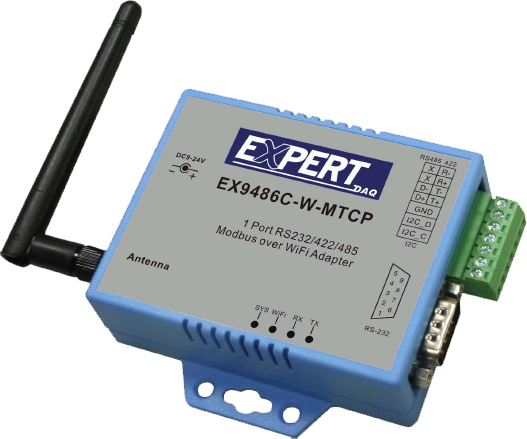
EX9486C-W-MQTT
MIPS 580Mhz 128M RAM 32M ROM;(Modbus TCP to Modbus RTU/ASCII) Socket Connection*8; Wi-Fi/Ethernet to RS-232/RS422/485 *2(AutoDetect) (Plastic); Subscribe & Publishe
235,00 EUR
including VAT 279.65 EUR
- Protocol Conversion:
Converts Modbus RTU/ASCII to Modbus TCP and vice versa, supporting both master and slave roles on each side.
- Dual Network Interfaces:
Equipped with both Ethernet (RJ-45) and Wi-Fi (802.11b/g/n) interfaces for flexible network integration.
- Multi-Protocol Support:
Supports Modbus RTU/ASCII Slave to Modbus TCP Master and Modbus TCP Slave to Modbus RTU/ASCII Master modes.
- Concurrent Connections:
Handles up to 8 simultaneous TCP master connections and allows a serial master to access up to 8 TCP slaves.
- Web-Based Configuration:
Configuration via standard web browsers (HTTP/HTTPS) without special software. Supports Internet Explorer, Chrome, and Firefox.
- Security Features:
Includes setup and access passwords, WPA/WPA2, WEP, AES encryption, and 802.1x authentication for Wi-Fi security.
- Dynamic IP Management:
Supports DHCP client mode for automatic IP assignment and management.
- Firmware Upgradeable:
Remote firmware updates via Ethernet to ensure compatibility with evolving network standards.
- Industrial Design:
Compact, durable PVC housing suitable for harsh industrial environments. Optional DIN rail mounting kit available.
- Flexible Operation Modes:
Operates as TCP Server, TCP Client, or UDP node. Supports both Infrastructure and Access Point (AP) Wi-Fi modes.
- High Reliability:
Built-in 1.5 kV magnetic isolation on Ethernet port and 15 kV ESD protection on serial lines.
Converts Modbus RTU/ASCII to Modbus TCP and vice versa, supporting both master and slave roles on each side.
- Dual Network Interfaces:
Equipped with both Ethernet (RJ-45) and Wi-Fi (802.11b/g/n) interfaces for flexible network integration.
- Multi-Protocol Support:
Supports Modbus RTU/ASCII Slave to Modbus TCP Master and Modbus TCP Slave to Modbus RTU/ASCII Master modes.
- Concurrent Connections:
Handles up to 8 simultaneous TCP master connections and allows a serial master to access up to 8 TCP slaves.
- Web-Based Configuration:
Configuration via standard web browsers (HTTP/HTTPS) without special software. Supports Internet Explorer, Chrome, and Firefox.
- Security Features:
Includes setup and access passwords, WPA/WPA2, WEP, AES encryption, and 802.1x authentication for Wi-Fi security.
- Dynamic IP Management:
Supports DHCP client mode for automatic IP assignment and management.
- Firmware Upgradeable:
Remote firmware updates via Ethernet to ensure compatibility with evolving network standards.
- Industrial Design:
Compact, durable PVC housing suitable for harsh industrial environments. Optional DIN rail mounting kit available.
- Flexible Operation Modes:
Operates as TCP Server, TCP Client, or UDP node. Supports both Infrastructure and Access Point (AP) Wi-Fi modes.
- High Reliability:
Built-in 1.5 kV magnetic isolation on Ethernet port and 15 kV ESD protection on serial lines.
Comprehensive Product Summary: EX9486C-W-MQTT / EX9486C-W-MTCP Wi-Fi to Modbus Gateway
### 1. Product Overview
Product Name: EX9486C-W-MQTT (also referenced as EX9486C-W-MTCP)
Article Number: EX9486C-W-MQTT
Series: EX94xxC Industrial Communication Gateway Series
Manufacturer: TOPSCCC (Taiwan)
Product Type: Wi-Fi to Modbus Gateway (Modbus RTU/ASCII ↔ Modbus TCP Converter)
Version: 2.0 (Manual dated April 24, 2018)
The EX9486C-W-MQTT is an industrial-grade Modbus communication gateway designed to bridge serial-based Modbus RTU/ASCII devices with Ethernet or Wi-Fi-based Modbus TCP/IP networks. It enables seamless integration of legacy serial equipment—such as PLCs, meters, and sensors—into modern IP-based control systems. The device supports both wired (Ethernet 10/100 Mbps) and wireless (Wi-Fi 802.11b/g/n) connectivity, offering flexible deployment in industrial automation, building management, and remote monitoring applications.
### 2. Key Features
- Protocol Conversion:
Converts Modbus RTU/ASCII to Modbus TCP and vice versa, supporting both master and slave roles on each side.
- Dual Network Interfaces:
Equipped with both Ethernet (RJ-45) and Wi-Fi (802.11b/g/n) interfaces for flexible network integration.
- Multi-Protocol Support:
Supports Modbus RTU/ASCII Slave to Modbus TCP Master and Modbus TCP Slave to Modbus RTU/ASCII Master modes.
- Concurrent Connections:
Handles up to 8 simultaneous TCP master connections and allows a serial master to access up to 8 TCP slaves.
- Web-Based Configuration:
Configuration via standard web browsers (HTTP/HTTPS) without special software. Supports Internet Explorer, Chrome, and Firefox.
- Security Features:
Includes setup and access passwords, WPA/WPA2, WEP, AES encryption, and 802.1x authentication for Wi-Fi security.
- Dynamic IP Management:
Supports DHCP client mode for automatic IP assignment and management.
- Firmware Upgradeable:
Remote firmware updates via Ethernet to ensure compatibility with evolving network standards.
- Industrial Design:
Compact, durable PVC housing suitable for harsh industrial environments. Optional DIN rail mounting kit available.
- Flexible Operation Modes:
Operates as TCP Server, TCP Client, or UDP node. Supports both Infrastructure and Access Point (AP) Wi-Fi modes.
- High Reliability:
Built-in 1.5 kV magnetic isolation on Ethernet port and 15 kV ESD protection on serial lines.
### 3. Technical Specifications
Processor & Memory:
- CPU: MIPS 580 MHz
- RAM: 128 MB
- ROM: 32 MB
Wireless LAN (Wi-Fi):
- Standard: IEEE 802.11b/g/n
- Frequency Band: 2.4 GHz (2.3–2.5 GHz)
- Data Rate: 11/54/72.2 Mbps @ 20 MHz bandwidth
- Modulation: DSSS, OFDM
- Transmission Power:
- 11b: Max. 22 dBm
- 11g/n: Max. 19 dBm
- Receiver Sensitivity:
- -76 dBm @ 54 Mbps
- -89.5 dBm @ 11 Mbps
- Transmission Range: Up to 100 meters (line-of-sight)
- Security: WEP 64/128-bit, AES, WPA/WPA2 Personal, WPS 2.0, WAPI
- Antenna: 2 dBi dipole antenna, RP-SMA connector
- Network Modes: Infrastructure / Access Point (for setup)
- Configuration: HTTP browser setup
- Authentication: Login password protection
Ethernet Interface:
- Connector: RJ-45
- Speed: 10/100 Mbps (auto-detect)
- Protocols Supported: ARP, IP, ICMP, UDP, TCP, HTTP, DHCP, PPPoE, DDNS, NTP, FTP, Telnet
- Modes: TCP Server / TCP Client / UDP
- Protection: 1.5 kV magnetic isolation
- Configuration: Web browser or console
Serial Communication:
- Ports:
- 1 × RS-232 (DB9 male)
- 1 × RS-422/485 (4-pin terminal block, auto-detect)
- RS-232 Signals: TxD, RxD, GND
- RS-422 Signals: Tx+, Tx−, Rx+, Rx−
- RS-485 Signals: Data+, Data−
- Baud Rate: 300 bps to 230.4 kbps
- Data Bits: 5, 6, 7, 8
- Stop Bits: 1, 2
- Parity: None, Even, Odd, Space, Mark
- Line Protection: 15 kV ESD for all signals
Power Requirements:
- Input Voltage: 9–24 VDC
- Current Consumption: 200 mA @ 12 VDC
- Connector: Terminal block or DC jack
Environmental Conditions:
- Operating Temperature: −20°C to +70°C
- Storage Temperature: −25°C to +80°C
- Humidity: 10–95% RH (operating), 5–95% RH (storage)
Certifications:
- CE, FCC, RoHS compliant
### 4. Functionality
The EX9486C-W-MQTT functions as a bidirectional gateway between serial-based Modbus RTU/ASCII devices and Ethernet/Wi-Fi-based Modbus TCP networks. It encapsulates serial data into TCP/IP packets for transmission over LAN/WLAN and decapsulates incoming TCP/IP data back into serial format.
Supported Conversion Modes:
1. Modbus RTU/ASCII Slave → Modbus TCP Master
2. Modbus TCP Slave → Modbus RTU/ASCII Master
3. TCP to RTU Slave
4. TCP to ASCII Slave
5. RTU to TCP Slave
6. ASCII to TCP Slave
7. TCP Client to RTU Slave
Use Cases:
- Integrating legacy PLCs, sensors, and meters into SCADA systems.
- Remote monitoring and control of Modbus RTU devices over Wi-Fi.
- Industrial automation and process control networks.
- Building management systems (BMS) and energy monitoring.
- IoT applications requiring Modbus-over-IP communication.
Compatibility:
- Compatible with Modbus TCP/IP servers and clients.
- Works with Windows-based configuration utilities (Windows 2000/2003/Vista/7/8/10).
- Supports standard web browsers for configuration (no proprietary software required).
### 5. Components & Accessories
Package Contents:
- 1 × EX9486C-W-MQTT Wi-Fi to Modbus Gateway
- 1 × 2.0 dBi dipole antenna (RP-SMA)
- 1 × CD-ROM (Operation Manual & Utility Software)
Optional Accessories:
- DIN rail mounting kit
- Power adapter (9–24 VDC)
Connectors:
- RS-232: DB9 male
- RS-422/485: 4-pin terminal block
- Ethernet: RJ-45
- Power: DC jack or terminal block
- Antenna: RP-SMA connector
### 6. Installation & Setup
Requirements:
- PC or notebook with Ethernet or Wi-Fi adapter
- Wireless Access Point (for Infrastructure mode)
- Power supply (9–24 VDC)
Mounting Options:
- Desktop placement
- DIN rail mounting (optional kit)
Initial Configuration:
1. Power on the device; it defaults to Access Point (AP) mode.
2. The default SSID is EXiot_XX:XX:XX:XX:XX:XX (based on MAC address).
3. Connect via Wi-Fi using password 12345678.
4. Access the web interface at the default IP (e.g., 192.168.0.115).
5. Login credentials: admin / admin.
6. Configure network type (Infrastructure or AP), SSID, encryption, and IP mode (DHCP or Static).
7. Set serial parameters (baud rate, parity, data bits, stop bits).
8. Configure Modbus gateway mode and mapping.
9. Save settings and reboot the device.
Reset Procedure:
- Press and hold the reset button for over 25 seconds while powered on to restore factory defaults (AP mode).
### 7. Performance & Capabilities
- Network Throughput: Up to 54 Mbps (Wi-Fi 802.11g)
- Serial Throughput: Up to 230.4 kbps
- Concurrent Connections: 8 TCP masters or 8 TCP slaves
- Latency: Optimized for real-time Modbus communication
- Range: Up to 100 meters (Wi-Fi line-of-sight)
- Reliability: Industrial-grade ESD and isolation protection ensures stable operation in noisy environments.
- Efficiency: Low power consumption (approx. 2.4 W @ 12 VDC).
- Limitations:
- Wi-Fi and Ethernet interfaces cannot operate in the same subnet simultaneously.
- Only one serial port active at a time (RS-232 or RS-422/485).
### 8. Standards & Compliance
Networking Standards:
- IEEE 802.11b/g/n (Wi-Fi)
- IEEE 802.3 (Ethernet 10/100 Mbps)
Communication Protocols:
- Modbus RTU, Modbus ASCII, Modbus TCP/IP
- TCP, UDP, HTTP, DHCP, PPPoE, DDNS, NTP, FTP, Telnet
Security Standards:
- WPA/WPA2 Personal, WEP 64/128-bit, AES, WAPI, 802.1x authentication
Regulatory Compliance:
- CE (Conformité Européenne)
- FCC (Federal Communications Commission)
- RoHS (Restriction of Hazardous Substances)
Environmental Standards:
- Operating temperature range: −20°C to +70°C
- Humidity tolerance: up to 95% non-condensing
### 9. Additional Information
Warranty & Support:
- Standard manufacturer warranty (duration varies by region)
- Technical support available via TOPSCCC website (www.topsccc.com.tw)
- Firmware updates downloadable from manufacturer’s support portal
Maintenance:
- Periodic firmware updates recommended for security and performance improvements.
- Ensure antenna and connectors remain securely fastened.
- Avoid exposure to excessive moisture or corrosive environments.
Software Utilities:
- EXiot Setup 1.0.10: Windows-based IP search and configuration tool.
- Web Console: Browser-based configuration interface for all parameters.
Firmware Upgrade:
- Performed remotely via Ethernet interface.
- Supports HTTPS-based management for secure updates.
Documentation:
- Operation Manual (Version 2.0, April 24, 2018)
- Wiring diagrams for RS-232, RS-422, and RS-485 connections included.
### Summary
The EX9486C-W-MQTT (EX9486C-W-MTCP) is a robust, feature-rich Modbus gateway that bridges traditional serial communication with modern IP-based networks. Its dual connectivity (Ethernet and Wi-Fi), flexible configuration options, and industrial-grade reliability make it an ideal solution for integrating Modbus RTU/ASCII devices into SCADA, IoT, and automation systems. With support for multiple concurrent connections, secure wireless communication, and web-based management, it provides a cost-effective and scalable platform for industrial data acquisition and control applications.
### 1. Product Overview
Product Name: EX9486C-W-MQTT (also referenced as EX9486C-W-MTCP)
Article Number: EX9486C-W-MQTT
Series: EX94xxC Industrial Communication Gateway Series
Manufacturer: TOPSCCC (Taiwan)
Product Type: Wi-Fi to Modbus Gateway (Modbus RTU/ASCII ↔ Modbus TCP Converter)
Version: 2.0 (Manual dated April 24, 2018)
The EX9486C-W-MQTT is an industrial-grade Modbus communication gateway designed to bridge serial-based Modbus RTU/ASCII devices with Ethernet or Wi-Fi-based Modbus TCP/IP networks. It enables seamless integration of legacy serial equipment—such as PLCs, meters, and sensors—into modern IP-based control systems. The device supports both wired (Ethernet 10/100 Mbps) and wireless (Wi-Fi 802.11b/g/n) connectivity, offering flexible deployment in industrial automation, building management, and remote monitoring applications.
### 2. Key Features
- Protocol Conversion:
Converts Modbus RTU/ASCII to Modbus TCP and vice versa, supporting both master and slave roles on each side.
- Dual Network Interfaces:
Equipped with both Ethernet (RJ-45) and Wi-Fi (802.11b/g/n) interfaces for flexible network integration.
- Multi-Protocol Support:
Supports Modbus RTU/ASCII Slave to Modbus TCP Master and Modbus TCP Slave to Modbus RTU/ASCII Master modes.
- Concurrent Connections:
Handles up to 8 simultaneous TCP master connections and allows a serial master to access up to 8 TCP slaves.
- Web-Based Configuration:
Configuration via standard web browsers (HTTP/HTTPS) without special software. Supports Internet Explorer, Chrome, and Firefox.
- Security Features:
Includes setup and access passwords, WPA/WPA2, WEP, AES encryption, and 802.1x authentication for Wi-Fi security.
- Dynamic IP Management:
Supports DHCP client mode for automatic IP assignment and management.
- Firmware Upgradeable:
Remote firmware updates via Ethernet to ensure compatibility with evolving network standards.
- Industrial Design:
Compact, durable PVC housing suitable for harsh industrial environments. Optional DIN rail mounting kit available.
- Flexible Operation Modes:
Operates as TCP Server, TCP Client, or UDP node. Supports both Infrastructure and Access Point (AP) Wi-Fi modes.
- High Reliability:
Built-in 1.5 kV magnetic isolation on Ethernet port and 15 kV ESD protection on serial lines.
### 3. Technical Specifications
Processor & Memory:
- CPU: MIPS 580 MHz
- RAM: 128 MB
- ROM: 32 MB
Wireless LAN (Wi-Fi):
- Standard: IEEE 802.11b/g/n
- Frequency Band: 2.4 GHz (2.3–2.5 GHz)
- Data Rate: 11/54/72.2 Mbps @ 20 MHz bandwidth
- Modulation: DSSS, OFDM
- Transmission Power:
- 11b: Max. 22 dBm
- 11g/n: Max. 19 dBm
- Receiver Sensitivity:
- -76 dBm @ 54 Mbps
- -89.5 dBm @ 11 Mbps
- Transmission Range: Up to 100 meters (line-of-sight)
- Security: WEP 64/128-bit, AES, WPA/WPA2 Personal, WPS 2.0, WAPI
- Antenna: 2 dBi dipole antenna, RP-SMA connector
- Network Modes: Infrastructure / Access Point (for setup)
- Configuration: HTTP browser setup
- Authentication: Login password protection
Ethernet Interface:
- Connector: RJ-45
- Speed: 10/100 Mbps (auto-detect)
- Protocols Supported: ARP, IP, ICMP, UDP, TCP, HTTP, DHCP, PPPoE, DDNS, NTP, FTP, Telnet
- Modes: TCP Server / TCP Client / UDP
- Protection: 1.5 kV magnetic isolation
- Configuration: Web browser or console
Serial Communication:
- Ports:
- 1 × RS-232 (DB9 male)
- 1 × RS-422/485 (4-pin terminal block, auto-detect)
- RS-232 Signals: TxD, RxD, GND
- RS-422 Signals: Tx+, Tx−, Rx+, Rx−
- RS-485 Signals: Data+, Data−
- Baud Rate: 300 bps to 230.4 kbps
- Data Bits: 5, 6, 7, 8
- Stop Bits: 1, 2
- Parity: None, Even, Odd, Space, Mark
- Line Protection: 15 kV ESD for all signals
Power Requirements:
- Input Voltage: 9–24 VDC
- Current Consumption: 200 mA @ 12 VDC
- Connector: Terminal block or DC jack
Environmental Conditions:
- Operating Temperature: −20°C to +70°C
- Storage Temperature: −25°C to +80°C
- Humidity: 10–95% RH (operating), 5–95% RH (storage)
Certifications:
- CE, FCC, RoHS compliant
### 4. Functionality
The EX9486C-W-MQTT functions as a bidirectional gateway between serial-based Modbus RTU/ASCII devices and Ethernet/Wi-Fi-based Modbus TCP networks. It encapsulates serial data into TCP/IP packets for transmission over LAN/WLAN and decapsulates incoming TCP/IP data back into serial format.
Supported Conversion Modes:
1. Modbus RTU/ASCII Slave → Modbus TCP Master
2. Modbus TCP Slave → Modbus RTU/ASCII Master
3. TCP to RTU Slave
4. TCP to ASCII Slave
5. RTU to TCP Slave
6. ASCII to TCP Slave
7. TCP Client to RTU Slave
Use Cases:
- Integrating legacy PLCs, sensors, and meters into SCADA systems.
- Remote monitoring and control of Modbus RTU devices over Wi-Fi.
- Industrial automation and process control networks.
- Building management systems (BMS) and energy monitoring.
- IoT applications requiring Modbus-over-IP communication.
Compatibility:
- Compatible with Modbus TCP/IP servers and clients.
- Works with Windows-based configuration utilities (Windows 2000/2003/Vista/7/8/10).
- Supports standard web browsers for configuration (no proprietary software required).
### 5. Components & Accessories
Package Contents:
- 1 × EX9486C-W-MQTT Wi-Fi to Modbus Gateway
- 1 × 2.0 dBi dipole antenna (RP-SMA)
- 1 × CD-ROM (Operation Manual & Utility Software)
Optional Accessories:
- DIN rail mounting kit
- Power adapter (9–24 VDC)
Connectors:
- RS-232: DB9 male
- RS-422/485: 4-pin terminal block
- Ethernet: RJ-45
- Power: DC jack or terminal block
- Antenna: RP-SMA connector
### 6. Installation & Setup
Requirements:
- PC or notebook with Ethernet or Wi-Fi adapter
- Wireless Access Point (for Infrastructure mode)
- Power supply (9–24 VDC)
Mounting Options:
- Desktop placement
- DIN rail mounting (optional kit)
Initial Configuration:
1. Power on the device; it defaults to Access Point (AP) mode.
2. The default SSID is EXiot_XX:XX:XX:XX:XX:XX (based on MAC address).
3. Connect via Wi-Fi using password 12345678.
4. Access the web interface at the default IP (e.g., 192.168.0.115).
5. Login credentials: admin / admin.
6. Configure network type (Infrastructure or AP), SSID, encryption, and IP mode (DHCP or Static).
7. Set serial parameters (baud rate, parity, data bits, stop bits).
8. Configure Modbus gateway mode and mapping.
9. Save settings and reboot the device.
Reset Procedure:
- Press and hold the reset button for over 25 seconds while powered on to restore factory defaults (AP mode).
### 7. Performance & Capabilities
- Network Throughput: Up to 54 Mbps (Wi-Fi 802.11g)
- Serial Throughput: Up to 230.4 kbps
- Concurrent Connections: 8 TCP masters or 8 TCP slaves
- Latency: Optimized for real-time Modbus communication
- Range: Up to 100 meters (Wi-Fi line-of-sight)
- Reliability: Industrial-grade ESD and isolation protection ensures stable operation in noisy environments.
- Efficiency: Low power consumption (approx. 2.4 W @ 12 VDC).
- Limitations:
- Wi-Fi and Ethernet interfaces cannot operate in the same subnet simultaneously.
- Only one serial port active at a time (RS-232 or RS-422/485).
### 8. Standards & Compliance
Networking Standards:
- IEEE 802.11b/g/n (Wi-Fi)
- IEEE 802.3 (Ethernet 10/100 Mbps)
Communication Protocols:
- Modbus RTU, Modbus ASCII, Modbus TCP/IP
- TCP, UDP, HTTP, DHCP, PPPoE, DDNS, NTP, FTP, Telnet
Security Standards:
- WPA/WPA2 Personal, WEP 64/128-bit, AES, WAPI, 802.1x authentication
Regulatory Compliance:
- CE (Conformité Européenne)
- FCC (Federal Communications Commission)
- RoHS (Restriction of Hazardous Substances)
Environmental Standards:
- Operating temperature range: −20°C to +70°C
- Humidity tolerance: up to 95% non-condensing
### 9. Additional Information
Warranty & Support:
- Standard manufacturer warranty (duration varies by region)
- Technical support available via TOPSCCC website (www.topsccc.com.tw)
- Firmware updates downloadable from manufacturer’s support portal
Maintenance:
- Periodic firmware updates recommended for security and performance improvements.
- Ensure antenna and connectors remain securely fastened.
- Avoid exposure to excessive moisture or corrosive environments.
Software Utilities:
- EXiot Setup 1.0.10: Windows-based IP search and configuration tool.
- Web Console: Browser-based configuration interface for all parameters.
Firmware Upgrade:
- Performed remotely via Ethernet interface.
- Supports HTTPS-based management for secure updates.
Documentation:
- Operation Manual (Version 2.0, April 24, 2018)
- Wiring diagrams for RS-232, RS-422, and RS-485 connections included.
### Summary
The EX9486C-W-MQTT (EX9486C-W-MTCP) is a robust, feature-rich Modbus gateway that bridges traditional serial communication with modern IP-based networks. Its dual connectivity (Ethernet and Wi-Fi), flexible configuration options, and industrial-grade reliability make it an ideal solution for integrating Modbus RTU/ASCII devices into SCADA, IoT, and automation systems. With support for multiple concurrent connections, secure wireless communication, and web-based management, it provides a cost-effective and scalable platform for industrial data acquisition and control applications.
(20180521)Final.webp)
No accessories available.