- IP to Serial Conversion: Converts 10/100Base-T Ethernet (RJ45) to RS232 serial communication.
- Multiple Serial Interfaces: Two isolated RS232 slave ports and one local RS232 pass-through port.
- High-Performance CPU: 32-bit 100 MHz MIPS RISC processor for efficient data handling.
- Memory Architecture: 16 MB Flash ROM and 16 MB SDRAM for firmware and buffering.
- Auto-Detecting Ethernet: Automatically detects 10/100 Mbps network speed.
- Flexible Communication Modes: Supports TCP Server/Client and UDP Send/Receive modes.
- Virtual COM Port Support: Compatible with Windows NT/2000/XP/Vista/7/8/10 via virtual COM drivers.
- Cross-Platform Drivers: Linux raw TTY and SCO UNIX real TTY drivers supported.
- Web, Telnet, and Console Configuration: Multiple setup interfaces for flexible management.
- Ground Isolation: Provides electrical isolation on RS232 ports to prevent ground loops.
- High Baud Rate: Supports serial communication speeds up to 230,400 bps.
- Compact Design: Small form factor for easy integration into industrial or embedded systems.
- Low Power Consumption: Operates at 5 VDC, 1200 mA.
- Industrial Reliability: Designed for continuous operation in industrial environments.
1. Product Overview
Product Name: APort210
Model: APort210
Series: APORT Series – IP to Serial Port Converters
Article Number: APort210
Manufacturer: Rayon Technology Co., Ltd.
Manufacturer Address: 2F, No. 177, Chung-Shan 2 Rd., Lu-Chou City, Taipei Hsien, Taiwan
Contact: Tel: +886-2-82858362 | Fax: +886-2-82857065
Email: rayon@ms1.hinet.net / info@rayontech.com.tw
Websites: [www.rayontech.com.tw](http://www.rayontech.com.tw), [www.computex.com.tw/rayon](http://www.computex.com.tw/rayon)
The APort210 is a compact, high-performance IP Device Server designed to convert Ethernet-based TCP/IP or UDP/IP communication into serial RS232 interfaces. It provides two isolated RS232 slave ports and one local RS232 pass-through port, enabling both local and remote serial device access over a 10/100 Mbps Ethernet network. The device is part of Rayon’s APORT series, which includes a range of IP-to-serial converters supporting RS232, RS422, and RS485 interfaces.
2. Key Features
- IP to Serial Conversion: Converts 10/100Base-T Ethernet (RJ45) to RS232 serial communication.
- Multiple Serial Interfaces: Two isolated RS232 slave ports and one local RS232 pass-through port.
- High-Performance CPU: 32-bit 100 MHz MIPS RISC processor for efficient data handling.
- Memory Architecture: 16 MB Flash ROM and 16 MB SDRAM for firmware and buffering.
- Auto-Detecting Ethernet: Automatically detects 10/100 Mbps network speed.
- Flexible Communication Modes: Supports TCP Server/Client and UDP Send/Receive modes.
- Virtual COM Port Support: Compatible with Windows NT/2000/XP/Vista/7/8/10 via virtual COM drivers.
- Cross-Platform Drivers: Linux raw TTY and SCO UNIX real TTY drivers supported.
- Web, Telnet, and Console Configuration: Multiple setup interfaces for flexible management.
- Ground Isolation: Provides electrical isolation on RS232 ports to prevent ground loops.
- High Baud Rate: Supports serial communication speeds up to 230,400 bps.
- Compact Design: Small form factor for easy integration into industrial or embedded systems.
- Low Power Consumption: Operates at 5 VDC, 1200 mA.
- Industrial Reliability: Designed for continuous operation in industrial environments.
3. Technical Specifications
Processor & Memory:
- CPU: 32-bit MIPS RISC, 100 MHz
- Flash ROM: 16 MB
- SDRAM: 16 MB
Network Interface:
- Ethernet: 10/100 Mbps, 100Base-T
- Connector: RJ45
- Auto-negotiation for 10/100 Mbps
Serial Interface:
- Type: RS232 (DB9 male connectors)
- Ports: 2 isolated RS232 ports + 1 local pass-through RS232 port
- Baud Rate: Up to 230,400 bps
- Isolation: Ground-isolated RS232 on port 2
- Console Port: Shared with Serial Port 1
Power Requirements:
- Input Voltage: 5 VDC
- Current Consumption: 1200 mA
- Power Adapter: UP110/UP220 (5 VDC regulated supply)
Environmental Conditions:
- Operating Temperature: 5°C to 40°C
- Storage Temperature: 0°C to 65°C
- Operating Humidity: 10–90% RH (non-condensing)
- Storage Humidity: 5–90% RH
Physical Dimensions:
- Size: 92 × 118 × 27 mm
- Material: Industrial-grade enclosure (Rayon standard)
- Weight: Approx. 0.3 kg (typical)
4. Functionality
The APort210 functions as an IP-to-Serial converter, bridging Ethernet networks with serial RS232 devices. It allows remote PCs or controllers to communicate with serial equipment as if they were directly connected via COM ports.
Operational Concept:
- Serial Port 1: Local pass-through port (shared with console).
- Serial Port 2: Master RS232 port with ground isolation.
- Virtual COM Ports: Two remote IP-accessible virtual COM ports.
Data Flow Logic:
- Data received from Serial Port 1 is transmitted to Serial Port 2 only.
- Data received from Serial Port 2 is broadcast to Serial Port 1 and both virtual COM ports.
- Data received from either virtual COM port is transmitted to Serial Port 2.
This architecture allows Serial Port 2 to act as the master communication channel, while Serial Port 1 and the virtual COM ports act as slaves. This configuration enables simultaneous access by multiple controllers or PCs to a single RS232 device.
Use Cases:
- Sharing a single RS232 device (e.g., GPS receiver, thermometer, PLC) among multiple PCs.
- Integrating legacy RS232 equipment into Ethernet-based control systems.
- Remote monitoring and control of serial devices over LAN/WAN.
- Industrial automation, SCADA, and HMI applications requiring serial-over-IP connectivity.
Compatibility:
- Windows NT/2000/XP/Vista/7/8/10 (Virtual COM driver)
- Linux (raw TTY driver)
- SCO UNIX (real TTY driver)
5. Components & Accessories
Included Items:
- APort210 main unit
- UP110/UP220 5VDC power adapter
- User manual and software CD (drivers and utilities)
Optional Accessories:
- Console cable (RS232 DB9)
- Ethernet cable (RJ45)
- Mounting brackets or DIN-rail kit (optional)
Connectors:
- Ethernet: RJ45 (10/100Base-T)
- Serial Ports: DB9 male connectors (RS232)
- Power Input: Barrel-type DC jack (5VDC)
6. Installation & Setup
Hardware Installation:
1. Connect the APort210 to a network hub or switch using a standard Ethernet cable.
2. Connect RS232 devices to the DB9 serial ports.
3. Attach the 5VDC power adapter (UP110/UP220).
4. Observe LED indicators for power and network link status.
DIP Switch Configuration:
- Bit 1: Console mode (ON) / Normal serial port (OFF)
- Bit 2: Firmware upgrade mode (ON) / Normal operation (OFF)
Software Configuration:
- Access via Web browser, Telnet, or Console terminal.
- Default IP address: 192.168.1.254
- Default password: 11111
- Configuration options include IP settings, serial parameters, and operating modes.
Operating Modes:
- TCP Server Mode: Accepts incoming TCP connections for serial data exchange.
- TCP Client Mode: Initiates connection to a remote server.
- UDP Mode: Sends/receives serial data via UDP packets.
- Real TTY Mode: For UNIX/Linux systems using fixed TTY mapping.
Driver Installation (Windows):
- Use aport_ap.exe or tport_ap.exe utilities to map virtual COM ports.
- Supports up to 64 virtual COM ports.
- Compatible with Windows Plug & Play for automatic COM port assignment.
7. Performance & Capabilities
- Data Rate: Up to 230,400 bps per serial port.
- Network Throughput: 10/100 Mbps auto-sensing.
- Latency: Dependent on network conditions; optimized for low-latency serial-over-IP communication.
- Concurrent Connections: Supports multiple virtual COM connections (two remote + one local).
- Isolation: Ground-isolated RS232 port ensures reliable communication in noisy environments.
- CPU Efficiency: 32-bit RISC architecture ensures minimal packet delay and stable throughput.
- Reliability: Continuous operation supported; watchdog and firmware recovery mechanisms available.
Limitations:
- RS232 is point-to-point; multiple device sharing is achieved through internal data routing, not direct multi-drop.
- Network latency may affect timing-sensitive applications; adjustable TCP delay parameters available.
8. Standards & Compliance
- Ethernet Standards: IEEE 802.3 10Base-T / 100Base-TX
- Serial Standards: EIA/TIA RS232
- Protocol Support: TCP/IP, UDP/IP, RFC2217 (Telnet COM Port Control)
- Driver Standards: Windows Virtual COM, Linux TTY, SCO UNIX RTTY
- Safety & EMC: Designed for industrial-grade operation (manufacturer internal compliance)
- Firmware Upgrade: TFTP-based firmware update supported via DIP switch configuration
9. Additional Information
Warranty:
- One-year limited warranty covering defects in materials and workmanship.
- Excludes damage from misuse, unauthorized servicing, or electrical faults.
Support & Maintenance:
- Technical support via email (rayon@ms1.hinet.net).
- Firmware updates available through Rayon’s website or distributor.
- RMA (Return Material Authorization) required for repairs.
Firmware Upgrade Procedure:
1. Set DIP switch bit 2 to ON (firmware upgrade mode).
2. Connect console terminal (115200 bps, 8N1).
3. Use TFTP client to upload new firmware to IP 192.168.1.254.
4. Reboot device after successful transfer.
Utilities & Tools:
- aport_ap.exe / tport_ap.exe: Configure virtual COM ports.
- aport_search.exe / tport_search.exe: Discover APORT devices on LAN.
- wftp8.exe: Windows TFTP utility for firmware updates.
Maintenance Recommendations:
- Use only the supplied 5VDC adapter.
- Avoid exposure to extreme temperatures or humidity.
- Periodically check firmware version and update if necessary.
Related Models in APORT Series:
- APORT200: Ethernet to 2 RS232 ports
- APORT020: Ethernet to 2 isolated RS232 ports
- APORT101: Ethernet to 1 RS232 + 1 isolated RS422/485 port
- APORT400: Ethernet to 4 RS232 ports
- APORT040: Ethernet to 4 isolated RS232 ports
- APORT202: Ethernet to 2 RS232 + 2 isolated RS422/485 ports
- APORT800: Ethernet to 8 RS232 ports
Summary
The Rayon APort210 is a versatile and robust IP-to-Serial device server engineered for industrial and automation environments requiring reliable serial communication over Ethernet. With its dual isolated RS232 ports, local pass-through capability, and comprehensive driver support, it enables seamless integration of legacy serial devices into modern IP networks. Its 32-bit RISC CPU, multi-platform compatibility, and flexible configuration options make it suitable for a wide range of applications—from remote monitoring and control to data acquisition and serial device sharing.
The APort210 exemplifies Rayon Technology’s commitment to providing high-performance, network-enabled serial communication solutions that bridge traditional serial systems with contemporary Ethernet infrastructures.
-
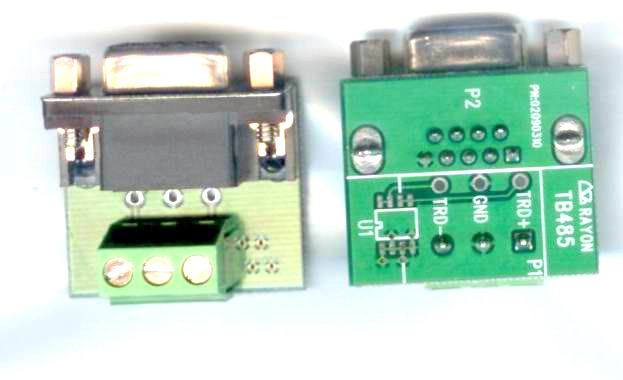
TB485
- DB9 Female to RS485 terminal screw block kit


 LOOKING FOR THE RIGHT

 APORT210_Catalog_en.pdf
PDF Catalog
APORT210_Catalog_en.pdf
PDF Catalog
 How_to_Use_APORT210_APP010.pdf
PDF Catalog
How_to_Use_APORT210_APP010.pdf
PDF Catalog
 APORT_manual.pdf
Manual
APORT_manual.pdf
Manual
 TPORT driver feature.pdf
Manual
TPORT driver feature.pdf
Manual