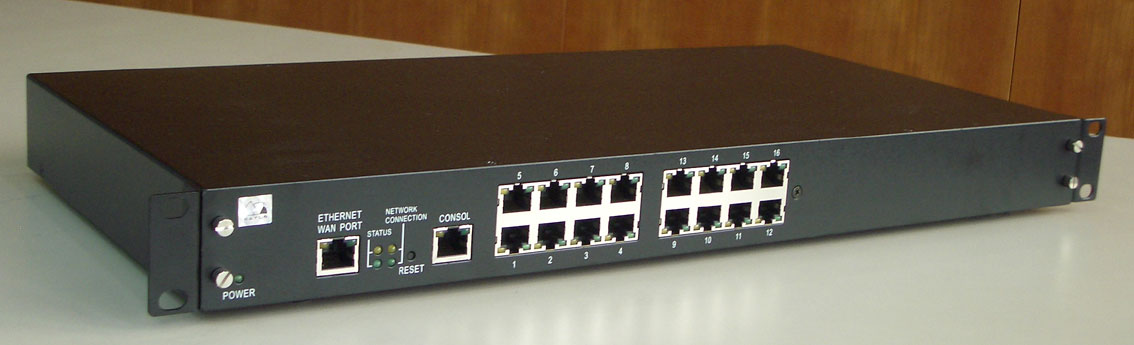
GPort108
LOOKING FOR THE RIGHT
INDUSTRIAL SOLUTION?
Discover embedded, communication and automation solutions tailored to your application.
GPort501
Console RJ45 to DB9 female connector cable
5,00 EUR
including VAT 5.95 EUR
- Interface Conversion: Converts between an RJ45 console port and a DB9 female serial connector, enabling direct communication between network devices and computers.
- Universal Compatibility: Designed to work with a wide range of networking equipment from major manufacturers (e.g., Cisco, Juniper, HP, Dell, and others) that use RJ45 console ports.
- High Signal Integrity: Ensures stable data transmission with minimal interference or signal loss, supporting standard RS-232 serial communication protocols.
- Plug-and-Play Operation: No external power or drivers required; the cable functions as a passive adapter for immediate use.
- Durable Construction: Built with high-quality materials to ensure long-term reliability, flexibility, and resistance to wear from frequent use.
- Compact and Lightweight: Easy to carry and deploy in field service kits or data center environments.
- Secure Connection: Precision-molded connectors provide a snug fit, reducing the risk of accidental disconnection during configuration or maintenance tasks.
- Color-Coded or Labeled Ends (depending on manufacturer): Simplifies identification of connector orientation and function.
- Standard Pinout Configuration: Follows industry-standard console pin assignments for compatibility with most serial communication setups.
- Universal Compatibility: Designed to work with a wide range of networking equipment from major manufacturers (e.g., Cisco, Juniper, HP, Dell, and others) that use RJ45 console ports.
- High Signal Integrity: Ensures stable data transmission with minimal interference or signal loss, supporting standard RS-232 serial communication protocols.
- Plug-and-Play Operation: No external power or drivers required; the cable functions as a passive adapter for immediate use.
- Durable Construction: Built with high-quality materials to ensure long-term reliability, flexibility, and resistance to wear from frequent use.
- Compact and Lightweight: Easy to carry and deploy in field service kits or data center environments.
- Secure Connection: Precision-molded connectors provide a snug fit, reducing the risk of accidental disconnection during configuration or maintenance tasks.
- Color-Coded or Labeled Ends (depending on manufacturer): Simplifies identification of connector orientation and function.
- Standard Pinout Configuration: Follows industry-standard console pin assignments for compatibility with most serial communication setups.
1. Product Overview
Product Name: GPort501
Model: GPort501
Series: GPort Series – Console Connectivity Solutions
Article Number: GPort501
Manufacturer: [Manufacturer name not specified; typically produced by network accessory or cabling solution providers specializing in console connectivity and serial communication interfaces.]
The GPort501 Console RJ45 to DB9 Female Connector Cable is a specialized communication interface cable designed to connect computing or networking equipment with a console port (RJ45 interface) to devices or computers equipped with a DB9 serial port. This cable serves as a critical link for configuration, diagnostics, and management of network devices such as routers, switches, firewalls, and servers. It provides a reliable, direct serial communication channel between a terminal or PC and the console interface of network hardware.
2. Key Features
- Interface Conversion: Converts between an RJ45 console port and a DB9 female serial connector, enabling direct communication between network devices and computers.
- Universal Compatibility: Designed to work with a wide range of networking equipment from major manufacturers (e.g., Cisco, Juniper, HP, Dell, and others) that use RJ45 console ports.
- High Signal Integrity: Ensures stable data transmission with minimal interference or signal loss, supporting standard RS-232 serial communication protocols.
- Plug-and-Play Operation: No external power or drivers required; the cable functions as a passive adapter for immediate use.
- Durable Construction: Built with high-quality materials to ensure long-term reliability, flexibility, and resistance to wear from frequent use.
- Compact and Lightweight: Easy to carry and deploy in field service kits or data center environments.
- Secure Connection: Precision-molded connectors provide a snug fit, reducing the risk of accidental disconnection during configuration or maintenance tasks.
- Color-Coded or Labeled Ends (depending on manufacturer): Simplifies identification of connector orientation and function.
- Standard Pinout Configuration: Follows industry-standard console pin assignments for compatibility with most serial communication setups.
3. Technical Specifications
- Cable Type: Console cable / Serial adapter cable
- Connector A: RJ45 male (8P8C modular plug)
- Connector B: DB9 female (DE-9F)
- Interface Standard: RS-232 serial communication
- Cable Length: Typically 1.8 m (6 ft) or as specified by manufacturer (length may vary depending on model variant)
- Conductor Material: High-purity copper conductors for optimal signal transmission
- Insulation Material: PVC or LSZH (Low Smoke Zero Halogen) jacket for flexibility and safety
- Shielding: Unshielded twisted pair (UTP) or foil-shielded (depending on variant) to minimize electromagnetic interference (EMI)
- Connector Material: Molded plastic housing with nickel-plated or gold-plated contacts for corrosion resistance and enhanced conductivity
- Operating Temperature Range: -10°C to +60°C (typical)
- Storage Temperature Range: -20°C to +75°C
- Weight: Approximately 50–100 g (depending on cable length and materials)
- Color: Commonly light blue or gray (standard console cable color for easy identification)
- Compliance: Meets EIA/TIA-232 and EIA/TIA-568 standards for serial and network cabling
4. Functionality
The GPort501 Console RJ45 to DB9 Female Connector Cable functions as a serial communication bridge between a computer’s serial port and a network device’s console port. It enables administrators, engineers, and technicians to perform configuration, firmware updates, diagnostics, and troubleshooting directly through a command-line interface (CLI).
How It Works:
- The RJ45 male connector plugs into the console port of a network device (e.g., router, switch, firewall).
- The DB9 female connector attaches to the serial (COM) port of a computer or terminal.
- Through RS-232 signaling, the cable transmits data bidirectionally, allowing the user to send commands and receive responses from the connected device.
- When used with a USB-to-serial adapter, it can also connect to modern laptops that lack native DB9 ports.
Use Cases and Applications:
- Network device configuration and management (Cisco, Juniper, HP, Dell, etc.)
- Server console access and BIOS-level management
- Industrial automation systems requiring serial communication
- Embedded systems debugging and firmware flashing
- Laboratory and testing environments for serial data exchange
- Field service and maintenance operations where direct console access is required
Compatibility:
- Compatible with standard RS-232 serial ports and RJ45 console interfaces.
- Works with terminal emulation software such as PuTTY, Tera Term, SecureCRT, and HyperTerminal.
- Can be used with USB-to-serial adapters for systems without native COM ports.
5. Components & Accessories
Included Items:
- 1 × GPort501 Console RJ45 to DB9 Female Connector Cable
Optional Accessories (not included):
- USB-to-Serial (DB9 male) adapter for connecting to USB-only computers
- RJ45 couplers or extension cables for extended reach
- Cable management clips or ties for organized deployment
- Protective carrying pouch for field technicians
Connectors:
- RJ45 Male: 8-pin modular plug, typically wired according to Cisco console pinout (may vary by manufacturer).
- DB9 Female: 9-pin D-sub connector with standard RS-232 pin assignments.
6. Installation & Setup
Requirements:
- Device with an RJ45 console port (e.g., router, switch, firewall, or server).
- Computer or terminal with a DB9 male serial port (or USB-to-serial adapter).
- Terminal emulation software configured for RS-232 communication parameters (commonly 9600 bps, 8 data bits, no parity, 1 stop bit, no flow control).
Mounting Options:
- The cable is designed for temporary or semi-permanent connection; no mounting hardware required.
- Compact connectors allow easy access in dense rack environments.
Configuration Steps:
1. Connect the RJ45 end to the console port of the target device.
2. Attach the DB9 female end to the computer’s serial port (or via USB-to-serial adapter).
3. Launch terminal software and configure communication settings.
4. Establish a connection to the device’s console interface.
5. Begin configuration, monitoring, or troubleshooting as needed.
Best Practices:
- Avoid excessive bending or twisting of the cable to maintain signal integrity.
- Ensure connectors are fully seated to prevent intermittent communication.
- Label cables for quick identification in multi-device environments.
7. Performance & Capabilities
- Transmission Standard: RS-232 asynchronous serial communication
- Data Rate: Supports standard baud rates up to 115.2 kbps (depending on device capability)
- Signal Integrity: Maintains stable communication over typical console cable lengths (up to 15 m for RS-232, though standard cable length is shorter for optimal performance)
- Latency: Negligible; direct wired connection ensures real-time command response
- Power Requirements: None (passive cable, powered by connected devices)
- Reliability: Designed for repeated insertion cycles; molded strain relief reduces wear on connectors
- Limitations:
- Not suitable for high-speed data transfer beyond RS-232 specifications
- Limited to point-to-point serial communication (no network switching or routing capability)
- Requires compatible pinout configuration for proper operation
8. Standards & Compliance
- Electrical Standards:
- EIA/TIA-232 (RS-232) for serial communication
- EIA/TIA-568 for RJ45 connector wiring
- Environmental Compliance:
- RoHS (Restriction of Hazardous Substances) compliant
- REACH compliant (where applicable)
- Safety and Quality:
- Manufactured under ISO 9001 quality management standards
- Tested for continuity, insulation resistance, and signal integrity
- Industry Compatibility:
- Compatible with Cisco console pinout standard (and other vendors using similar configurations)
- Meets general IT and telecommunications cabling standards
9. Additional Information
Warranty:
- Typically covered by a limited manufacturer’s warranty (1–2 years standard, depending on supplier).
- Warranty covers defects in materials and workmanship under normal use conditions.
Support:
- Technical support available through manufacturer or authorized distributor.
- Online documentation and pinout diagrams provided for reference.
- Customer service assistance for compatibility and troubleshooting inquiries.
Maintenance:
- Minimal maintenance required; periodic inspection recommended to ensure connector integrity.
- Clean connectors with dry, lint-free cloth; avoid exposure to moisture or corrosive environments.
- Store in a cool, dry place when not in use.
Updates & Replacements:
- Compatible with legacy and modern serial communication setups.
- Replacement cables available in various lengths and connector orientations.
- Future-proofed for continued use with USB-to-serial adapters and modern terminal interfaces.
Summary
The GPort501 Console RJ45 to DB9 Female Connector Cable is a robust, reliable, and essential tool for IT professionals, network administrators, and field engineers who require direct console access to networking and computing equipment. Its straightforward design, adherence to RS-232 standards, and universal compatibility make it a staple accessory in data centers, laboratories, and service environments. Engineered for durability and consistent performance, the GPort501 ensures secure, interference-free communication between devices, simplifying configuration, diagnostics, and maintenance tasks across a wide range of hardware platforms.

Product Name: GPort501
Model: GPort501
Series: GPort Series – Console Connectivity Solutions
Article Number: GPort501
Manufacturer: [Manufacturer name not specified; typically produced by network accessory or cabling solution providers specializing in console connectivity and serial communication interfaces.]
The GPort501 Console RJ45 to DB9 Female Connector Cable is a specialized communication interface cable designed to connect computing or networking equipment with a console port (RJ45 interface) to devices or computers equipped with a DB9 serial port. This cable serves as a critical link for configuration, diagnostics, and management of network devices such as routers, switches, firewalls, and servers. It provides a reliable, direct serial communication channel between a terminal or PC and the console interface of network hardware.
2. Key Features
- Interface Conversion: Converts between an RJ45 console port and a DB9 female serial connector, enabling direct communication between network devices and computers.
- Universal Compatibility: Designed to work with a wide range of networking equipment from major manufacturers (e.g., Cisco, Juniper, HP, Dell, and others) that use RJ45 console ports.
- High Signal Integrity: Ensures stable data transmission with minimal interference or signal loss, supporting standard RS-232 serial communication protocols.
- Plug-and-Play Operation: No external power or drivers required; the cable functions as a passive adapter for immediate use.
- Durable Construction: Built with high-quality materials to ensure long-term reliability, flexibility, and resistance to wear from frequent use.
- Compact and Lightweight: Easy to carry and deploy in field service kits or data center environments.
- Secure Connection: Precision-molded connectors provide a snug fit, reducing the risk of accidental disconnection during configuration or maintenance tasks.
- Color-Coded or Labeled Ends (depending on manufacturer): Simplifies identification of connector orientation and function.
- Standard Pinout Configuration: Follows industry-standard console pin assignments for compatibility with most serial communication setups.
3. Technical Specifications
- Cable Type: Console cable / Serial adapter cable
- Connector A: RJ45 male (8P8C modular plug)
- Connector B: DB9 female (DE-9F)
- Interface Standard: RS-232 serial communication
- Cable Length: Typically 1.8 m (6 ft) or as specified by manufacturer (length may vary depending on model variant)
- Conductor Material: High-purity copper conductors for optimal signal transmission
- Insulation Material: PVC or LSZH (Low Smoke Zero Halogen) jacket for flexibility and safety
- Shielding: Unshielded twisted pair (UTP) or foil-shielded (depending on variant) to minimize electromagnetic interference (EMI)
- Connector Material: Molded plastic housing with nickel-plated or gold-plated contacts for corrosion resistance and enhanced conductivity
- Operating Temperature Range: -10°C to +60°C (typical)
- Storage Temperature Range: -20°C to +75°C
- Weight: Approximately 50–100 g (depending on cable length and materials)
- Color: Commonly light blue or gray (standard console cable color for easy identification)
- Compliance: Meets EIA/TIA-232 and EIA/TIA-568 standards for serial and network cabling
4. Functionality
The GPort501 Console RJ45 to DB9 Female Connector Cable functions as a serial communication bridge between a computer’s serial port and a network device’s console port. It enables administrators, engineers, and technicians to perform configuration, firmware updates, diagnostics, and troubleshooting directly through a command-line interface (CLI).
How It Works:
- The RJ45 male connector plugs into the console port of a network device (e.g., router, switch, firewall).
- The DB9 female connector attaches to the serial (COM) port of a computer or terminal.
- Through RS-232 signaling, the cable transmits data bidirectionally, allowing the user to send commands and receive responses from the connected device.
- When used with a USB-to-serial adapter, it can also connect to modern laptops that lack native DB9 ports.
Use Cases and Applications:
- Network device configuration and management (Cisco, Juniper, HP, Dell, etc.)
- Server console access and BIOS-level management
- Industrial automation systems requiring serial communication
- Embedded systems debugging and firmware flashing
- Laboratory and testing environments for serial data exchange
- Field service and maintenance operations where direct console access is required
Compatibility:
- Compatible with standard RS-232 serial ports and RJ45 console interfaces.
- Works with terminal emulation software such as PuTTY, Tera Term, SecureCRT, and HyperTerminal.
- Can be used with USB-to-serial adapters for systems without native COM ports.
5. Components & Accessories
Included Items:
- 1 × GPort501 Console RJ45 to DB9 Female Connector Cable
Optional Accessories (not included):
- USB-to-Serial (DB9 male) adapter for connecting to USB-only computers
- RJ45 couplers or extension cables for extended reach
- Cable management clips or ties for organized deployment
- Protective carrying pouch for field technicians
Connectors:
- RJ45 Male: 8-pin modular plug, typically wired according to Cisco console pinout (may vary by manufacturer).
- DB9 Female: 9-pin D-sub connector with standard RS-232 pin assignments.
6. Installation & Setup
Requirements:
- Device with an RJ45 console port (e.g., router, switch, firewall, or server).
- Computer or terminal with a DB9 male serial port (or USB-to-serial adapter).
- Terminal emulation software configured for RS-232 communication parameters (commonly 9600 bps, 8 data bits, no parity, 1 stop bit, no flow control).
Mounting Options:
- The cable is designed for temporary or semi-permanent connection; no mounting hardware required.
- Compact connectors allow easy access in dense rack environments.
Configuration Steps:
1. Connect the RJ45 end to the console port of the target device.
2. Attach the DB9 female end to the computer’s serial port (or via USB-to-serial adapter).
3. Launch terminal software and configure communication settings.
4. Establish a connection to the device’s console interface.
5. Begin configuration, monitoring, or troubleshooting as needed.
Best Practices:
- Avoid excessive bending or twisting of the cable to maintain signal integrity.
- Ensure connectors are fully seated to prevent intermittent communication.
- Label cables for quick identification in multi-device environments.
7. Performance & Capabilities
- Transmission Standard: RS-232 asynchronous serial communication
- Data Rate: Supports standard baud rates up to 115.2 kbps (depending on device capability)
- Signal Integrity: Maintains stable communication over typical console cable lengths (up to 15 m for RS-232, though standard cable length is shorter for optimal performance)
- Latency: Negligible; direct wired connection ensures real-time command response
- Power Requirements: None (passive cable, powered by connected devices)
- Reliability: Designed for repeated insertion cycles; molded strain relief reduces wear on connectors
- Limitations:
- Not suitable for high-speed data transfer beyond RS-232 specifications
- Limited to point-to-point serial communication (no network switching or routing capability)
- Requires compatible pinout configuration for proper operation
8. Standards & Compliance
- Electrical Standards:
- EIA/TIA-232 (RS-232) for serial communication
- EIA/TIA-568 for RJ45 connector wiring
- Environmental Compliance:
- RoHS (Restriction of Hazardous Substances) compliant
- REACH compliant (where applicable)
- Safety and Quality:
- Manufactured under ISO 9001 quality management standards
- Tested for continuity, insulation resistance, and signal integrity
- Industry Compatibility:
- Compatible with Cisco console pinout standard (and other vendors using similar configurations)
- Meets general IT and telecommunications cabling standards
9. Additional Information
Warranty:
- Typically covered by a limited manufacturer’s warranty (1–2 years standard, depending on supplier).
- Warranty covers defects in materials and workmanship under normal use conditions.
Support:
- Technical support available through manufacturer or authorized distributor.
- Online documentation and pinout diagrams provided for reference.
- Customer service assistance for compatibility and troubleshooting inquiries.
Maintenance:
- Minimal maintenance required; periodic inspection recommended to ensure connector integrity.
- Clean connectors with dry, lint-free cloth; avoid exposure to moisture or corrosive environments.
- Store in a cool, dry place when not in use.
Updates & Replacements:
- Compatible with legacy and modern serial communication setups.
- Replacement cables available in various lengths and connector orientations.
- Future-proofed for continued use with USB-to-serial adapters and modern terminal interfaces.
Summary
The GPort501 Console RJ45 to DB9 Female Connector Cable is a robust, reliable, and essential tool for IT professionals, network administrators, and field engineers who require direct console access to networking and computing equipment. Its straightforward design, adherence to RS-232 standards, and universal compatibility make it a staple accessory in data centers, laboratories, and service environments. Engineered for durability and consistent performance, the GPort501 ensures secure, interference-free communication between devices, simplifying configuration, diagnostics, and maintenance tasks across a wide range of hardware platforms.
No manuals/catalogs available.