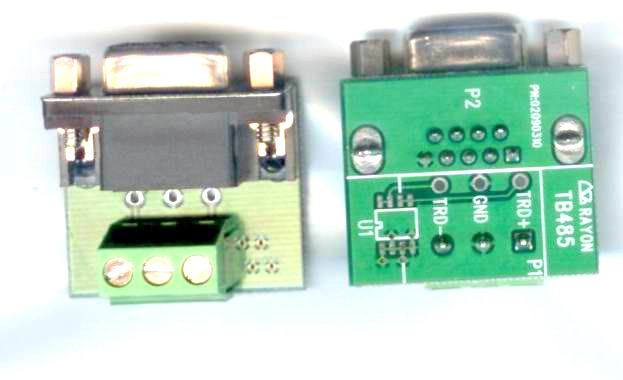
TB485
LOOKING FOR THE RIGHT
INDUSTRIAL SOLUTION?
Discover embedded, communication and automation solutions tailored to your application.
APort220
IP Device Server TX to 2*RS232 Isolated 2*RS232
216,00 EUR
including VAT 257.04 EUR
- Dual Standard and Dual Isolated RS232 Ports: Two standard RS232 and two galvanically isolated RS232 interfaces for noise immunity and protection against ground loops.
- Ethernet Connectivity: Auto-detecting 10/100 Mbps Ethernet interface (RJ45, 100Base-T) for flexible LAN integration.
- High-Performance Embedded CPU: 32-bit 100 MHz MIPS RISC processor ensures low latency and efficient serial-to-IP data handling.
- Multi-Protocol Support: Operates in TCP Server, TCP Client, UDP Send/Receive, and UDP Multi-Serial modes.
- Cross-Platform Drivers:
- Windows NT/2000/XP/Vista/7 Virtual COM driver (APORT or TPORT mode)
- Linux raw TTY (GVMODEM) driver
- SCO UNIX real TTY (RTTY) driver
- Web, Telnet, and Console Configuration: Multiple setup interfaces for flexible deployment and remote management.
- Ground Isolation: Electrical isolation on RS232 ports enhances reliability in industrial environments.
- Firmware Upgradeable: Supports TFTP-based firmware updates for long-term maintainability.
- Compact Design: Slim 205 × 135 × 29 mm enclosure suitable for panel or desktop installation.
- Low Power Consumption: Operates at 5 V DC, 1.2 A (6 W typical).
- Industrial Reliability: Designed for continuous operation in 5–40 °C and 10–90 % RH environments.
- Ethernet Connectivity: Auto-detecting 10/100 Mbps Ethernet interface (RJ45, 100Base-T) for flexible LAN integration.
- High-Performance Embedded CPU: 32-bit 100 MHz MIPS RISC processor ensures low latency and efficient serial-to-IP data handling.
- Multi-Protocol Support: Operates in TCP Server, TCP Client, UDP Send/Receive, and UDP Multi-Serial modes.
- Cross-Platform Drivers:
- Windows NT/2000/XP/Vista/7 Virtual COM driver (APORT or TPORT mode)
- Linux raw TTY (GVMODEM) driver
- SCO UNIX real TTY (RTTY) driver
- Web, Telnet, and Console Configuration: Multiple setup interfaces for flexible deployment and remote management.
- Ground Isolation: Electrical isolation on RS232 ports enhances reliability in industrial environments.
- Firmware Upgradeable: Supports TFTP-based firmware updates for long-term maintainability.
- Compact Design: Slim 205 × 135 × 29 mm enclosure suitable for panel or desktop installation.
- Low Power Consumption: Operates at 5 V DC, 1.2 A (6 W typical).
- Industrial Reliability: Designed for continuous operation in 5–40 °C and 10–90 % RH environments.
1. Product Overview
Product Name: APort220
Model: APort220
Series: APORT400 Series – IP to Serial Port Converter Family
Article Number: APort220
Manufacturer: Rayon Technology Co., Ltd.
Manufacturer Address: 2F, No. 177, Chung Shan 2 Rd., Lu Chou City, Taipei Hsien, Taiwan
Contact: Tel: +886-2-82858362 | Fax: +886-2-82857065
Email: rayon@ms1.hinet.net
Websites: [www.rayontech.com](http://www.rayontech.com), [www.computex.com.tw/rayon](http://www.computex.com.tw/rayon)
The APort220 is a compact, high-performance IP Device Server designed to convert Ethernet-based TCP/IP or UDP/IP communication into multiple serial interfaces. It provides two standard RS232 ports and two isolated RS232 ports, enabling secure and flexible serial connectivity over IP networks. As part of Rayon’s APORT400 series, it integrates a 32-bit 100 MHz MIPS RISC CPU, 16 MB Flash ROM, and 16 MB SDRAM, offering robust performance for industrial and automation applications requiring remote serial device management.
2. Key Features
- Dual Standard and Dual Isolated RS232 Ports: Two standard RS232 and two galvanically isolated RS232 interfaces for noise immunity and protection against ground loops.
- Ethernet Connectivity: Auto-detecting 10/100 Mbps Ethernet interface (RJ45, 100Base-T) for flexible LAN integration.
- High-Performance Embedded CPU: 32-bit 100 MHz MIPS RISC processor ensures low latency and efficient serial-to-IP data handling.
- Multi-Protocol Support: Operates in TCP Server, TCP Client, UDP Send/Receive, and UDP Multi-Serial modes.
- Cross-Platform Drivers:
- Windows NT/2000/XP/Vista/7 Virtual COM driver (APORT or TPORT mode)
- Linux raw TTY (GVMODEM) driver
- SCO UNIX real TTY (RTTY) driver
- Web, Telnet, and Console Configuration: Multiple setup interfaces for flexible deployment and remote management.
- Ground Isolation: Electrical isolation on RS232 ports enhances reliability in industrial environments.
- Firmware Upgradeable: Supports TFTP-based firmware updates for long-term maintainability.
- Compact Design: Slim 205 × 135 × 29 mm enclosure suitable for panel or desktop installation.
- Low Power Consumption: Operates at 5 V DC, 1.2 A (6 W typical).
- Industrial Reliability: Designed for continuous operation in 5–40 °C and 10–90 % RH environments.
3. Technical Specifications
Hardware:
- CPU: 32-bit 100 MHz MIPS RISC processor
- Memory: 16 MB Flash ROM, 16 MB SDRAM
- Operating System: Embedded Linux-based system board
Network Interface:
- Type: 10/100 Mbps Ethernet (IEEE 802.3 compliant)
- Connector: RJ45 (auto MDI/MDIX detection)
- Protocols: TCP/IP, UDP/IP, DHCP (optional), ARP, ICMP, HTTP, TELNET
Serial Interfaces:
- Ports: 4 total (2 × RS232, 2 × Isolated RS232)
- Connector Type: DB9 male
- Baud Rate: Up to 230,400 bps
- Isolation: Optical/electrical ground isolation on isolated ports
- Signal Lines (RS232): TXD, RXD, RTS, CTS, DTR, DSR, DCD, RI, GND
- Console Port: Shared with Serial Port 1 (configurable via DIP switch)
Power:
- Input Voltage: 5 V DC
- Current Consumption: 1.2 A (max)
- Power Adapter: UP110/UP220 (included)
Physical:
- Dimensions: 205 mm × 135 mm × 29 mm
- Weight: Approx. 0.6 kg (typical)
- Material: Metal enclosure (Rayon industrial-grade housing)
Environmental:
- Operating Temperature: 5 °C – 40 °C
- Storage Temperature: 0 °C – 65 °C
- Operating Humidity: 10 – 90 % RH (non-condensing)
- Storage Humidity: 5 – 90 % RH
4. Functionality
The APort220 functions as an IP-to-Serial converter, bridging Ethernet networks with legacy serial devices. It encapsulates serial data into TCP or UDP packets, enabling remote access and control of serial equipment over LAN or WAN.
Operating Modes:
1. TCP Server Mode: Listens for incoming TCP connections; ideal for remote terminal or SCADA systems.
2. TCP Client Mode: Initiates connections to a designated server for data transmission.
3. UDP Send/Receive Mode: Broadcasts or receives serial data via UDP packets to/from up to four hosts.
4. UDP Multi-Serial Mode: Allows multiple serial ports to share the same UDP port number for simultaneous data distribution.
5. Real TTY Mode (COM or GVMODEM): Provides direct serial device mapping for UNIX/Linux systems.
Configuration Interfaces:
- Web Browser: HTTP-based GUI (default IP 192.168.1.254, password 11111).
- Telnet: Command-line configuration and diagnostics.
- Console Port: Local serial setup via terminal (115200 bps, 8N1).
Compatibility:
- Windows: NT/2000/XP/Vista/7 (APORT and TPORT drivers)
- Linux/UNIX: GVMODEM and RTTY drivers for real TTY mapping
- Protocols Supported: RFC 2217 (Telnet COM port control), TCP/IP, UDP/IP
Use Cases:
- Industrial automation and SCADA systems
- Remote monitoring of PLCs, sensors, and controllers
- POS systems and serial-based data acquisition
- Legacy serial device networking and virtualization
5. Components & Accessories
Included Items:
- APort220 main unit
- UP110/UP220 5 V DC power adapter
- User manual and software CD (drivers, utilities, firmware)
Optional Accessories:
- Console cable (RS232 DB9)
- Ethernet patch cable (RJ45)
- DIN-rail or wall-mount brackets (optional)
Connectors:
- LAN: RJ45 (10/100 Mbps)
- Serial: 4 × DB9 male connectors
- Power: DC barrel jack (5 V DC input)
Pin Assignments (DB9 Male):
| Pin | RS232 Signal | Description |
|-----|---------------|-------------|
| 1 | DCD | Data Carrier Detect |
| 2 | RXD | Receive Data |
| 3 | TXD | Transmit Data |
| 4 | DTR | Data Terminal Ready |
| 5 | GND | Signal Ground |
| 6 | DSR | Data Set Ready |
| 7 | RTS | Request to Send |
| 8 | CTS | Clear to Send |
| 9 | RI | Ring Indicator |
6. Installation & Setup
Hardware Installation:
1. Connect the APort220 to a network hub or switch using a standard Ethernet cable.
2. Attach serial cables between the APort220’s DB9 ports and target serial devices.
3. Configure DIP switches:
- Bit 1: Console port enable (ON = console, OFF = normal serial).
- Bit 2: Firmware upgrade mode (ON = upgrade, OFF = normal).
4. Connect the 5 V DC power adapter (UP110/UP220).
5. Verify LED indicators for power and LAN link/activity.
Software Setup:
- Windows:
- Use *aport_ap.exe* or *tport_ap.exe* to detect and configure APORT devices.
- Install virtual COM drivers (APORT or TPORT mode).
- Map each virtual COM port to the APort220’s IP and serial port number.
- Linux/UNIX:
- Install *gvmodem* or *rtty* drivers.
- Configure `/etc/gtstcpd/gtstcpd.cf` or `nasd.rc` for IP and port mapping.
- Web/Telnet Configuration:
- Access via browser or Telnet to set IP address, subnet mask, gateway, and serial parameters.
Firmware Upgrade:
- Enter upgrade mode (DIP 2 = ON).
- Use TFTP client (e.g., *wftp8.exe*) to upload firmware to IP 192.168.1.254.
- Reboot after completion.
7. Performance & Capabilities
- Data Rate: Up to 230.4 kbps per serial port
- Throughput: Optimized for low-latency serial-to-IP conversion
- CPU Efficiency: 32-bit RISC architecture ensures stable multitasking
- Network Performance: Auto-negotiation for 10/100 Mbps Ethernet
- Latency: Dependent on network conditions; supports configurable TCP delay compensation
- Reliability: Heartbeat mechanism in TPORT driver detects disconnections within 10 s
- Multi-Host Communication: UDP mode supports up to four simultaneous destinations
- Isolation: Ground-isolated RS232 ports prevent signal interference and protect connected devices
- Limitations:
- TCP mode latency may vary with network congestion
- TPORT driver supports single Windows host per serial port; use RPORT for multi-host environments
8. Standards & Compliance
- Ethernet Standards: IEEE 802.3 10/100Base-T
- Serial Standards: EIA/TIA RS232
- Protocol Compliance: TCP/IP, UDP/IP, RFC 2217 (Telnet COM Port Control)
- Operating System Support: Windows NT/2000/XP/Vista/7, Linux, SCO UNIX
- Safety & Isolation: Ground-isolated serial interfaces for industrial-grade protection
- Firmware Upgrade Protocol: TFTP (Trivial File Transfer Protocol)
- Environmental Compliance: Designed for standard industrial temperature and humidity ranges
9. Additional Information
Warranty:
- One-year limited warranty covering defects in materials and workmanship.
- Excludes damage from misuse, unauthorized servicing, or electrical faults.
Support & Maintenance:
- Technical support via email (rayon@ms1.hinet.net).
- Firmware updates available through Rayon’s website or authorized distributors.
- RMA (Return Material Authorization) required for repairs; contact Rayon for RMA number and return instructions.
Maintenance Recommendations:
- Use only the supplied 5 V DC adapter.
- Avoid exposure to excessive heat, humidity, or vibration.
- Periodically check firmware version and update as needed.
- Use proper grounding and shielded cables in electrically noisy environments.
Software Utilities:
- aport_ap.exe / tport_ap.exe: Configure virtual COM ports and map IP addresses.
- aport_search.exe / tport_search.exe: Discover APORT devices on the network.
- wftp8.exe: Firmware upgrade utility.
- Teraterm: Recommended terminal emulator for console access.
Driver Modes Summary:
- APORT Mode: UDP-based virtual COM for Windows (low latency).
- TPORT Mode: TCP-based virtual COM for Windows (reliable connection).
- RPORT Mode: Dynamic TCP connection for multi-user environments.
- GVMODEM Mode: Fixed TTY mapping for Linux/UNIX.
- RTTY Mode: Real TTY mapping for SCO OpenServer.
Typical Applications:
- Industrial automation and process control
- Remote serial device networking
- Building management systems (BMS)
- POS and kiosk systems
- Data acquisition and telemetry
Summary
The Rayon APort220 is a versatile, industrial-grade IP-to-Serial Device Server that bridges Ethernet networks with up to four serial interfaces—two standard RS232 and two isolated RS232 ports. Powered by a 32-bit 100 MHz MIPS CPU and embedded Linux OS, it delivers reliable, high-speed serial communication over TCP/IP or UDP/IP. With comprehensive driver support for Windows, Linux, and UNIX, and flexible configuration via Web, Telnet, or console, the APort220 is ideal for integrating legacy serial devices into modern IP-based infrastructures. Its robust isolation, compact design, and firmware upgradeability make it a dependable solution for industrial automation, remote monitoring, and serial networking applications.

Product Name: APort220
Model: APort220
Series: APORT400 Series – IP to Serial Port Converter Family
Article Number: APort220
Manufacturer: Rayon Technology Co., Ltd.
Manufacturer Address: 2F, No. 177, Chung Shan 2 Rd., Lu Chou City, Taipei Hsien, Taiwan
Contact: Tel: +886-2-82858362 | Fax: +886-2-82857065
Email: rayon@ms1.hinet.net
Websites: [www.rayontech.com](http://www.rayontech.com), [www.computex.com.tw/rayon](http://www.computex.com.tw/rayon)
The APort220 is a compact, high-performance IP Device Server designed to convert Ethernet-based TCP/IP or UDP/IP communication into multiple serial interfaces. It provides two standard RS232 ports and two isolated RS232 ports, enabling secure and flexible serial connectivity over IP networks. As part of Rayon’s APORT400 series, it integrates a 32-bit 100 MHz MIPS RISC CPU, 16 MB Flash ROM, and 16 MB SDRAM, offering robust performance for industrial and automation applications requiring remote serial device management.
2. Key Features
- Dual Standard and Dual Isolated RS232 Ports: Two standard RS232 and two galvanically isolated RS232 interfaces for noise immunity and protection against ground loops.
- Ethernet Connectivity: Auto-detecting 10/100 Mbps Ethernet interface (RJ45, 100Base-T) for flexible LAN integration.
- High-Performance Embedded CPU: 32-bit 100 MHz MIPS RISC processor ensures low latency and efficient serial-to-IP data handling.
- Multi-Protocol Support: Operates in TCP Server, TCP Client, UDP Send/Receive, and UDP Multi-Serial modes.
- Cross-Platform Drivers:
- Windows NT/2000/XP/Vista/7 Virtual COM driver (APORT or TPORT mode)
- Linux raw TTY (GVMODEM) driver
- SCO UNIX real TTY (RTTY) driver
- Web, Telnet, and Console Configuration: Multiple setup interfaces for flexible deployment and remote management.
- Ground Isolation: Electrical isolation on RS232 ports enhances reliability in industrial environments.
- Firmware Upgradeable: Supports TFTP-based firmware updates for long-term maintainability.
- Compact Design: Slim 205 × 135 × 29 mm enclosure suitable for panel or desktop installation.
- Low Power Consumption: Operates at 5 V DC, 1.2 A (6 W typical).
- Industrial Reliability: Designed for continuous operation in 5–40 °C and 10–90 % RH environments.
3. Technical Specifications
Hardware:
- CPU: 32-bit 100 MHz MIPS RISC processor
- Memory: 16 MB Flash ROM, 16 MB SDRAM
- Operating System: Embedded Linux-based system board
Network Interface:
- Type: 10/100 Mbps Ethernet (IEEE 802.3 compliant)
- Connector: RJ45 (auto MDI/MDIX detection)
- Protocols: TCP/IP, UDP/IP, DHCP (optional), ARP, ICMP, HTTP, TELNET
Serial Interfaces:
- Ports: 4 total (2 × RS232, 2 × Isolated RS232)
- Connector Type: DB9 male
- Baud Rate: Up to 230,400 bps
- Isolation: Optical/electrical ground isolation on isolated ports
- Signal Lines (RS232): TXD, RXD, RTS, CTS, DTR, DSR, DCD, RI, GND
- Console Port: Shared with Serial Port 1 (configurable via DIP switch)
Power:
- Input Voltage: 5 V DC
- Current Consumption: 1.2 A (max)
- Power Adapter: UP110/UP220 (included)
Physical:
- Dimensions: 205 mm × 135 mm × 29 mm
- Weight: Approx. 0.6 kg (typical)
- Material: Metal enclosure (Rayon industrial-grade housing)
Environmental:
- Operating Temperature: 5 °C – 40 °C
- Storage Temperature: 0 °C – 65 °C
- Operating Humidity: 10 – 90 % RH (non-condensing)
- Storage Humidity: 5 – 90 % RH
4. Functionality
The APort220 functions as an IP-to-Serial converter, bridging Ethernet networks with legacy serial devices. It encapsulates serial data into TCP or UDP packets, enabling remote access and control of serial equipment over LAN or WAN.
Operating Modes:
1. TCP Server Mode: Listens for incoming TCP connections; ideal for remote terminal or SCADA systems.
2. TCP Client Mode: Initiates connections to a designated server for data transmission.
3. UDP Send/Receive Mode: Broadcasts or receives serial data via UDP packets to/from up to four hosts.
4. UDP Multi-Serial Mode: Allows multiple serial ports to share the same UDP port number for simultaneous data distribution.
5. Real TTY Mode (COM or GVMODEM): Provides direct serial device mapping for UNIX/Linux systems.
Configuration Interfaces:
- Web Browser: HTTP-based GUI (default IP 192.168.1.254, password 11111).
- Telnet: Command-line configuration and diagnostics.
- Console Port: Local serial setup via terminal (115200 bps, 8N1).
Compatibility:
- Windows: NT/2000/XP/Vista/7 (APORT and TPORT drivers)
- Linux/UNIX: GVMODEM and RTTY drivers for real TTY mapping
- Protocols Supported: RFC 2217 (Telnet COM port control), TCP/IP, UDP/IP
Use Cases:
- Industrial automation and SCADA systems
- Remote monitoring of PLCs, sensors, and controllers
- POS systems and serial-based data acquisition
- Legacy serial device networking and virtualization
5. Components & Accessories
Included Items:
- APort220 main unit
- UP110/UP220 5 V DC power adapter
- User manual and software CD (drivers, utilities, firmware)
Optional Accessories:
- Console cable (RS232 DB9)
- Ethernet patch cable (RJ45)
- DIN-rail or wall-mount brackets (optional)
Connectors:
- LAN: RJ45 (10/100 Mbps)
- Serial: 4 × DB9 male connectors
- Power: DC barrel jack (5 V DC input)
Pin Assignments (DB9 Male):
| Pin | RS232 Signal | Description |
|-----|---------------|-------------|
| 1 | DCD | Data Carrier Detect |
| 2 | RXD | Receive Data |
| 3 | TXD | Transmit Data |
| 4 | DTR | Data Terminal Ready |
| 5 | GND | Signal Ground |
| 6 | DSR | Data Set Ready |
| 7 | RTS | Request to Send |
| 8 | CTS | Clear to Send |
| 9 | RI | Ring Indicator |
6. Installation & Setup
Hardware Installation:
1. Connect the APort220 to a network hub or switch using a standard Ethernet cable.
2. Attach serial cables between the APort220’s DB9 ports and target serial devices.
3. Configure DIP switches:
- Bit 1: Console port enable (ON = console, OFF = normal serial).
- Bit 2: Firmware upgrade mode (ON = upgrade, OFF = normal).
4. Connect the 5 V DC power adapter (UP110/UP220).
5. Verify LED indicators for power and LAN link/activity.
Software Setup:
- Windows:
- Use *aport_ap.exe* or *tport_ap.exe* to detect and configure APORT devices.
- Install virtual COM drivers (APORT or TPORT mode).
- Map each virtual COM port to the APort220’s IP and serial port number.
- Linux/UNIX:
- Install *gvmodem* or *rtty* drivers.
- Configure `/etc/gtstcpd/gtstcpd.cf` or `nasd.rc` for IP and port mapping.
- Web/Telnet Configuration:
- Access via browser or Telnet to set IP address, subnet mask, gateway, and serial parameters.
Firmware Upgrade:
- Enter upgrade mode (DIP 2 = ON).
- Use TFTP client (e.g., *wftp8.exe*) to upload firmware to IP 192.168.1.254.
- Reboot after completion.
7. Performance & Capabilities
- Data Rate: Up to 230.4 kbps per serial port
- Throughput: Optimized for low-latency serial-to-IP conversion
- CPU Efficiency: 32-bit RISC architecture ensures stable multitasking
- Network Performance: Auto-negotiation for 10/100 Mbps Ethernet
- Latency: Dependent on network conditions; supports configurable TCP delay compensation
- Reliability: Heartbeat mechanism in TPORT driver detects disconnections within 10 s
- Multi-Host Communication: UDP mode supports up to four simultaneous destinations
- Isolation: Ground-isolated RS232 ports prevent signal interference and protect connected devices
- Limitations:
- TCP mode latency may vary with network congestion
- TPORT driver supports single Windows host per serial port; use RPORT for multi-host environments
8. Standards & Compliance
- Ethernet Standards: IEEE 802.3 10/100Base-T
- Serial Standards: EIA/TIA RS232
- Protocol Compliance: TCP/IP, UDP/IP, RFC 2217 (Telnet COM Port Control)
- Operating System Support: Windows NT/2000/XP/Vista/7, Linux, SCO UNIX
- Safety & Isolation: Ground-isolated serial interfaces for industrial-grade protection
- Firmware Upgrade Protocol: TFTP (Trivial File Transfer Protocol)
- Environmental Compliance: Designed for standard industrial temperature and humidity ranges
9. Additional Information
Warranty:
- One-year limited warranty covering defects in materials and workmanship.
- Excludes damage from misuse, unauthorized servicing, or electrical faults.
Support & Maintenance:
- Technical support via email (rayon@ms1.hinet.net).
- Firmware updates available through Rayon’s website or authorized distributors.
- RMA (Return Material Authorization) required for repairs; contact Rayon for RMA number and return instructions.
Maintenance Recommendations:
- Use only the supplied 5 V DC adapter.
- Avoid exposure to excessive heat, humidity, or vibration.
- Periodically check firmware version and update as needed.
- Use proper grounding and shielded cables in electrically noisy environments.
Software Utilities:
- aport_ap.exe / tport_ap.exe: Configure virtual COM ports and map IP addresses.
- aport_search.exe / tport_search.exe: Discover APORT devices on the network.
- wftp8.exe: Firmware upgrade utility.
- Teraterm: Recommended terminal emulator for console access.
Driver Modes Summary:
- APORT Mode: UDP-based virtual COM for Windows (low latency).
- TPORT Mode: TCP-based virtual COM for Windows (reliable connection).
- RPORT Mode: Dynamic TCP connection for multi-user environments.
- GVMODEM Mode: Fixed TTY mapping for Linux/UNIX.
- RTTY Mode: Real TTY mapping for SCO OpenServer.
Typical Applications:
- Industrial automation and process control
- Remote serial device networking
- Building management systems (BMS)
- POS and kiosk systems
- Data acquisition and telemetry
Summary
The Rayon APort220 is a versatile, industrial-grade IP-to-Serial Device Server that bridges Ethernet networks with up to four serial interfaces—two standard RS232 and two isolated RS232 ports. Powered by a 32-bit 100 MHz MIPS CPU and embedded Linux OS, it delivers reliable, high-speed serial communication over TCP/IP or UDP/IP. With comprehensive driver support for Windows, Linux, and UNIX, and flexible configuration via Web, Telnet, or console, the APort220 is ideal for integrating legacy serial devices into modern IP-based infrastructures. Its robust isolation, compact design, and firmware upgradeability make it a dependable solution for industrial automation, remote monitoring, and serial networking applications.
-
APORT400_Catalog.pdf
PDF Catalog
-
APORT_manual.pdf
Manual
-
TPORT driver feature.pdf
Manual
- TB485 - DB9 Female to RS485 terminal screw block kit