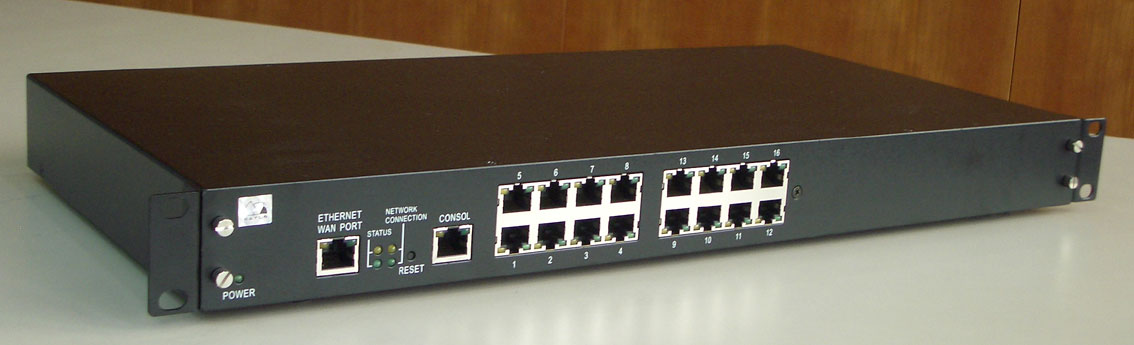
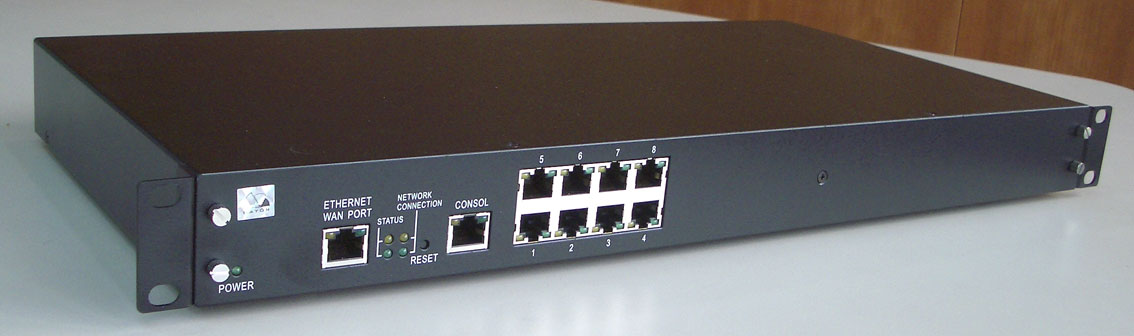
Comprehensive Product Summary – GPort116 IP Serial Server
### 1. Product Overview
Product Name: GPort116
Model: GPort116
Series: GPORT Serial Router Series (GPort104 / GPort108 / GPort116)
Article Number: GPort116
Manufacturer: Rayon Technology Co., Ltd.
The GPort116 is a high-density IP serial communication server designed to connect up to sixteen RS-232 serial devices to an Ethernet network. It functions as a multi-port serial-to-IP router, enabling remote access, control, and data exchange between serial equipment and networked systems. The device is housed in a 1U 19-inch rack-mountable chassis, making it suitable for industrial, enterprise, and data center environments where centralized serial communication management is required.
### 2. Key Features
- 16-Port RS-232 Serial Server: Provides sixteen independent RS-232 serial interfaces via RJ45 connectors, each supporting data rates up to 115.2 kbps.
- Embedded 32-bit MIPS CPU: Powered by a 100 MHz 32-bit MIPS processor, ensuring stable and efficient data handling across multiple ports.
- Integrated Memory: Equipped with 8 MB Flash ROM and 16 MB SDRAM for firmware, buffering, and runtime operations.
- Ethernet Connectivity: Supports 10/100 Mbps auto-sensing Ethernet (100Base-T) for flexible network integration.
- Multiple Operating Modes: Each serial port can be configured independently in one of several modes:
- Virtual COM Port Mode (Windows NT/2000/XP/2003/Vista)
- Real TTY Mode (SCO UNIX, Linux, HP/UX, AIX)
- TCP Server Mode
- TCP Client Mode
- UDP Send/Receive Mode
- Cross-Platform Drivers: Includes drivers for Windows and UNIX/Linux systems, enabling transparent serial communication over IP.
- Web, Telnet, and Console Configuration: Supports multiple configuration interfaces for flexible management.
- Linux-Based Embedded OS: Runs a compact Linux operating system, allowing SDK-based customization and firmware upgrades.
- SDK Support: Developers can use the provided SDK to build custom applications and firmware images.
- Rack-Mountable Design: Standard 1U 19-inch form factor for easy integration into network racks.
- Universal Power Input: Operates on 100–240 VAC switching power supply.
- Firmware Upgradeable: Supports TFTP-based firmware updates via console or network.
- Diagnostic and Monitoring Tools: Built-in status monitoring for serial ports, network connectivity, and system health.
### 3. Technical Specifications
Processor: 32-bit MIPS CPU, 100 MHz
Memory: 8 MB Flash ROM, 16 MB SDRAM
Serial Ports:
- 16 × RS-232 (RJ45 connectors)
- Data rate: up to 115.2 kbps
- Signal lines: RTS, CTS, DTR, DSR, DCD, TxD, RxD, SGND
- Connector pinout (RJ45):
1–RTS, 2–DTR, 3–TxD, 4–SGND, 5–DSR, 6–RxD, 7–DCD, 8–CTS
Console Port:
- 1 × RS-232 (RJ45 connector)
- Baud rate: 115200 bps, 8 data bits, no parity, 1 stop bit
Ethernet Interface:
- 1 × 10/100 Mbps Ethernet (RJ45)
- Auto-negotiation for 10/100Base-T
- LED indicators for link and activity
Power Supply:
- Input: 100–240 VAC, 50/60 Hz (switching power supply)
- Power cord included
Physical Dimensions:
- Form factor: 1U rack-mountable (19-inch width)
- Construction: Metal chassis for durability and EMI shielding
Operating Environment:
- Temperature: 0°C to 50°C (typical)
- Humidity: 10%–90% non-condensing
Weight: Approx. 2.5–3.0 kg (typical for 1U rack device)
Indicators:
- Power LED
- LAN link/activity LEDs
- Serial port TX/RX LEDs
### 4. Functionality
The GPort116 acts as a serial-to-Ethernet communication bridge, allowing legacy serial devices to communicate over IP networks. Each of its sixteen RS-232 ports can be configured independently to operate in different modes, enabling flexible deployment in mixed environments.
Operating Modes:
1. Virtual COM Port Mode:
- Emulates standard COM ports on Windows systems.
- Enables existing serial applications to communicate over TCP/IP without modification.
- Supported OS: Windows NT, 2000, XP, 2003, Vista.
2. Real TTY Mode:
- Provides true TTY device mapping for UNIX/Linux systems.
- Two sub-modes:
- COM Real TTY Mode (for SCO OpenServer)
- GVMODEM Real TTY Mode (for Linux/UNIX)
3. TCP Server Mode:
- Allows remote clients to connect via TCP sockets or Telnet.
- Each serial port is assigned a unique TCP port number.
4. TCP Client Mode:
- GPort116 initiates a connection to a designated remote server.
- Supports “startup” or “on data received” connection triggers.
5. UDP Mode:
- Enables broadcast or point-to-multipoint communication.
- Can send data to up to four remote hosts simultaneously.
Configuration Interfaces:
- Web Browser: Default IP 192.168.1.254, password “11111”.
- Telnet: Command-line configuration.
- Console Port: Direct serial configuration via terminal.
Use Cases:
- Industrial automation and SCADA systems
- POS and kiosk networks
- Remote serial device management
- Data acquisition and monitoring
- Legacy equipment integration into IP networks
Compatibility:
- Windows NT/2000/XP/2003/Vista
- Linux, SCO UNIX, HP/UX, AIX
- Compatible with standard TCP/IP and UDP/IP protocols
### 5. Components & Accessories
Included Items:
- GPort116 main unit
- Power cord (100–240 VAC)
- GPORT501 RJ45-to-DB9 female console cable
- User manual and software CD (drivers, utilities, SDK)
Optional Accessories:
- GPORT502: RJ45-to-DB25 male cable
- GPORT503: RJ45-to-DB9 male cable
- GPORT500: RJ45-to-DB9 female cable (for GPort104)
Connectors:
- RJ45 for serial and console ports
- RJ45 for Ethernet
- IEC power connector
### 6. Installation & Setup
Requirements:
- Ethernet LAN connection (10/100 Mbps)
- Console terminal or PC for initial configuration
- Web browser or Telnet client for network setup
Installation Steps:
1. Power off the GPort116.
2. Connect the LAN cable to a network hub or switch.
3. Connect the console cable to a terminal (115200 bps, 8N1).
4. Connect serial devices to the RS-232 ports.
5. Power on the unit; verify LEDs for power and LAN activity.
6. Access the configuration interface via web (default IP 192.168.1.254).
7. Set static IP, subnet mask, and gateway.
8. Configure each serial port’s mode and parameters.
9. Save settings and restart the device.
Mounting Options:
- Standard 19-inch rack mounting (1U height)
- Optional desktop placement
Configuration Tools:
- Web GUI: For network and port setup
- Telnet Console: For command-line configuration
- Windows Utility (aport_ap.exe): For virtual COM mapping
### 7. Performance & Capabilities
- Serial Speed: Up to 115.2 kbps per port
- Network Speed: 10/100 Mbps auto-sensing
- Concurrent Connections: 16 independent serial sessions
- Data Throughput: Optimized for simultaneous multi-port operation
- Latency: Low-latency serial-to-IP conversion suitable for real-time control
- Reliability: Embedded Linux OS ensures stable operation and watchdog recovery
- Scalability: Supports up to 64 virtual COM ports in Windows environments
- Firmware Upgrade: TFTP-based upgrade mechanism for maintenance and feature updates
- Limitations:
- No hardware flow control beyond RS-232 standard signals
- Requires static IP for stable operation in most industrial setups
### 8. Standards & Compliance
- Network Protocols: TCP/IP, UDP/IP, Telnet, DHCP (optional), TFTP
- Electrical Standards: RS-232 (TIA/EIA-232-F)
- Ethernet Standards: IEEE 802.3 10Base-T / 100Base-TX
- Operating System: Embedded Linux
- Driver Support:
- Windows NT/2000/XP/2003/Vista (Virtual COM)
- SCO UNIX (RTTY driver)
- Linux/UNIX (GVMODEM driver)
- Firmware Upgrade Protocol: TFTP (Trivial File Transfer Protocol)
- Compliance: CE, FCC Class A (typical for industrial communication devices)
### 9. Additional Information
Firmware Upgrade Procedure:
- Enter firmware upgrade mode by pressing the reset button during power-on.
- Device enters TFTP server mode (IP 192.168.1.254).
- Upload new firmware image (e.g., `gport116_050330.hg`) via TFTP or `wftp8.exe`.
- Verify firmware version via web interface.
SDK Development:
- SDK includes cross-compilation tools for MIPS architecture.
- Developers can build custom Linux images and applications.
- Supports private key protection for firmware integrity.
- Allows integration of user applications into boot sequence.
Maintenance & Troubleshooting:
- Power LED and port LEDs indicate operational status.
- Console output provides Linux boot messages for diagnostics.
- Built-in “ping” utility for network connectivity testing.
- Troubleshooting steps include verifying power, LAN, and serial connections.
Warranty & Support:
- Warranty Period: 1 year limited warranty covering defects in materials and workmanship.
- Exclusions: Damage from misuse, unauthorized servicing, or electrical faults.
- RMA Procedure:
- Obtain RMA number from Rayon support (rayon@ms1.hinet.net).
- Provide model, serial number, and failure description.
- Return to designated service center.
- Repair Policy:
- Warranty repairs free of charge.
- Out-of-warranty repairs available at flat-rate cost.
Manufacturer Contact:
Rayon Technology Co., Ltd.
Email: [rayon@ms1.hinet.net](mailto:rayon@ms1.hinet.net)
Website: [www.rayontech.com](http://www.rayontech.com)
### Summary
The Rayon GPort116 is a robust, Linux-based 16-port RS-232 to Ethernet serial server engineered for industrial and enterprise applications requiring centralized serial communication over IP networks. With flexible configuration modes, cross-platform driver support, and a developer-friendly SDK, it bridges the gap between legacy serial systems and modern network infrastructures. Its rack-mountable design, reliable performance, and comprehensive management interfaces make it an ideal solution for system integrators, automation engineers, and IT administrators managing large-scale serial device networks.



 LOOKING FOR THE RIGHT