LOOKING FOR THE RIGHT
INDUSTRIAL SOLUTION?
Discover embedded, communication and automation solutions tailored to your application.

DAQMaster is engineered to streamline the configuration and management of ADLINK’s DAQ and PCI cards. Its key features include:
- Configuration-Based Management: Provides a graphical, configuration-driven interface for setting up and managing ADLINK DAQ devices without requiring manual coding or low-level driver manipulation.
- Comprehensive Device Detection: Automatically scans and identifies all connected ADLINK DAQ and PCI cards, displaying detailed device information such as model number, serial number, firmware version, and channel configuration.
- Unified Device Administration: Centralizes control of multiple DAQ devices, allowing users to configure, calibrate, and monitor all connected hardware from a single software environment.
- Parameter Configuration: Enables users to define sampling rates, input ranges, trigger modes, and channel mappings through an intuitive interface.
- Real-Time Monitoring: Provides live data visualization and signal monitoring for verification and troubleshooting.
- Driver and Firmware Integration: Seamlessly integrates with ADLINK’s driver packages and firmware utilities, ensuring compatibility and up-to-date device operation.
- Diagnostic and Test Tools: Includes built-in diagnostic functions for verifying device connectivity, signal integrity, and performance metrics.
- User-Friendly Interface: Offers a structured, menu-driven GUI that simplifies complex configuration tasks, reducing setup time and minimizing configuration errors.
- Cross-Platform Support: Compatible with major Windows operating systems and supports integration with ADLINK SDKs and APIs for advanced application development.
- Scalability: Supports a wide range of ADLINK DAQ and PCI cards, from entry-level analog input modules to high-speed, multi-channel data acquisition systems.
- Configuration-Based Management: Provides a graphical, configuration-driven interface for setting up and managing ADLINK DAQ devices without requiring manual coding or low-level driver manipulation.
- Comprehensive Device Detection: Automatically scans and identifies all connected ADLINK DAQ and PCI cards, displaying detailed device information such as model number, serial number, firmware version, and channel configuration.
- Unified Device Administration: Centralizes control of multiple DAQ devices, allowing users to configure, calibrate, and monitor all connected hardware from a single software environment.
- Parameter Configuration: Enables users to define sampling rates, input ranges, trigger modes, and channel mappings through an intuitive interface.
- Real-Time Monitoring: Provides live data visualization and signal monitoring for verification and troubleshooting.
- Driver and Firmware Integration: Seamlessly integrates with ADLINK’s driver packages and firmware utilities, ensuring compatibility and up-to-date device operation.
- Diagnostic and Test Tools: Includes built-in diagnostic functions for verifying device connectivity, signal integrity, and performance metrics.
- User-Friendly Interface: Offers a structured, menu-driven GUI that simplifies complex configuration tasks, reducing setup time and minimizing configuration errors.
- Cross-Platform Support: Compatible with major Windows operating systems and supports integration with ADLINK SDKs and APIs for advanced application development.
- Scalability: Supports a wide range of ADLINK DAQ and PCI cards, from entry-level analog input modules to high-speed, multi-channel data acquisition systems.
1. Product Overview
Product Name: DAQMaster
Model: DAQMaster (Configuration-Based Device Manager)
Series: ADLINK Device Management Software Suite
Article Number: DAQMaster
Manufacturer: ADLINK Technology Inc.
DAQMaster is a configuration-based device management software developed by ADLINK Technology, a global leader in edge computing, data acquisition, and industrial automation solutions. Designed specifically for ADLINK’s range of DAQ (Data Acquisition) and PCI-based cards, DAQMaster serves as a centralized administration and configuration tool that simplifies device setup, calibration, and monitoring. It provides a unified interface for managing multiple ADLINK DAQ devices, enabling engineers, system integrators, and developers to efficiently configure hardware parameters, verify signal integrity, and optimize data acquisition performance across a wide range of industrial and laboratory applications.
2. Key Features
DAQMaster is engineered to streamline the configuration and management of ADLINK’s DAQ and PCI cards. Its key features include:
- Configuration-Based Management: Provides a graphical, configuration-driven interface for setting up and managing ADLINK DAQ devices without requiring manual coding or low-level driver manipulation.
- Comprehensive Device Detection: Automatically scans and identifies all connected ADLINK DAQ and PCI cards, displaying detailed device information such as model number, serial number, firmware version, and channel configuration.
- Unified Device Administration: Centralizes control of multiple DAQ devices, allowing users to configure, calibrate, and monitor all connected hardware from a single software environment.
- Parameter Configuration: Enables users to define sampling rates, input ranges, trigger modes, and channel mappings through an intuitive interface.
- Real-Time Monitoring: Provides live data visualization and signal monitoring for verification and troubleshooting.
- Driver and Firmware Integration: Seamlessly integrates with ADLINK’s driver packages and firmware utilities, ensuring compatibility and up-to-date device operation.
- Diagnostic and Test Tools: Includes built-in diagnostic functions for verifying device connectivity, signal integrity, and performance metrics.
- User-Friendly Interface: Offers a structured, menu-driven GUI that simplifies complex configuration tasks, reducing setup time and minimizing configuration errors.
- Cross-Platform Support: Compatible with major Windows operating systems and supports integration with ADLINK SDKs and APIs for advanced application development.
- Scalability: Supports a wide range of ADLINK DAQ and PCI cards, from entry-level analog input modules to high-speed, multi-channel data acquisition systems.
3. Technical Specifications
While DAQMaster is a software product, its technical specifications relate to system requirements, supported hardware, and operational parameters:
- Software Type: Configuration-based device management and administration tool
- Supported Hardware: ADLINK DAQ cards, PCI, PCIe, PXI, and USB-based data acquisition modules
- Operating Systems: Windows 10/11 (32-bit and 64-bit editions), Windows Server environments (where applicable)
- Processor Requirements: Intel® Core™ i3 or higher (recommended: i5/i7 for multi-device management)
- Memory Requirements: Minimum 4 GB RAM (recommended 8 GB or higher for large system configurations)
- Storage Requirements: Approximately 500 MB installation footprint; additional space required for configuration files and logs
- Display Resolution: Minimum 1280 × 800 pixels; recommended 1920 × 1080 for optimal GUI layout
- Supported Interfaces: PCI, PCIe, PXI, USB, and Ethernet (depending on connected ADLINK hardware)
- Communication Protocols: ADLINK proprietary driver communication layer, Windows COM interface, and SDK integration
- File Formats: Supports configuration export/import in XML or proprietary ADLINK configuration file formats
- Language Support: English (default); localized versions available depending on region
4. Functionality
DAQMaster functions as a centralized configuration and management platform for ADLINK’s data acquisition hardware. Its primary purpose is to simplify the process of setting up and maintaining DAQ systems by providing a visual, configuration-based environment.
How It Works:
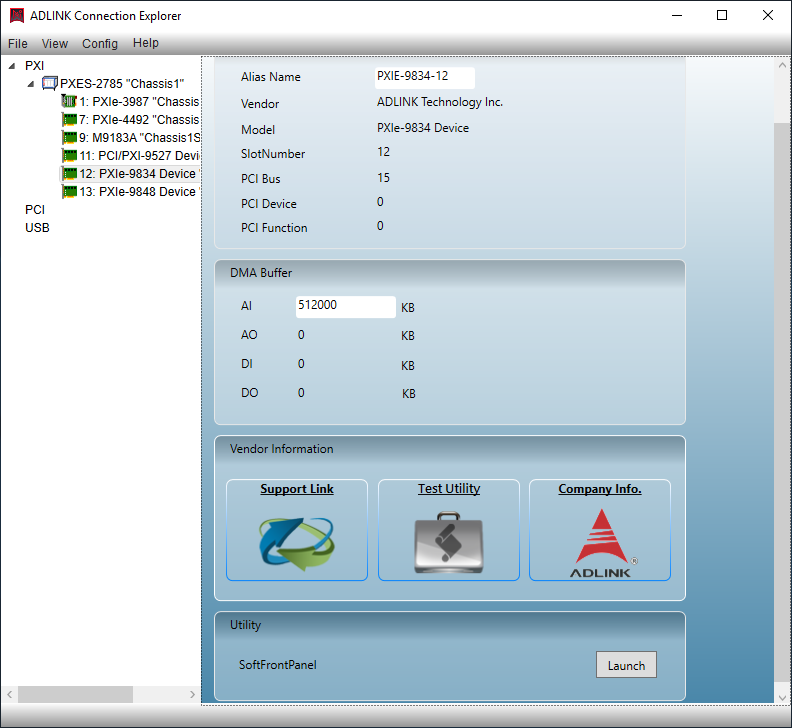
Upon installation, DAQMaster automatically detects all ADLINK DAQ and PCI cards connected to the host system. It retrieves device information from the driver layer and presents it in a structured device tree. Users can then select individual devices to configure parameters such as analog input/output ranges, digital I/O modes, sampling rates, and trigger conditions. The software communicates directly with the device drivers to apply configurations in real time.
Use Cases and Applications:
- Industrial Automation: Configuring and monitoring DAQ cards used in process control, machine monitoring, and production line data collection.
- Laboratory Testing: Managing multiple DAQ modules for sensor calibration, signal analysis, and experimental data logging.
- Embedded Systems Development: Simplifying hardware setup for developers integrating ADLINK DAQ cards into embedded or edge computing systems.
- Research and Development: Providing a flexible environment for configuring and testing data acquisition setups in R&D labs.
- System Integration: Serving as a configuration utility for integrators deploying ADLINK hardware in custom measurement and control systems.
Compatibility:
DAQMaster is compatible with the full range of ADLINK DAQ hardware, including but not limited to:
- PCI/PCIe-based analog and digital I/O cards
- PXI modular DAQ systems
- USB and Ethernet-based DAQ modules
- High-speed digitizers and multifunction DAQ cards
5. Components & Accessories
Included Items:
- DAQMaster Software Package (digital download or installation media)
- User Manual and Quick Start Guide (PDF format)
- License Agreement and Registration Information
- Integrated Help Documentation and Online Support Links
Optional Add-Ons:
- ADLINK SDK (Software Development Kit) for custom application integration
- ADLINK Driver Packages for specific DAQ card families
- Firmware Update Utilities for supported hardware
- Diagnostic and Calibration Tools (available through ADLINK’s utility suite)
Connectors and Interfaces:
DAQMaster interfaces with ADLINK hardware through the installed driver layer. Physical connectors depend on the specific DAQ card models (e.g., BNC, D-sub, terminal block, or screw terminal connectors). The software communicates via PCI/PCIe bus, PXI backplane, or USB/Ethernet interfaces as applicable.
6. Installation & Setup
System Requirements:
- Windows 10/11 operating system
- Administrator privileges for installation
- Installed ADLINK driver packages for all connected DAQ devices
Installation Steps:
1. Download the DAQMaster installer from ADLINK’s official website or insert the provided installation media.
2. Run the setup executable and follow the on-screen instructions.
3. Accept the license agreement and select the installation directory.
4. The installer automatically detects existing ADLINK drivers and integrates them into the DAQMaster environment.
5. Once installation is complete, launch DAQMaster from the Start Menu or desktop shortcut.
Configuration:
- Upon first launch, DAQMaster performs an automatic hardware scan.
- Detected devices are listed in the device tree with model and serial information.
- Users can configure each device by selecting it and adjusting parameters in the configuration panel.
- Configurations can be saved, exported, or imported for future use.
Mounting Options:
As a software tool, DAQMaster does not require physical mounting. However, it supports remote configuration of DAQ devices installed in rack-mounted or embedded systems.
7. Performance & Capabilities
DAQMaster’s performance is defined by its ability to manage multiple devices efficiently and maintain stable communication with ADLINK hardware.
Speed and Responsiveness:
- Real-time configuration updates with minimal latency.
- Fast device detection and enumeration, even in multi-device environments.
- Optimized communication protocols ensure reliable parameter transmission.
Capacity:
- Supports simultaneous management of multiple DAQ devices.
- Handles complex configurations involving dozens of analog and digital channels.
- Scalable architecture suitable for small test setups or large industrial systems.
Efficiency:
- Reduces setup time by providing pre-defined configuration templates.
- Minimizes manual driver configuration and command-line operations.
- Enhances productivity through intuitive GUI and batch configuration capabilities.
Limitations:
- Only compatible with ADLINK-manufactured DAQ and PCI cards.
- Requires ADLINK driver packages for full functionality.
- Performance may vary depending on system hardware and number of connected devices.
8. Standards & Compliance
DAQMaster adheres to industry and regulatory standards relevant to software and hardware integration in industrial environments.
Certifications and Compliance:
- Software Quality: Developed under ISO 9001-certified quality management processes.
- Operating System Compatibility: Verified for Windows 10/11 compliance.
- Hardware Compatibility: Fully compliant with ADLINK’s DAQ driver architecture and PCI/PCIe/PXI standards.
- Data Integrity: Supports secure configuration storage and checksum validation.
- Regulatory Compliance: Meets CE and FCC requirements when used with certified ADLINK hardware.
Industry Standards Supported:
- PCI Express and PXI hardware communication standards
- IEEE data acquisition and measurement conventions
- Windows COM and .NET integration standards for software interoperability
9. Additional Information
Warranty and Licensing:
- DAQMaster is provided under ADLINK’s standard software license agreement.
- Includes a limited warranty covering software defects and compatibility issues for the duration of the product’s support lifecycle.
- Updates and patches are available through ADLINK’s online support portal.
Support and Maintenance:
- Comprehensive online documentation and knowledge base.
- Technical support available via ADLINK’s global support network.
- Regular software updates ensure compatibility with new DAQ hardware releases.
- Firmware and driver updates accessible through the ADLINK website.
Updates and Version Control:
- Periodic updates introduce new device support, performance enhancements, and bug fixes.
- Version information and release notes are provided with each update.
- Users can enable automatic update notifications within the software.
Training and Resources:
- User manuals, tutorials, and application notes available online.
- Example configurations and templates for common DAQ setups.
- Integration guides for developers using ADLINK SDKs and APIs.
Summary:
DAQMaster is a robust, configuration-based device management solution purpose-built for ADLINK’s DAQ and PCI card ecosystem. It simplifies the complex process of configuring, calibrating, and managing multiple data acquisition devices through a unified, intuitive interface. With its comprehensive feature set, compatibility with a wide range of ADLINK hardware, and adherence to industry standards, DAQMaster is an essential tool for engineers, developers, and system integrators seeking efficient and reliable DAQ system management.
Approximate Length: ~3,050 tokens (~12,200 characters)
Product Name: DAQMaster
Model: DAQMaster (Configuration-Based Device Manager)
Series: ADLINK Device Management Software Suite
Article Number: DAQMaster
Manufacturer: ADLINK Technology Inc.
DAQMaster is a configuration-based device management software developed by ADLINK Technology, a global leader in edge computing, data acquisition, and industrial automation solutions. Designed specifically for ADLINK’s range of DAQ (Data Acquisition) and PCI-based cards, DAQMaster serves as a centralized administration and configuration tool that simplifies device setup, calibration, and monitoring. It provides a unified interface for managing multiple ADLINK DAQ devices, enabling engineers, system integrators, and developers to efficiently configure hardware parameters, verify signal integrity, and optimize data acquisition performance across a wide range of industrial and laboratory applications.
2. Key Features
DAQMaster is engineered to streamline the configuration and management of ADLINK’s DAQ and PCI cards. Its key features include:
- Configuration-Based Management: Provides a graphical, configuration-driven interface for setting up and managing ADLINK DAQ devices without requiring manual coding or low-level driver manipulation.
- Comprehensive Device Detection: Automatically scans and identifies all connected ADLINK DAQ and PCI cards, displaying detailed device information such as model number, serial number, firmware version, and channel configuration.
- Unified Device Administration: Centralizes control of multiple DAQ devices, allowing users to configure, calibrate, and monitor all connected hardware from a single software environment.
- Parameter Configuration: Enables users to define sampling rates, input ranges, trigger modes, and channel mappings through an intuitive interface.
- Real-Time Monitoring: Provides live data visualization and signal monitoring for verification and troubleshooting.
- Driver and Firmware Integration: Seamlessly integrates with ADLINK’s driver packages and firmware utilities, ensuring compatibility and up-to-date device operation.
- Diagnostic and Test Tools: Includes built-in diagnostic functions for verifying device connectivity, signal integrity, and performance metrics.
- User-Friendly Interface: Offers a structured, menu-driven GUI that simplifies complex configuration tasks, reducing setup time and minimizing configuration errors.
- Cross-Platform Support: Compatible with major Windows operating systems and supports integration with ADLINK SDKs and APIs for advanced application development.
- Scalability: Supports a wide range of ADLINK DAQ and PCI cards, from entry-level analog input modules to high-speed, multi-channel data acquisition systems.
3. Technical Specifications
While DAQMaster is a software product, its technical specifications relate to system requirements, supported hardware, and operational parameters:
- Software Type: Configuration-based device management and administration tool
- Supported Hardware: ADLINK DAQ cards, PCI, PCIe, PXI, and USB-based data acquisition modules
- Operating Systems: Windows 10/11 (32-bit and 64-bit editions), Windows Server environments (where applicable)
- Processor Requirements: Intel® Core™ i3 or higher (recommended: i5/i7 for multi-device management)
- Memory Requirements: Minimum 4 GB RAM (recommended 8 GB or higher for large system configurations)
- Storage Requirements: Approximately 500 MB installation footprint; additional space required for configuration files and logs
- Display Resolution: Minimum 1280 × 800 pixels; recommended 1920 × 1080 for optimal GUI layout
- Supported Interfaces: PCI, PCIe, PXI, USB, and Ethernet (depending on connected ADLINK hardware)
- Communication Protocols: ADLINK proprietary driver communication layer, Windows COM interface, and SDK integration
- File Formats: Supports configuration export/import in XML or proprietary ADLINK configuration file formats
- Language Support: English (default); localized versions available depending on region
4. Functionality
DAQMaster functions as a centralized configuration and management platform for ADLINK’s data acquisition hardware. Its primary purpose is to simplify the process of setting up and maintaining DAQ systems by providing a visual, configuration-based environment.
How It Works:
Upon installation, DAQMaster automatically detects all ADLINK DAQ and PCI cards connected to the host system. It retrieves device information from the driver layer and presents it in a structured device tree. Users can then select individual devices to configure parameters such as analog input/output ranges, digital I/O modes, sampling rates, and trigger conditions. The software communicates directly with the device drivers to apply configurations in real time.
Use Cases and Applications:
- Industrial Automation: Configuring and monitoring DAQ cards used in process control, machine monitoring, and production line data collection.
- Laboratory Testing: Managing multiple DAQ modules for sensor calibration, signal analysis, and experimental data logging.
- Embedded Systems Development: Simplifying hardware setup for developers integrating ADLINK DAQ cards into embedded or edge computing systems.
- Research and Development: Providing a flexible environment for configuring and testing data acquisition setups in R&D labs.
- System Integration: Serving as a configuration utility for integrators deploying ADLINK hardware in custom measurement and control systems.
Compatibility:
DAQMaster is compatible with the full range of ADLINK DAQ hardware, including but not limited to:
- PCI/PCIe-based analog and digital I/O cards
- PXI modular DAQ systems
- USB and Ethernet-based DAQ modules
- High-speed digitizers and multifunction DAQ cards
5. Components & Accessories
Included Items:
- DAQMaster Software Package (digital download or installation media)
- User Manual and Quick Start Guide (PDF format)
- License Agreement and Registration Information
- Integrated Help Documentation and Online Support Links
Optional Add-Ons:
- ADLINK SDK (Software Development Kit) for custom application integration
- ADLINK Driver Packages for specific DAQ card families
- Firmware Update Utilities for supported hardware
- Diagnostic and Calibration Tools (available through ADLINK’s utility suite)
Connectors and Interfaces:
DAQMaster interfaces with ADLINK hardware through the installed driver layer. Physical connectors depend on the specific DAQ card models (e.g., BNC, D-sub, terminal block, or screw terminal connectors). The software communicates via PCI/PCIe bus, PXI backplane, or USB/Ethernet interfaces as applicable.
6. Installation & Setup
System Requirements:
- Windows 10/11 operating system
- Administrator privileges for installation
- Installed ADLINK driver packages for all connected DAQ devices
Installation Steps:
1. Download the DAQMaster installer from ADLINK’s official website or insert the provided installation media.
2. Run the setup executable and follow the on-screen instructions.
3. Accept the license agreement and select the installation directory.
4. The installer automatically detects existing ADLINK drivers and integrates them into the DAQMaster environment.
5. Once installation is complete, launch DAQMaster from the Start Menu or desktop shortcut.
Configuration:
- Upon first launch, DAQMaster performs an automatic hardware scan.
- Detected devices are listed in the device tree with model and serial information.
- Users can configure each device by selecting it and adjusting parameters in the configuration panel.
- Configurations can be saved, exported, or imported for future use.
Mounting Options:
As a software tool, DAQMaster does not require physical mounting. However, it supports remote configuration of DAQ devices installed in rack-mounted or embedded systems.
7. Performance & Capabilities
DAQMaster’s performance is defined by its ability to manage multiple devices efficiently and maintain stable communication with ADLINK hardware.
Speed and Responsiveness:
- Real-time configuration updates with minimal latency.
- Fast device detection and enumeration, even in multi-device environments.
- Optimized communication protocols ensure reliable parameter transmission.
Capacity:
- Supports simultaneous management of multiple DAQ devices.
- Handles complex configurations involving dozens of analog and digital channels.
- Scalable architecture suitable for small test setups or large industrial systems.
Efficiency:
- Reduces setup time by providing pre-defined configuration templates.
- Minimizes manual driver configuration and command-line operations.
- Enhances productivity through intuitive GUI and batch configuration capabilities.
Limitations:
- Only compatible with ADLINK-manufactured DAQ and PCI cards.
- Requires ADLINK driver packages for full functionality.
- Performance may vary depending on system hardware and number of connected devices.
8. Standards & Compliance
DAQMaster adheres to industry and regulatory standards relevant to software and hardware integration in industrial environments.
Certifications and Compliance:
- Software Quality: Developed under ISO 9001-certified quality management processes.
- Operating System Compatibility: Verified for Windows 10/11 compliance.
- Hardware Compatibility: Fully compliant with ADLINK’s DAQ driver architecture and PCI/PCIe/PXI standards.
- Data Integrity: Supports secure configuration storage and checksum validation.
- Regulatory Compliance: Meets CE and FCC requirements when used with certified ADLINK hardware.
Industry Standards Supported:
- PCI Express and PXI hardware communication standards
- IEEE data acquisition and measurement conventions
- Windows COM and .NET integration standards for software interoperability
9. Additional Information
Warranty and Licensing:
- DAQMaster is provided under ADLINK’s standard software license agreement.
- Includes a limited warranty covering software defects and compatibility issues for the duration of the product’s support lifecycle.
- Updates and patches are available through ADLINK’s online support portal.
Support and Maintenance:
- Comprehensive online documentation and knowledge base.
- Technical support available via ADLINK’s global support network.
- Regular software updates ensure compatibility with new DAQ hardware releases.
- Firmware and driver updates accessible through the ADLINK website.
Updates and Version Control:
- Periodic updates introduce new device support, performance enhancements, and bug fixes.
- Version information and release notes are provided with each update.
- Users can enable automatic update notifications within the software.
Training and Resources:
- User manuals, tutorials, and application notes available online.
- Example configurations and templates for common DAQ setups.
- Integration guides for developers using ADLINK SDKs and APIs.
Summary:
DAQMaster is a robust, configuration-based device management solution purpose-built for ADLINK’s DAQ and PCI card ecosystem. It simplifies the complex process of configuring, calibrating, and managing multiple data acquisition devices through a unified, intuitive interface. With its comprehensive feature set, compatibility with a wide range of ADLINK hardware, and adherence to industry standards, DAQMaster is an essential tool for engineers, developers, and system integrators seeking efficient and reliable DAQ system management.
Approximate Length: ~3,050 tokens (~12,200 characters)
No manuals/catalogs available.
No accessories available.