LOOKING FOR THE RIGHT
INDUSTRIAL SOLUTION?
Discover embedded, communication and automation solutions tailored to your application.
- Comprehensive Integration: Provides a direct interface between IsaGRAF control programs and ADLINK’s NuDAQ PCI or NuIPC CompactPCI data acquisition cards.
- SoftPLC Functionality: Enables PC‑based control systems to perform programmable logic controller (PLC) functions using standard industrial automation languages.
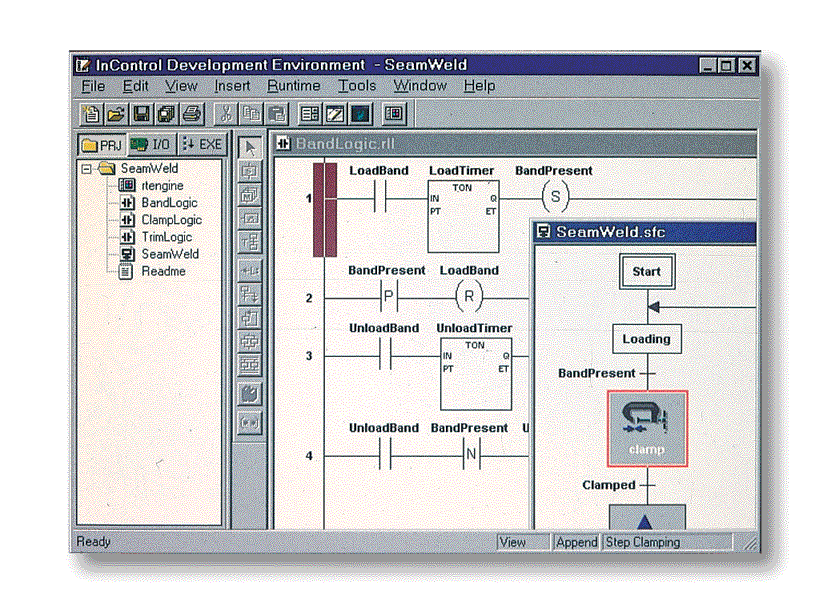
- IEC 1131‑3 Compliance: Fully supports the internationally recognized IEC 1131‑3 standard for industrial control programming, including IL, ST, FBD, LD, and SFC languages.
- Windows NT Compatibility: Designed specifically for the Windows NT IsaGRAF Target environment.
- Broad Hardware Support: Compatible with a wide range of ADLINK PCI and CompactPCI DAQ cards (see Section 3).
- Integrated Driver Management: Includes a Driver Registry Utility (PciUtil.exe) for registering, configuring, and managing device drivers.
- Sample Programs Included: Provides example projects for each supported card to accelerate development and testing.
- Flexible Installation Options: Supports installation from floppy diskettes or ADLINK’s All‑In‑One Compact Disc.
- Automatic Uninstallation: Can be removed cleanly via the Windows Control Panel.
- Licensing Control: Offers a 120‑minute demo mode if no valid serial number is entered during installation.
- SoftPLC Functionality: Enables PC‑based control systems to perform programmable logic controller (PLC) functions using standard industrial automation languages.
- IEC 1131‑3 Compliance: Fully supports the internationally recognized IEC 1131‑3 standard for industrial control programming, including IL, ST, FBD, LD, and SFC languages.
- Windows NT Compatibility: Designed specifically for the Windows NT IsaGRAF Target environment.
- Broad Hardware Support: Compatible with a wide range of ADLINK PCI and CompactPCI DAQ cards (see Section 3).
- Integrated Driver Management: Includes a Driver Registry Utility (PciUtil.exe) for registering, configuring, and managing device drivers.
- Sample Programs Included: Provides example projects for each supported card to accelerate development and testing.
- Flexible Installation Options: Supports installation from floppy diskettes or ADLINK’s All‑In‑One Compact Disc.
- Automatic Uninstallation: Can be removed cleanly via the Windows Control Panel.
- Licensing Control: Offers a 120‑minute demo mode if no valid serial number is entered during installation.
Comprehensive Product Summary: ADLINK PCIS‑ISG IsaGRAF Driver for PCI and CompactPCI Data Acquisition Cards
### 1. Product Overview
Product Name: PCIS‑ISG
Model: PCIS‑ISG
Series: IsaGRAF Interface Driver Series for NuDAQ and NuIPC Cards
Article Number: PCIS‑ISG
Manufacturer: ADLINK Technology Inc.
Product Description:
The ADLINK PCIS‑ISG is a dedicated IsaGRAF driver designed to integrate ADLINK’s NuDAQ PCI‑bus and NuIPC CompactPCI data acquisition cards with the CJ International IsaGRAF industrial automation software environment. It enables seamless communication between the IsaGRAF runtime target and ADLINK’s hardware I/O modules under Windows NT, effectively transforming a standard industrial PC into a software‑based programmable logic controller (SoftPLC) compliant with IEC 1131‑3 standards.
Document Reference:
User’s Guide, Manual Revision 1.00a, dated May 20, 1999.
© 1997–1999 ADLINK Technology Inc. All rights reserved.
### 2. Key Features
- Comprehensive Integration: Provides a direct interface between IsaGRAF control programs and ADLINK’s NuDAQ PCI or NuIPC CompactPCI data acquisition cards.
- SoftPLC Functionality: Enables PC‑based control systems to perform programmable logic controller (PLC) functions using standard industrial automation languages.
- IEC 1131‑3 Compliance: Fully supports the internationally recognized IEC 1131‑3 standard for industrial control programming, including IL, ST, FBD, LD, and SFC languages.
- Windows NT Compatibility: Designed specifically for the Windows NT IsaGRAF Target environment.
- Broad Hardware Support: Compatible with a wide range of ADLINK PCI and CompactPCI DAQ cards (see Section 3).
- Integrated Driver Management: Includes a Driver Registry Utility (PciUtil.exe) for registering, configuring, and managing device drivers.
- Sample Programs Included: Provides example projects for each supported card to accelerate development and testing.
- Flexible Installation Options: Supports installation from floppy diskettes or ADLINK’s All‑In‑One Compact Disc.
- Automatic Uninstallation: Can be removed cleanly via the Windows Control Panel.
- Licensing Control: Offers a 120‑minute demo mode if no valid serial number is entered during installation.
### 3. Technical Specifications
Supported Operating System:
- Microsoft Windows NT 4.0 or later (Target system only)
Supported Hardware Platforms:
- IBM PC/AT or compatible systems
- CompactPCI industrial systems
Supported ADLINK Data Acquisition Cards:
CompactPCI (NuIPC) Series:
- cPCI‑7200, cPCI‑7230, cPCI‑7248, cPCI‑7252
- cPCI‑7432, cPCI‑7433, cPCI‑7434, cPCI‑9112
PCI (NuDAQ) Series:
- PCI‑7200, PCI‑7230, PCI‑7248, PCI‑7296
- PCI‑7250, PCI‑7432, PCI‑7433, PCI‑7434
- PCI‑9111DG, PCI‑9111HR, PCI‑9112, PCI‑9113
- PCI‑9114DG, PCI‑9114HG, PCI‑6208A, PCI‑6208V
- PCI‑6216V, PCI‑9118DG, PCI‑9118HG, PCI‑9118HR
System Requirements:
- Windows NT 4.0 or later
- Hard disk with sufficient free space for installation
- 1.44‑MB 3.5‑inch floppy drive or CD‑ROM drive
- Installed CJ International IsaGRAF Workbench and Target for Windows NT
- At least one supported ADLINK NuDAQ or NuIPC card
Driver Components:
- PCIS‑ISG IsaGRAF Driver
- AdlDask device driver (core DAQ driver)
- Individual card drivers (e.g., Pci7200.sys, Pci7434.sys, etc.)
File Locations:
- Default installation path: `C:\Program Files\ADLINK\PCIS‑ISG`
- Driver Registry Utility: `<Windows NT Directory>\SYSTEM32\PciUtil.exe`
Physical Characteristics:
- Software product (no physical dimensions or weight)
### 4. Functionality
Operational Concept:
The PCIS‑ISG driver acts as a middleware layer between the IsaGRAF runtime environment and ADLINK’s hardware I/O subsystems. It allows control logic developed in the IsaGRAF Workbench to directly access analog and digital input/output channels on ADLINK DAQ cards.
Workflow:
1. Develop control logic using the IsaGRAF Workbench in any IEC 1131‑3 language.
2. Download the compiled project to the IsaGRAF Target running on Windows NT.
3. The PCIS‑ISG driver links the logical I/O variables in the control program to the physical I/O channels on the ADLINK hardware.
4. During runtime, the driver facilitates bidirectional data exchange:
- Acquiring analog/digital input signals from external sensors.
- Delivering analog/digital output signals to actuators or external devices.
Use Cases and Applications:
- Industrial process control and automation
- Machine control and monitoring
- Data acquisition and signal processing
- Replacement of traditional PLCs with PC‑based control systems
- Laboratory automation and test systems
Compatibility:
- Compatible with CJ International IsaGRAF Workbench and Target (Windows NT version only).
- Supports both NuDAQ PCI and NuIPC CompactPCI hardware families.
### 5. Components & Accessories
Included Software Components:
- PCIS‑ISG IsaGRAF Driver installation package
- Driver Registry Utility (PciUtil.exe)
- Device drivers for supported ADLINK cards
- IsaGRAF I/O Board and I/O Equipment Object archives
- Sample IsaGRAF projects for each supported card
Distribution Media:
- ADLINK “PCIS‑ISG” diskettes (multiple 3.5‑inch floppy disks)
- ADLINK “All‑In‑One Compact Disc” (CD‑ROM)
Optional Add‑Ons:
- Additional ADLINK NuDAQ or NuIPC data acquisition cards
- CJ International IsaGRAF Workbench and Target licenses
Connectors and Interfaces:
- Software interfaces only; physical I/O handled by the installed ADLINK DAQ cards.
### 6. Installation & Setup
Pre‑Installation Requirements:
- Ensure that the IsaGRAF Target (Windows NT version) is installed and operational.
- Verify that the target system meets minimum hardware and OS requirements.
Installation Procedure (Floppy Disk Version):
1. Insert “PCIS‑ISG IsaGRAF Driver Disk 1” into drive A:.
2. From Windows NT, select *Run* from the Start menu.
3. Type `A:\SETUP` and press *Enter*.
4. Follow on‑screen prompts to enter user information and serial number.
5. Specify installation directory (default: `C:\Program Files\ADLINK\PCIS‑ISG`).
6. Complete installation and launch the Driver Registry Utility to register device drivers.
7. Restart Windows NT to activate the drivers.
Installation Procedure (CD‑ROM Version):
1. Insert the ADLINK All‑In‑One Compact Disc into the CD‑ROM drive.
2. If autorun does not start, manually execute `x:\setup.exe` (where *x* is the CD‑ROM drive letter).
3. Select *Software Package → PCIS‑ISG* to begin installation.
4. Follow the same steps as above to complete setup and driver registration.
Driver Registration:
- Use the *Driver Registry Utility* (PciUtil.exe) to add or remove device drivers.
- Ensure both *AdlDask* and the specific card driver (e.g., *Pci7200*) are registered and started.
- Restart the system after registration to activate the drivers.
Uninstallation:
- Open *Control Panel → Add/Remove Programs*.
- Select *PCIS‑ISG/NT* and follow prompts to remove the software.
Restoring IsaGRAF Objects:
- Use the IsaGRAF Archive Manager to restore I/O Board and I/O Equipment Objects from either floppy disk or CD‑ROM.
- Follow the documented directory paths to locate the correct archive files.
Restoring Sample Programs:
- Use the IsaGRAF Archive Manager (Project mode) to restore sample projects from the provided media.
### 7. Performance & Capabilities
Functional Capabilities:
- Provides real‑time communication between IsaGRAF runtime and ADLINK DAQ hardware.
- Supports analog input (AI), analog output (AO), digital input (DI), and digital output (DO) channels depending on the installed card.
- Enables mapping of project variables to physical I/O channels through the IsaGRAF Workbench I/O Connection Editor.
- Supports multiple cards simultaneously within a single IsaGRAF project.
Performance Metrics:
- Real‑time I/O access through Windows NT device drivers.
- Buffer size parameters for continuous data acquisition (AI, AO, DI, DO) configurable but typically managed automatically.
- Supports up to 8 CompactPCI and 20 PCI cards concurrently.
Limitations:
- Compatible only with Windows NT IsaGRAF Target (not supported on DOS, VxWorks, or other OS targets).
- Requires valid license for unrestricted operation; otherwise limited to 120‑minute demo mode.
- Dependent on proper installation of AdlDask and card‑specific drivers.
### 8. Standards & Compliance
Software and Programming Standards:
- Fully compliant with IEC 1131‑3 industrial automation programming standard.
- Supports all five IEC 1131‑3 languages:
- IL (Instruction List)
- ST (Structured Text)
- FBD (Function Block Diagram)
- LD (Ladder Diagram)
- SFC (Sequential Function Chart)
Operating System Compatibility:
- Designed for Microsoft Windows NT 4.0 or later.
Hardware Interface Standards:
- PCI and CompactPCI bus architectures.
Regulatory and Trademark Notices:
- NuDAQ and PCIS‑ISG are registered trademarks of ADLINK Technology Inc.
- IBM PC is a registered trademark of International Business Machines Corporation.
- Intel is a registered trademark of Intel Corporation.
- Other product names are trademarks or registered trademarks of their respective owners.
Compliance Notes:
- ADLINK reserves the right to modify design and specifications without prior notice to improve reliability and performance.
- The product documentation and software are protected by copyright and proprietary information laws.
### 9. Additional Information
Warranty and Liability:
- ADLINK provides the PCIS‑ISG software “as is” without expressed or implied warranties.
- The manufacturer is not liable for direct, indirect, incidental, or consequential damages arising from use or inability to use the product.
Technical Support:
- Users may contact ADLINK Technology Inc. for assistance with installation, configuration, or licensing.
- As an authorized distributor of IsaGRAF products, ADLINK can also provide the IsaGRAF Workbench and Target software packages.
Maintenance:
- Regularly verify that device drivers (AdlDask and card‑specific drivers) are active in the Windows NT *Devices* control panel.
- Use the Driver Registry Utility to manage driver registration as hardware configurations change.
- Keep installation media and license information secure for future reinstallation or updates.
Software Updates:
- Updates may be distributed via ADLINK’s All‑In‑One Compact Disc or through authorized support channels.
- Users should check for updated driver versions to ensure compatibility with newer ADLINK hardware.
Documentation and Training:
- The User’s Guide provides detailed installation, configuration, and operational instructions.
- Sample programs serve as practical templates for developing custom control applications.
Revision History:
- Manual Revision 1.00a (May 20, 1999) – Initial release.
### Summary
The ADLINK PCIS‑ISG IsaGRAF Driver is a specialized software interface enabling seamless integration between the IsaGRAF industrial automation environment and ADLINK’s PCI/CompactPCI data acquisition hardware. By bridging the gap between software logic and physical I/O, it transforms standard PCs into powerful, standards‑compliant SoftPLCs suitable for industrial control, monitoring, and data acquisition applications.
With broad hardware support, compliance with IEC 1131‑3, and robust integration tools, PCIS‑ISG provides a reliable and flexible foundation for PC‑based automation systems operating under Windows NT.
### 1. Product Overview
Product Name: PCIS‑ISG
Model: PCIS‑ISG
Series: IsaGRAF Interface Driver Series for NuDAQ and NuIPC Cards
Article Number: PCIS‑ISG
Manufacturer: ADLINK Technology Inc.
Product Description:
The ADLINK PCIS‑ISG is a dedicated IsaGRAF driver designed to integrate ADLINK’s NuDAQ PCI‑bus and NuIPC CompactPCI data acquisition cards with the CJ International IsaGRAF industrial automation software environment. It enables seamless communication between the IsaGRAF runtime target and ADLINK’s hardware I/O modules under Windows NT, effectively transforming a standard industrial PC into a software‑based programmable logic controller (SoftPLC) compliant with IEC 1131‑3 standards.
Document Reference:
User’s Guide, Manual Revision 1.00a, dated May 20, 1999.
© 1997–1999 ADLINK Technology Inc. All rights reserved.
### 2. Key Features
- Comprehensive Integration: Provides a direct interface between IsaGRAF control programs and ADLINK’s NuDAQ PCI or NuIPC CompactPCI data acquisition cards.
- SoftPLC Functionality: Enables PC‑based control systems to perform programmable logic controller (PLC) functions using standard industrial automation languages.
- IEC 1131‑3 Compliance: Fully supports the internationally recognized IEC 1131‑3 standard for industrial control programming, including IL, ST, FBD, LD, and SFC languages.
- Windows NT Compatibility: Designed specifically for the Windows NT IsaGRAF Target environment.
- Broad Hardware Support: Compatible with a wide range of ADLINK PCI and CompactPCI DAQ cards (see Section 3).
- Integrated Driver Management: Includes a Driver Registry Utility (PciUtil.exe) for registering, configuring, and managing device drivers.
- Sample Programs Included: Provides example projects for each supported card to accelerate development and testing.
- Flexible Installation Options: Supports installation from floppy diskettes or ADLINK’s All‑In‑One Compact Disc.
- Automatic Uninstallation: Can be removed cleanly via the Windows Control Panel.
- Licensing Control: Offers a 120‑minute demo mode if no valid serial number is entered during installation.
### 3. Technical Specifications
Supported Operating System:
- Microsoft Windows NT 4.0 or later (Target system only)
Supported Hardware Platforms:
- IBM PC/AT or compatible systems
- CompactPCI industrial systems
Supported ADLINK Data Acquisition Cards:
CompactPCI (NuIPC) Series:
- cPCI‑7200, cPCI‑7230, cPCI‑7248, cPCI‑7252
- cPCI‑7432, cPCI‑7433, cPCI‑7434, cPCI‑9112
PCI (NuDAQ) Series:
- PCI‑7200, PCI‑7230, PCI‑7248, PCI‑7296
- PCI‑7250, PCI‑7432, PCI‑7433, PCI‑7434
- PCI‑9111DG, PCI‑9111HR, PCI‑9112, PCI‑9113
- PCI‑9114DG, PCI‑9114HG, PCI‑6208A, PCI‑6208V
- PCI‑6216V, PCI‑9118DG, PCI‑9118HG, PCI‑9118HR
System Requirements:
- Windows NT 4.0 or later
- Hard disk with sufficient free space for installation
- 1.44‑MB 3.5‑inch floppy drive or CD‑ROM drive
- Installed CJ International IsaGRAF Workbench and Target for Windows NT
- At least one supported ADLINK NuDAQ or NuIPC card
Driver Components:
- PCIS‑ISG IsaGRAF Driver
- AdlDask device driver (core DAQ driver)
- Individual card drivers (e.g., Pci7200.sys, Pci7434.sys, etc.)
File Locations:
- Default installation path: `C:\Program Files\ADLINK\PCIS‑ISG`
- Driver Registry Utility: `<Windows NT Directory>\SYSTEM32\PciUtil.exe`
Physical Characteristics:
- Software product (no physical dimensions or weight)
### 4. Functionality
Operational Concept:
The PCIS‑ISG driver acts as a middleware layer between the IsaGRAF runtime environment and ADLINK’s hardware I/O subsystems. It allows control logic developed in the IsaGRAF Workbench to directly access analog and digital input/output channels on ADLINK DAQ cards.
Workflow:
1. Develop control logic using the IsaGRAF Workbench in any IEC 1131‑3 language.
2. Download the compiled project to the IsaGRAF Target running on Windows NT.
3. The PCIS‑ISG driver links the logical I/O variables in the control program to the physical I/O channels on the ADLINK hardware.
4. During runtime, the driver facilitates bidirectional data exchange:
- Acquiring analog/digital input signals from external sensors.
- Delivering analog/digital output signals to actuators or external devices.
Use Cases and Applications:
- Industrial process control and automation
- Machine control and monitoring
- Data acquisition and signal processing
- Replacement of traditional PLCs with PC‑based control systems
- Laboratory automation and test systems
Compatibility:
- Compatible with CJ International IsaGRAF Workbench and Target (Windows NT version only).
- Supports both NuDAQ PCI and NuIPC CompactPCI hardware families.
### 5. Components & Accessories
Included Software Components:
- PCIS‑ISG IsaGRAF Driver installation package
- Driver Registry Utility (PciUtil.exe)
- Device drivers for supported ADLINK cards
- IsaGRAF I/O Board and I/O Equipment Object archives
- Sample IsaGRAF projects for each supported card
Distribution Media:
- ADLINK “PCIS‑ISG” diskettes (multiple 3.5‑inch floppy disks)
- ADLINK “All‑In‑One Compact Disc” (CD‑ROM)
Optional Add‑Ons:
- Additional ADLINK NuDAQ or NuIPC data acquisition cards
- CJ International IsaGRAF Workbench and Target licenses
Connectors and Interfaces:
- Software interfaces only; physical I/O handled by the installed ADLINK DAQ cards.
### 6. Installation & Setup
Pre‑Installation Requirements:
- Ensure that the IsaGRAF Target (Windows NT version) is installed and operational.
- Verify that the target system meets minimum hardware and OS requirements.
Installation Procedure (Floppy Disk Version):
1. Insert “PCIS‑ISG IsaGRAF Driver Disk 1” into drive A:.
2. From Windows NT, select *Run* from the Start menu.
3. Type `A:\SETUP` and press *Enter*.
4. Follow on‑screen prompts to enter user information and serial number.
5. Specify installation directory (default: `C:\Program Files\ADLINK\PCIS‑ISG`).
6. Complete installation and launch the Driver Registry Utility to register device drivers.
7. Restart Windows NT to activate the drivers.
Installation Procedure (CD‑ROM Version):
1. Insert the ADLINK All‑In‑One Compact Disc into the CD‑ROM drive.
2. If autorun does not start, manually execute `x:\setup.exe` (where *x* is the CD‑ROM drive letter).
3. Select *Software Package → PCIS‑ISG* to begin installation.
4. Follow the same steps as above to complete setup and driver registration.
Driver Registration:
- Use the *Driver Registry Utility* (PciUtil.exe) to add or remove device drivers.
- Ensure both *AdlDask* and the specific card driver (e.g., *Pci7200*) are registered and started.
- Restart the system after registration to activate the drivers.
Uninstallation:
- Open *Control Panel → Add/Remove Programs*.
- Select *PCIS‑ISG/NT* and follow prompts to remove the software.
Restoring IsaGRAF Objects:
- Use the IsaGRAF Archive Manager to restore I/O Board and I/O Equipment Objects from either floppy disk or CD‑ROM.
- Follow the documented directory paths to locate the correct archive files.
Restoring Sample Programs:
- Use the IsaGRAF Archive Manager (Project mode) to restore sample projects from the provided media.
### 7. Performance & Capabilities
Functional Capabilities:
- Provides real‑time communication between IsaGRAF runtime and ADLINK DAQ hardware.
- Supports analog input (AI), analog output (AO), digital input (DI), and digital output (DO) channels depending on the installed card.
- Enables mapping of project variables to physical I/O channels through the IsaGRAF Workbench I/O Connection Editor.
- Supports multiple cards simultaneously within a single IsaGRAF project.
Performance Metrics:
- Real‑time I/O access through Windows NT device drivers.
- Buffer size parameters for continuous data acquisition (AI, AO, DI, DO) configurable but typically managed automatically.
- Supports up to 8 CompactPCI and 20 PCI cards concurrently.
Limitations:
- Compatible only with Windows NT IsaGRAF Target (not supported on DOS, VxWorks, or other OS targets).
- Requires valid license for unrestricted operation; otherwise limited to 120‑minute demo mode.
- Dependent on proper installation of AdlDask and card‑specific drivers.
### 8. Standards & Compliance
Software and Programming Standards:
- Fully compliant with IEC 1131‑3 industrial automation programming standard.
- Supports all five IEC 1131‑3 languages:
- IL (Instruction List)
- ST (Structured Text)
- FBD (Function Block Diagram)
- LD (Ladder Diagram)
- SFC (Sequential Function Chart)
Operating System Compatibility:
- Designed for Microsoft Windows NT 4.0 or later.
Hardware Interface Standards:
- PCI and CompactPCI bus architectures.
Regulatory and Trademark Notices:
- NuDAQ and PCIS‑ISG are registered trademarks of ADLINK Technology Inc.
- IBM PC is a registered trademark of International Business Machines Corporation.
- Intel is a registered trademark of Intel Corporation.
- Other product names are trademarks or registered trademarks of their respective owners.
Compliance Notes:
- ADLINK reserves the right to modify design and specifications without prior notice to improve reliability and performance.
- The product documentation and software are protected by copyright and proprietary information laws.
### 9. Additional Information
Warranty and Liability:
- ADLINK provides the PCIS‑ISG software “as is” without expressed or implied warranties.
- The manufacturer is not liable for direct, indirect, incidental, or consequential damages arising from use or inability to use the product.
Technical Support:
- Users may contact ADLINK Technology Inc. for assistance with installation, configuration, or licensing.
- As an authorized distributor of IsaGRAF products, ADLINK can also provide the IsaGRAF Workbench and Target software packages.
Maintenance:
- Regularly verify that device drivers (AdlDask and card‑specific drivers) are active in the Windows NT *Devices* control panel.
- Use the Driver Registry Utility to manage driver registration as hardware configurations change.
- Keep installation media and license information secure for future reinstallation or updates.
Software Updates:
- Updates may be distributed via ADLINK’s All‑In‑One Compact Disc or through authorized support channels.
- Users should check for updated driver versions to ensure compatibility with newer ADLINK hardware.
Documentation and Training:
- The User’s Guide provides detailed installation, configuration, and operational instructions.
- Sample programs serve as practical templates for developing custom control applications.
Revision History:
- Manual Revision 1.00a (May 20, 1999) – Initial release.
### Summary
The ADLINK PCIS‑ISG IsaGRAF Driver is a specialized software interface enabling seamless integration between the IsaGRAF industrial automation environment and ADLINK’s PCI/CompactPCI data acquisition hardware. By bridging the gap between software logic and physical I/O, it transforms standard PCs into powerful, standards‑compliant SoftPLCs suitable for industrial control, monitoring, and data acquisition applications.
With broad hardware support, compliance with IEC 1131‑3, and robust integration tools, PCIS‑ISG provides a reliable and flexible foundation for PC‑based automation systems operating under Windows NT.
-
 PSISG Manual.pdf
Manual
PSISG Manual.pdf
Manual
No accessories available.